
Most project managers assume the biggest risk with instant link sharing is security. That assumption causes teams to over-restrict, over-email, and end up with five versions of the same document floating around in inboxes. The truth is that understanding how instant link sharing aids collaboration actually solves most of those security and version-control problems. When you use the right tools with intention, shared links become your team's fastest path from information to action, with far fewer back-and-forth messages clogging up the process.
Table of Contents
- Key takeaways
- How instant link sharing aids collaboration dynamics
- Security and link sharing best practices
- Tools enhancing teamwork through instant link sharing
- Integrating instant link sharing into team workflows
- Measuring success and avoiding common pitfalls
- My take on what teams actually get wrong
- How Markbin fits into your link sharing workflow
- FAQ
Key takeaways
| Point | Details |
|---|---|
| Instant sharing cuts friction | Real-time link access removes communication lag and eliminates the need for attachment-heavy email threads. |
| Security is built into modern tools | Self-destruct links and one-time access features protect sensitive data without slowing teams down. |
| Live components prevent version confusion | Embedding live, updatable content into chats and emails keeps everyone on the same page automatically. |
| Tool choice depends on context | Match your sharing method to team size, project sensitivity, and access requirements for best results. |
| Measurement drives improvement | Track metrics like email thread reduction and task completion rates to prove and improve collaboration gains. |
How instant link sharing aids collaboration dynamics
Instant link sharing means generating a URL on demand and sending it through any channel so recipients gain immediate access without downloading files or requesting permissions. That sounds simple. The impact on team dynamics, though, goes much deeper than convenience.

Traditional file sharing typically requires someone to attach a document, the recipient to download it, make edits, and send it back. By that point, three other people may have received the original and started their own edits. You now have a version control nightmare. Instant link sharing sidesteps this entirely by pointing everyone to the same source.
There are several distinct types to understand:
- Live collaborative links point to a document that updates in real time, so everyone always sees the current version.
- One-time links expire or self-destruct after a single view, ideal for sensitive handoffs.
- QR code sharing allows instant access without typing a URL, useful in hybrid meetings or physical locations.
- LAN-based sharing keeps files inside a local network, removing cloud risk entirely.
Each type serves a different collaboration need. Using a live link for a sprint board and a self-destruct link for a client password are very different decisions, and making the right one is where most teams gain significant efficiency.
Pro Tip: Before choosing a sharing method, ask two questions: How long does this information need to be accessible, and who should be able to see it? Those two answers will point you directly to the right tool.
The comparison below puts traditional sharing methods against instant link sharing across the dimensions that matter most to team leaders.
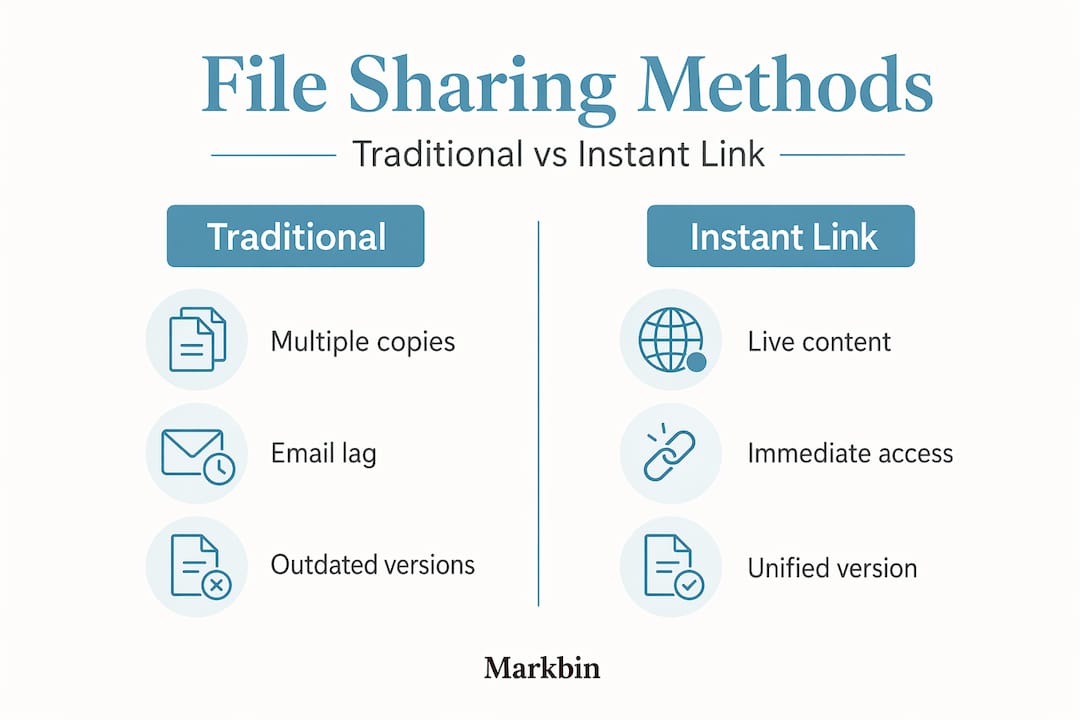
| Dimension | Traditional file sharing | Instant link sharing |
|---|---|---|
| Version control | Multiple copies, manual tracking | Single source, always current |
| Access speed | Minutes to hours | Seconds |
| Security control | Limited post-send control | Expiry, passwords, one-time access |
| Communication overhead | High (follow-up emails) | Low (link replaces conversation) |
| Setup required | Often requires accounts or VPN | Often zero authentication needed |
The benefits of instant link sharing become obvious when you map them against real team pain points. Context switching alone is one of the biggest productivity drains in collaborative work, and instant link sharing reduces it by keeping information retrieval within the same tool your team already uses.
Security and link sharing best practices
The concern that sharing a link means losing control of your content is understandable. It is also largely solved by modern tools, provided you use them correctly.
Careless link sharing does create real risks. A link to a confidential proposal sent to a Slack channel stays in that channel's history indefinitely. A link with embedded session tokens can expose user data when forwarded. Shared links with tracking parameters create privacy exposure and reduce link longevity, which causes broken references in collaborative documents down the line.
Here is how teams that handle this well approach it:
- Use self-destruct links for sensitive content. Tools like ClipShare SNAP offer a 10-minute expiration window with a 60-second reading period after reveal, making truly temporary sharing possible without follow-up cleanup.
- Use one-time links for single-recipient handoffs. When you share an API key, a password, or a draft for review, a one-time link wipes the content after viewing, preventing repeated or lingering access in chat and email logs.
- Clean your links before sharing. Strip tracking tokens and session parameters from URLs before distributing them to your team. This improves link stability, reduces privacy exposure, and makes links more readable in collaborative documents.
- Set expiration dates on access. Any link pointing to sensitive project data should have a defined access window tied to the project phase, not left open indefinitely.
- Use password protection for external sharing. When a link must go outside your organization, a password adds an access layer without requiring the recipient to create an account.
For organizations handling highly sensitive data, secure research collaboration models suggest sharing representations of information rather than raw data itself, which cuts risk significantly while preserving collaboration capability.
Pro Tip: Make link hygiene a team habit, not a one-off task. Build a one-sentence rule into your communication guide: "Strip tracking parameters before sharing any URL in a team channel." It takes seconds and prevents a category of problems entirely.
Tools enhancing teamwork through instant link sharing
The technology available in 2026 makes effective instant link sharing for teamwork far more accessible than it was even two years ago. Several platforms stand out for how they integrate sharing into existing workflows rather than requiring behavioral change.
Microsoft Loop changed how teams think about embedding information. Live collaborative components in Loop sync across Teams and Outlook in real time, so a task list shared via link in an email is the exact same task list your teammate edits in Teams. No duplication. No stale data. This directly solves the version confusion that plagues email-heavy teams. For project managers running cross-functional sprints, this alone is worth the adoption curve.
Instbyte takes a different approach by keeping sharing entirely inside your local network. Self-hosted LAN sharing requires no accounts and no cloud dependency, making it attractive for technical teams that need fast peer-to-peer file exchange without external exposure. For developer teams working with proprietary code or unreleased builds, this eliminates the risk of cloud provider vulnerabilities entirely.
QR code and no-login sharing tools serve a specific but high-value use case: getting content into hands immediately without onboarding friction. Frictionless QR code access requires zero authentication, which makes it a strong fit for microlearning delivery in hybrid environments, quick reference guides shared during meetings, or external stakeholders who should not need accounts just to view a brief.
Here is a summary of when to reach for each tool type:
- Live link tools (Loop, Google Workspace): Ongoing documents, sprint boards, shared agendas
- Self-destruct tools (ClipShare SNAP, 1use.lol): Passwords, credentials, sensitive reviews
- LAN-based tools (Instbyte): Technical teams, proprietary files, zero-cloud scenarios
- QR code tools (7Taps): Hybrid meetings, onboarding, external quick access
The productivity case is compelling. Consolidating priorities through connected collaboration apps reduces time-consuming work by 33%, and instant link sharing is a core mechanism that makes that kind of consolidation possible. When your team's information lives in links rather than attachments, pulling it together becomes a matter of seconds.
Integrating instant link sharing into team workflows
Knowing which tools exist is only half the work. The other half is embedding them into how your team actually operates, without creating a new layer of process that people ignore.
Start with the highest-friction points in your current workflow. For most teams, that is either status updates or design and document reviews, places where someone sends a file, gets feedback by email, makes changes, and re-sends. Replace that cycle with a shared live link from day one of the project. Anyone with the link sees the current version. Comments happen in context. The email thread disappears.
Here is a practical integration approach for project managers:
- Audit your current sharing habits. Count how many files are being sent as attachments in a typical sprint week. That number is your baseline for measuring improvement.
- Choose one workflow to replace first. Pick the highest-friction process, typically design reviews or weekly standups, and shift it entirely to live link sharing before expanding.
- Set access rules at the start of each project. Decide upfront whether links are internal-only, password-protected, or open. Document this in your project kickoff notes so no one improvises later.
- Use one-time links for sensitive project milestones. When sharing a client deliverable draft or a budget for approval, send a self-destruct link rather than a PDF attachment. This keeps your communication channel clean and prevents the draft from living forever in someone's inbox.
- Standardize your link format. Clean URLs, no tracking tokens, consistent naming. This makes links usable in documentation without breaking over time.
For teams using syntax-highlighted code sharing, the same principle applies. A shareable link to a properly formatted code snippet is more useful and more readable than pasting raw code into a chat message.
Pro Tip: In your next sprint demo, replace the screen-share of a document with a shared live link sent to all attendees before the meeting. Stakeholders can follow along on their own screens, leave inline comments, and refer back after the call without asking you to re-send anything.
Measuring success and avoiding common pitfalls
Adopting instant link sharing without measuring its impact means you cannot justify the process change to stakeholders or identify where it is not working. Tracking the right things makes the difference between a one-time experiment and a permanent workflow improvement.
Metrics worth tracking include the reduction in email threads per project, the time between a request and content access, and the number of version conflicts reported in a given sprint. Even a simple before-and-after comparison across two comparable projects tells a meaningful story.
Common pitfalls that undermine the benefits of instant link sharing:
- Over-sharing without access controls. Sending a single link to your entire organization when only three people need it creates noise and potential exposure.
- Ignoring link expiration. Temporary links that expire mid-project without notice create confusion. Set expiration dates relative to project phases, and communicate them upfront.
- Mixing secure and open links without a policy. When team members do not know which type of link to use, they default to whatever is fastest. That default is often wrong for sensitive content.
- Not training the team. Centralizing sensitive data in instantly accessible, secure systems only works if the people using it understand the access model. A 15-minute onboarding session on your link sharing policy prevents most misuse.
The goal is not perfection on day one. It is continuous refinement based on what the data shows and what your team reports feeling.
My take on what teams actually get wrong
I have worked with enough project teams to say this clearly: the resistance to instant link sharing is almost never about security. It is about habit. People are comfortable with email attachments. Comfortable is not the same as effective.
What I have seen consistently is that teams who shift to live link sharing for documentation and reviews recover hours per sprint. Not because the technology is magic, but because they removed an entire category of back-and-forth from their process. The document is always current. The link is always the same. The question "which version do you have?" disappears entirely.
The hesitation I hear most often is, "What if someone shares it who shouldn't have it?" That is a real concern, and it is exactly what self-destruct links, password protection, and access expiry solve. The answer to that concern is not going back to attachments. It is choosing the right link type for the right situation.
My recommendation: start narrow. Pick one document type, one team, one sprint. Run the experiment. The data will make the case better than any argument I can offer.
— Zack
How Markbin fits into your link sharing workflow
If your team works with technical documentation, notes, tutorials, or any kind of written content, Markbin gives you a direct line from writing to sharing. You write in markdown, and Markbin converts it into a beautifully rendered, shareable link instantly. No sign-up required for basic sharing. No formatting headaches. Full GitHub Flavored Markdown support means your tables, task lists, code blocks, and math formulas render exactly as intended.
For teams handling sensitive content, Markbin offers password protection and self-destructing documents, so you get the security controls discussed throughout this guide without stitching together separate tools. Check out Markbin's pricing plans to find the right fit for your team size. Whether you are a solo project manager or leading a distributed team, Markbin makes effective collaboration through link sharing practical from the first document.
FAQ
What is instant link sharing in team collaboration?
Instant link sharing means generating a URL that gives recipients immediate access to content, without downloads or permission requests. It reduces communication lag and keeps everyone working from the same source.
How does link sharing improve communication for project teams?
By replacing email attachments with live or controlled-access links, teams eliminate version conflicts and reduce follow-up messages. Live links mean everyone sees current information without anyone re-sending updated files.
Are self-destruct links safe enough for sensitive team content?
Yes, when used correctly. Tools like ClipShare SNAP offer 10-minute expiration windows with single-view access, and one-time link services wipe content after the first view. These tools are specifically designed for sensitive, temporary handoffs.
What is the biggest mistake teams make with instant link sharing?
The most common mistake is sharing links without setting access rules upfront. Without a clear policy on link type, expiration, and audience, team members improvise, which leads to either over-sharing or under-using the tools available.
How do I measure whether instant link sharing is actually helping my team?
Track email thread volume per project, time-to-access for shared content, and the number of version conflicts per sprint. Compare two similar projects before and after adopting live link sharing to get a clear before-and-after picture.