
Shared markdown documents have a way of becoming a headache fast. You send a ".md` file by email, your colleague opens it in a plain text editor and sees nothing but hashtags and asterisks. Or you paste the raw content into a chat thread and it renders as a wall of symbols. Meanwhile, the team is iterating on the document in three different places, and nobody is sure which version is canonical. A single shareable link changes all of that. When a link delivers a beautifully rendered, permission-controlled markdown document, collaboration stops being friction and starts being flow.
Table of Contents
- Why shareable document links matter
- Popular platforms: Comparing GitHub, Google Drive, and more
- Security and privacy: Protecting your shared documents
- Real-world use cases and workflows
- Best practices and expert tips
- A smarter approach to sharing: Beyond convenience
- Get started with secure markdown sharing
- Frequently asked questions
Key Takeaways
| Point | Details |
|---|---|
| Choose purpose-built platforms | Match your link-sharing tool to your workflow needs and level of privacy. |
| Prioritize security features | Always use permission controls, encryption, and sanitized rendering when sharing markdown. |
| Balance collaboration with protection | Real-time editing and open links help teams move fast, but must be combined with smart access management. |
| Leverage stateless and ephemeral options | Temporary or URL-encoded sharing methods keep sensitive docs off permanent servers. |
| Educate users on best practices | Teach your team about permission settings, safe protocols, and XSS risks in markdown links. |
Why shareable document links matter
The frustration above is not unique. Distributed teams across software development, education, and content creation run into broken markdown workflows every day. Attachments get lost, raw files look wrong, and manually versioned documents pile up in shared drives with names like final_FINAL_v3_revised.md. Shareable document links cut through all of that by giving every stakeholder one stable, readable URL.
The core benefits stack up quickly:
- No more attachments. A single link replaces the cycle of download, edit, re-upload.
- Instant readability. Rendered markdown converts headings, tables, and code blocks into structured, readable content on first click.
- Controlled access. The link owner decides who can view, comment, or edit.
- Always current. When the document updates, the link still points to the latest version.
- Embedded anywhere. Drop the link in Slack, a pull request, an email, or a course platform.
Open-source contributors already rely on this model. GitHub renders markdown files like README.md directly in the browser, turning raw syntax into polished documentation that any visitor can read without installing anything. Remote teachers post read-only lesson plan links that students access on any device. Code reviewers share annotated walkthroughs as rendered documents instead of attaching PDFs.
Good markdown formatting matters too. A well-structured document is only as useful as its readability. If your headers are inconsistent or your code blocks are missing language tags, even a perfect sharing setup will fail the reader. Brushing up on markdown formatting principles before sharing is time well spent.
A shareable link is not just a convenience feature. It is the difference between a document that lives in one person's inbox and a document that works for an entire team.
Security is part of this conversation from the start. Even a read-only public link exposes content to anyone who has it. That is acceptable for open documentation but not for internal specs or client deliverables. Understanding the tradeoffs is essential, and solid website security tips apply here just as much as they do to any web resource.
Popular platforms: Comparing GitHub, Google Drive, and more
Understanding the benefits is one thing. Choosing the right platform for your specific sharing needs is another. Each major option takes a different approach to permissions, rendering, and collaboration.
| Platform | Markdown native | Real-time collab | Permission control | Self-hostable |
|---|---|---|---|---|
| GitHub | Yes (GFM) | No | Public/private repo | Yes (Enterprise) |
| Google Drive | No (requires add-on) | Yes | Granular roles | No |
| CodiMD | Yes | Yes | Configurable | Yes |
| Stateless URL | Yes | No | None | N/A |
| Markbin | Yes (GFM) | Via sharing | Password + expiry | No |
Here is how each option plays in practice:
- GitHub excels at versioned, public-facing documentation. Pull requests add a built-in review layer. The downside is that real-time collaboration lacks direct support, so two people editing simultaneously create merge conflicts.
- Google Drive gives you granular permission roles, including Viewer, Commenter, and Editor, and owners can disable download, print, and copy. The problem is that Google Drive is not markdown-native, so rendering depends on third-party add-ons that often break formatting.
- CodiMD is purpose-built for live collaborative markdown editing. It supports self-hosting for teams that need full data control. The self-hosted collaboration overview explains why this matters for privacy-sensitive teams.
- Stateless URL sharing encodes the entire document content into the URL using base64. No server, no account, no persistence. It is ideal for quick, anonymous sharing but breaks down with longer documents because URLs have size limits.
- Ephemeral tools go even further, building in automatic deletion after a set time window, which is useful for temporary, sensitive content.
For self-hosting insights that apply broadly to managing your own document infrastructure, the underlying principles of access control and data ownership translate directly to markdown platforms.
The right platform depends on your use case. Public technical docs belong on GitHub. Internal team notes with live editing belong on CodiMD or a similar collaborative tool. One-off private shares work well with stateless or ephemeral options. And when you need a clean, rendered, shareable link with security controls built in, a dedicated markdown sharing platform fills that gap better than any of the above.
Security and privacy: Protecting your shared documents
Flexibility in sharing creates real attack surfaces if you are not careful. The moment you render markdown as HTML and serve it via a link, you open the door to several security concerns worth taking seriously.

Permission management is the first line of defense. Set the minimum access level each recipient actually needs. If someone only needs to read, do not give them edit access. Google Drive's granular permissions set a useful standard: Viewer, Commenter, and Editor roles each carry distinct capabilities, and owners can further restrict download and print options.
Ephemeral and encrypted sharing adds another layer. Some platforms auto-delete documents after a defined period, so a link that was valid yesterday simply returns nothing today. Peer-to-peer encrypted sharing eliminates the server as a potential point of compromise entirely.
Cross-site scripting (XSS) is a real threat in markdown rendering. When a document contains raw HTML elements, a malicious actor can inject scripts that run in the reader's browser. The solution is sanitization. Libraries like DOMPurify strip dangerous elements from HTML output before it reaches the browser. According to the Markdown Preview Safety Guide, teams should also validate every link protocol in rendered output and restrict allowed protocols to https: and mailto: to block javascript: injection attacks.
Pro Tip: Before deploying any custom markdown renderer, test it against a payload that includes <script>alert(1)</script> in the markdown source. If it executes, your sanitization pipeline has a gap.
Convenience is not a substitute for security. The most elegant sharing link in the world is a liability if it exposes sensitive content to the wrong audience.
Self-hosting, as noted in the Markdown Preview Safety Guide, gives teams full data control but also full responsibility. You own the sanitization logic, the TLS configuration, and the access control layer. That is a meaningful commitment that smaller teams should weigh carefully against a managed platform.
For those sharing code snippets in their documents, syntax highlighting and security intersect in interesting ways. Code blocks that render inline HTML can carry injection risks just like prose content. The rendering pipeline needs to handle both.
The importance of HTTPS for all shared links cannot be overstated. Sharing a markdown document over an unencrypted connection exposes the content to anyone on the same network. Always verify that your sharing platform enforces HTTPS before sending sensitive links.
Real-world use cases and workflows
Security is foundational, but the real test of any sharing system is how well it serves actual workflows. Here is how different teams put shareable markdown links to work.
For open-source projects, the workflow is mature and well-understood. Maintainers write documentation in markdown, commit it to a repository, and share the rendered GitHub URL in issue threads, wikis, and README files. Anyone with the link can read the rendered output. GitHub and CodiMD serve complementary roles here: GitHub for versioned public docs, CodiMD for private team collaboration where live editing matters.
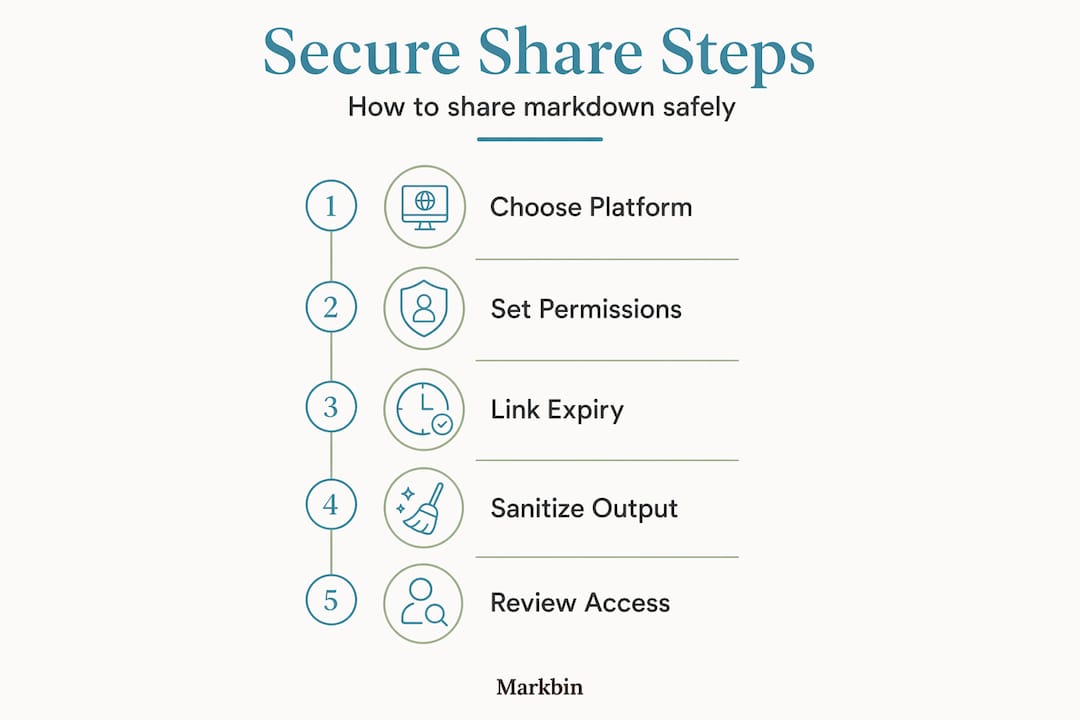
For remote educators, the workflow looks different. A teacher writes a lesson plan in markdown with structured headings, code examples, and task lists. They share a read-only link with students. No downloads, no formatting issues, no version confusion. The link is the document.
For product and engineering teams, the use cases multiply:
- Meeting notes: Spin up a live collaborative session in CodiMD before the meeting starts. Everyone edits in real time, and the rendered output is shareable immediately after.
- Technical specs: Write the spec in markdown, share a read-only link with stakeholders, and update the source document as feedback arrives.
- Code review walkthroughs: Share an annotated markdown document explaining a pull request. Reviewers follow the rendered narrative alongside the code diff.
- Incident post-mortems: Use a structured markdown template, fill it in collaboratively, and share the rendered link with the broader team.
| Use case | Recommended platform | Key permission setting |
|---|---|---|
| Public documentation | GitHub | Public repository |
| Internal team notes | CodiMD | Invite-only |
| Temporary client brief | Ephemeral tool | Auto-delete enabled |
| Quick anonymous share | Stateless URL | No account needed |
| Secure professional share | Markbin | Password + expiry |
Pro Tip: Match the lifetime of the link to the lifetime of its purpose. A link to a sprint retrospective does not need to exist six months later. Use markdown structure tips to build documents that are easy to archive or delete cleanly.
Best practices and expert tips
Experienced teams develop habits around document sharing that prevent the most common problems before they occur. These are the practices worth building into your workflow from day one.
- Default to least privilege. Start every shared link at the lowest access level needed. Escalate only when there is a clear reason.
- Keep sensitive content off public links. Even an obscure URL is technically accessible to anyone. Use password protection or access-controlled links for anything that is not genuinely public.
- Use stateless or ephemeral links for temporary work. One-off documents, draft ideas, and private brainstorms do not need permanent homes.
- Automate link expiry where possible. Many platforms support time-limited links. Use them for resources that have a natural end date, like event briefs or seasonal campaign docs.
- Educate your team. The weakest link in any sharing system is the person who forwards a restricted link to the wrong recipient. Regular, brief conversations about XSS, protocol validation, and permission hygiene are worth more than any technical control.
The Markdown Preview Safety Guide is clear: sanitizing markdown-to-HTML output and restricting link protocols in custom renderers are non-negotiable steps, not optional hardening measures.
A markdown collaboration platform that handles sanitization, permission management, and link expiry at the infrastructure level removes the burden from individual teams, which is significant in fast-moving organizations where security hygiene tends to slip under deadline pressure.
Pro Tip: Audit your shared document links quarterly. Pull a list of active links, check who still needs access, and revoke anything that has outlived its purpose. It takes thirty minutes and eliminates a large category of low-effort data exposure.
A smarter approach to sharing: Beyond convenience
Most teams discover their document sharing problems after something goes wrong. A sensitive spec gets indexed by a search engine because it was on a public link. A contractor gets edit access when they should have had view-only. A document lives indefinitely in a shared drive long after the project it served is closed.
The uncomfortable truth is that convenience and security pull in opposite directions by default. The easier you make it to share a document, the harder it is to control where that document ends up. The teams that navigate this well are not the ones with the most sophisticated tools. They are the ones that have decided, in advance, what their standards are.
That means defining a default permission level and sticking to it. It means using platforms that enforce expiry and sanitization automatically rather than relying on individuals to remember. It means treating a shared link as a security decision, not just a collaboration shortcut.
The secure sharing guide makes this concrete for code-heavy documents, but the principle applies everywhere. Proactive validation, consistent tooling, and periodic audits are not overhead. They are the habits that separate teams that trust their own infrastructure from teams that are always one forwarded link away from a problem.
Fast-moving, cross-functional teams feel this acutely. When a designer, a developer, and a product manager all share the same document, the platform has to enforce the rules because no one person is watching all three access patterns at once. Choose your platform based on what it enforces automatically, not just what it allows.
Get started with secure markdown sharing
If this article has made one thing clear, it is that the platform you choose for sharing markdown documents shapes both your workflow and your security posture. Markbin is built specifically for this. It renders full GitHub Flavored Markdown, including syntax highlighting, tables, and task lists, and turns any document into a clean, shareable link in seconds. No sign-up required to get started.
Markbin supports password protection and self-destructing documents out of the box, so you control exactly how long a link lives and who can open it. Markbin pricing is designed to scale from individual creators to full teams without unnecessary complexity. If you are ready to replace attachment chaos with a sharing workflow that actually works, Markbin is the right place to start.
Frequently asked questions
What is the safest way to share markdown documents online?
Self-hosted solutions or platforms that enforce strict permission controls and HTML content sanitization are safest, because they prevent XSS attacks and give you full control over who accesses the document.
Can I prevent others from copying or downloading my shared markdown files?
Some platforms give you strong controls here. Google Drive's permission settings let owners disable download, print, and copy for viewers, though not every markdown-native service offers the same level of granularity.
What is stateless link sharing for markdown, and when should I use it?
Stateless link sharing encodes your entire document into the URL itself so no server stores the content. It is ideal for temporary, anonymous sharing but breaks down with longer documents because URLs have practical length limits.
How do I keep shared markdown documents safe from XSS or malicious code?
Always sanitize your rendered HTML output using a library like DOMPurify, and follow the Markdown Preview Safety Guide recommendation to restrict link protocols to https: and mailto: to block any javascript: injection attempts.