
A writing portfolio is not a folder where you dump every piece you've ever created. A curated collection of your best work demonstrates your range, voice, and capability as an argument for what you can do, not a record of what you've done. For developers, educators, and content creators working in 2026, the stakes are higher than ever. Portfolios need to be shareable, secure, and visually polished without requiring a full web development project just to get a link out the door. This guide walks through everything you need to know to build one that actually works.
Table of Contents
- Defining a shareable writing portfolio
- How Markdown and online tools enable shareable portfolios
- Curating for impact: Selection, privacy, and access
- Automation vs curation: Portfolio strategies for different goals
- Fresh perspective: Why shareable writing portfolios succeed (or fail))
- Create your own shareable writing portfolio with Markbin
- Frequently asked questions
Key Takeaways
| Point | Details |
|---|---|
| Curate purposefully | Select only your best writing samples tailored for your audience, not every piece you have. |
| Share securely | Treat every public link as visible to all and keep sensitive content private. |
| Leverage Markdown tools | Use Markdown-based platforms to create visually compelling, easily shareable portfolios. |
| Balance curation and automation | Choose between hand-picking work for impact or using automated tools to keep portfolios up to date. |

Defining a shareable writing portfolio
Not every writing portfolio is built to be shared. A private archive lives on your hard drive. A shareable writing portfolio, by contrast, is purpose-built to be accessed through a public or semi-public link, designed so recipients can view your work immediately without friction.
"A digital portfolio is a collection of examples of your work that's accessible online and designed so you can easily share it for jobs, networking, or freelance opportunities."
This distinction matters enormously. A shareable portfolio serves as a living, lightweight document you can drop into an email, a Slack message, or a job application. It invites immediate engagement. A private archive just sits there.
For developers and content creators, the shareable portfolio is typically a static or Markdown-based page hosted somewhere public with a stable URL that visitors can browse without creating accounts or downloading files.
Here is what separates a shareable portfolio from a generic writing collection:
- Curation: Only your strongest, most relevant pieces make the cut. Not everything you've published or drafted.
- Visual clarity: Clean formatting makes your writing the focus. Cluttered layouts push readers away before they read a word.
- Controlled accessibility: You decide who sees what and for how long. Some links can be public. Others can expire or be password-protected.
- Purpose alignment: Every sample in the portfolio speaks directly to a defined audience, whether that's a hiring manager, a client, or an academic reviewer.
The practical value of using Markdown for portfolios is that it forces clarity. When you write in Markdown, you focus on structure and content rather than getting lost in design decisions. The result is a portfolio that looks professional without requiring any graphic design background.
How Markdown and online tools enable shareable portfolios
Markdown has become the go-to format for technical writers, developers, and educators who want readable, well-structured documents without touching HTML or CSS. A solid Markdown guide can get you from plain text to a polished page in minutes, supporting headers, code blocks, tables, bullet lists, and even math formulas through GitHub Flavored Markdown.
The key step is choosing the right tool to convert your Markdown into something shareable. Options vary widely:
| Tool type | Best for | Key trade-off |
|---|---|---|
| Static site generators | Developers with version control workflows | Requires setup and hosting knowledge |
| Online Markdown converters | Quick, one-off sharing needs | Limited customization or persistence |
| Dedicated portfolio platforms | Ongoing professional presence | May require subscriptions |
| Markdown share tools | Instant sharing without sign-up | May have expiry or size limits |
Markdown-to-portfolio tooling often outputs a shareable web page from Markdown and applies constraints such as size limits and auto-expiry. For example, some tools auto-expire a document in 24 hours, which is useful for temporary access but not for a portfolio you want to keep live for months.
For most creators, here is a practical workflow that balances speed with quality:
- Write your portfolio content in Markdown. Use headers for sections, bullet lists for skills or highlights, and code blocks if you're a developer showcasing technical work.
- Choose a tool that renders Markdown visually. The rendered version should be clean, readable, and mobile-friendly without you having to write a single line of CSS.
- Generate a shareable link. Ideally, one that doesn't require your recipient to sign up for anything.
- Set access controls. Decide whether the link is public, password-protected, or time-limited based on who you're sharing it with.
- Test the link before sending it. Open it in a private browser window to confirm it loads exactly as intended.
Pro Tip: Before sharing a portfolio link with a potential employer or client, review it as an outsider. Look for formatting inconsistencies, missing context, or writing samples that feel off-topic for that specific opportunity. A five-minute review can prevent a poor first impression.
You can find additional platform inspiration for how different creator communities are building and sharing work online. Studying how others present their portfolios often reveals formatting decisions you wouldn't have thought of on your own.
Curating for impact: Selection, privacy, and access
The hardest part of building a strong portfolio isn't writing the content. It's deciding what to leave out.
Most people include too much. They reason that more samples prove more capability. In practice, a hiring manager or client scanning a portfolio is making a judgment within the first 60 seconds. If the first three samples are relevant and strong, you've made a case. If the first three are scattered across unrelated topics with inconsistent quality, you've lost them even if your best work is on page two.
Here is a practical curation checklist:
- Does this sample directly relate to what my target audience needs?
- Is this among my strongest executions of this type of work?
- Is it current enough to reflect my current skill level?
- Have I removed any confidential client details, internal company references, or sensitive data?
- Does the formatting look clean and intentional, not like a rough draft?
That last point matters more than people realize. Sharing confidential content via a public link creates a genuine security risk. Once something is accessible via a URL, you must assume it can reach anyone. That means no internal strategy documents, no drafts containing client names without permission, and no data that could identify individuals without their consent.
Privacy controls are a major differentiator between portfolio tools. Here's what to look for:
| Privacy feature | When to use it |
|---|---|
| Public link (no login required) | General job applications, open client outreach |
| Password-protected link | Sharing with a specific client or recruiter |
| Expiring link | Temporary project showcases or interview materials |
| Private/hidden link | Work in progress you want feedback on without indexing |
The methodology here is intentional: treat the portfolio as a curated pitch to a specific audience, not an archive of everything you've ever touched. The work of building a portfolio is largely the work of deciding what not to include.
For more secure use cases, understanding how to securely share code snippets and sensitive content gives you a template for applying the same discipline to written work. The principles transfer directly.
Pro Tip: Create multiple versions of your portfolio for different audiences. A version tailored for technical hiring managers looks very different from one aimed at editorial clients. Markdown makes this easy since you're working with plain text that you can quickly duplicate and edit.
Automation vs curation: Portfolio strategies for different goals
Once you understand curation, the next question is whether to do it manually or automate it. Both approaches have real merit, and the right choice depends on your situation.
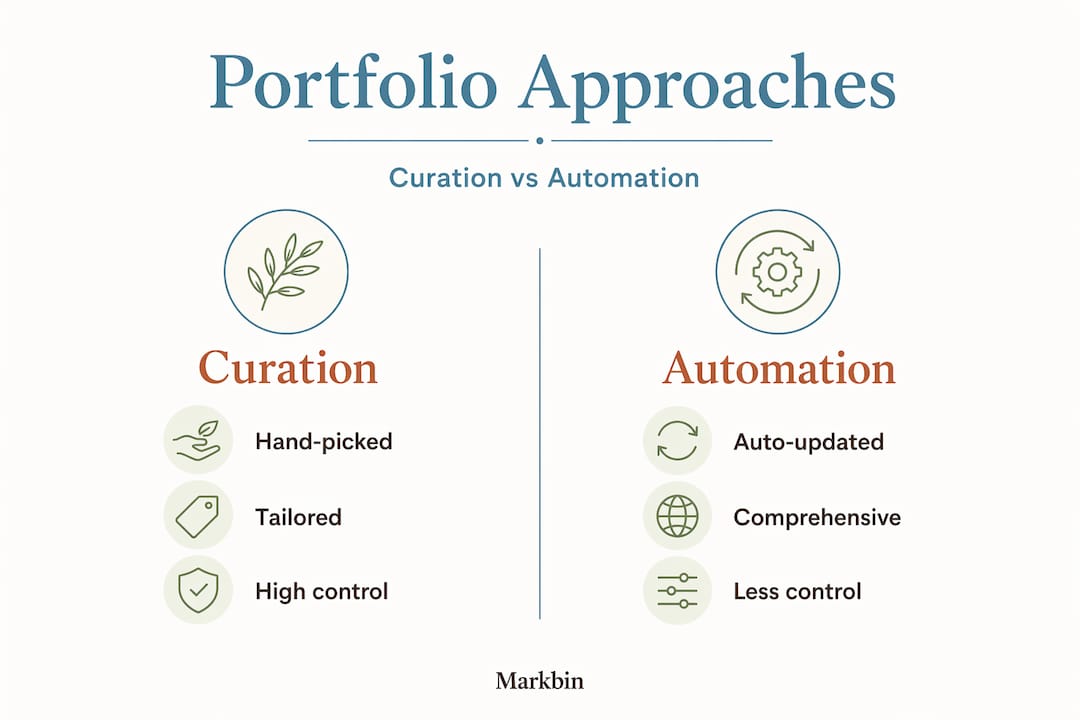
Some platforms emphasize automated aggregation of published work so your portfolio stays current automatically, while others prioritize manual curation of hand-picked samples. The trade-off is between completeness and narrative control.
| Strategy | Pros | Cons | Best for |
|---|---|---|---|
| Full automation | Always current, no maintenance | No narrative control, may surface weak work | Prolific freelancers with consistent quality |
| Manual curation | Tight narrative, audience-specific | Requires regular updates | Job seekers, consultants, educators |
| Hybrid approach | Balanced freshness and control | Requires a workflow to manage both | Experienced creators with diverse outputs |
Here is how to approach the decision:
- Assess your publishing frequency. If you publish multiple pieces per week, automation handles the volume. If you publish monthly or situationally, manual curation is more practical.
- Clarify your primary portfolio goal. Job applications need a tight, targeted narrative. Freelance client pitches need diversity. Academic portfolios need depth and rigor.
- Evaluate your current skill consistency. If your quality varies across pieces, automation surfaces your weakest work alongside your strongest. Manual curating samples with Markdown protects your reputation by keeping only your best visible.
- Decide on a review cadence. Even automated portfolios need a human review every quarter to remove outdated or irrelevant content.
A hybrid approach often works best for creators who are actively building a career. Set up automation to capture and store everything you publish, but maintain a manually curated public-facing portfolio that draws from that archive selectively. Think of the automated layer as your raw material and the curated layer as your finished product.
The tools you choose matter here too. Platforms that support Markdown natively let you switch between a comprehensive archive and a focused showcase without reformatting content. That flexibility is a major productivity advantage over tools that lock content into proprietary formats.
Fresh perspective: Why shareable writing portfolios succeed (or fail)
Here's something most portfolio guides won't tell you. Most portfolios fail not because the creator lacks talent but because the portfolio lacks a clear point of view. Walk through a hundred writer portfolios and you'll find the same pattern: twenty samples, generic bio, no defined audience, and a contact form that leads nowhere. The work might be excellent. But the portfolio itself communicates nothing specific.
The uncomfortable reality is that building a strong shareable portfolio requires saying no more often than saying yes. No to the piece you're personally proud of but that doesn't fit the narrative. No to sharing via a public link when the content is too sensitive. No to including work from five years ago that no longer reflects your skills.
Security is another area where creators consistently underestimate the risk. When you share a link publicly, that link can be forwarded, indexed, or accessed by people you never intended to reach. This isn't paranoia. It's a realistic view of how the web works. Actively curating your portfolio means treating every piece you include as something you'd be comfortable seeing on the front page of your professional reputation.
The creators whose portfolios consistently land them work share a common trait: they treat the portfolio as a strategic document, not a personal archive. They update it before major opportunities, not after. They tailor the visible samples to each opportunity when possible. And they choose tools that match their privacy needs rather than defaulting to whatever's most convenient.
One more honest observation: the visual quality of your portfolio affects how people perceive your writing quality, even before they read a word. A poorly formatted page signals carelessness. A clean, readable, well-structured Markdown-rendered page signals professionalism. The content and the presentation are inseparable in the reader's first impression.
Create your own shareable writing portfolio with Markbin
If you're ready to apply these lessons and build a standout, shareable writing portfolio, here's the best way to start. Markbin is built exactly for this use case. Write your portfolio in plain Markdown, and Markbin renders it into a clean, visually polished page you can share via a single link, no sign-up required for recipients, no HTML required from you.
Markbin supports full GitHub Flavored Markdown including syntax highlighting, tables, task lists, and math formulas. It offers password protection, self-destructing documents, and instant link sharing, covering every privacy scenario this guide has outlined. Whether you're sharing a portfolio publicly, with a specific recruiter, or as a time-limited showcase for a project proposal, Markbin handles the access controls cleanly. Check out Markbin pricing to find the plan that fits how often you create and share. Getting a polished, shareable portfolio link takes minutes, not days.
Frequently asked questions
What should I include in a shareable writing portfolio?
Include your best and most relevant writing samples, selected specifically for your target audience. A strong portfolio demonstrates range and voice while making a clear argument for your capabilities, not just documenting your output.
Is it safe to share a portfolio link publicly?
Publicly shared links can be accessed by anyone who receives or finds them, so never include sensitive data or confidential client work in a publicly accessible portfolio. Use password protection or expiring links when the content requires restricted access.
How do Markdown tools help with shareable portfolios?
Markdown tools convert your plain text into formatted, readable web pages that you can share instantly via a link. Markdown-to-portfolio tooling often outputs a shareable HTML page directly from your Markdown source, sometimes with built-in expiry or access controls, making the publishing step extremely fast.
Can I keep some samples private when sharing my portfolio?
Yes. Many platforms support restricted access or expiring links for exactly this reason. Some portfolio platforms explicitly offer protected or gated access so you can share selectively without exposing confidential drafts, client work, or unpublished writing to a general audience.