
What is a secure content delivery link?
A secure content delivery link is a cryptographically protected URL that grants time-bound access to a digital asset, typically served through a Content Delivery Network (CDN) for both performance and access control. Unlike a static URL that anyone can bookmark and reuse indefinitely, a secure delivery link embeds a signed token that expires, making the link worthless after a set window. The token encodes the file path, an expiration timestamp, a secret key, and optionally a trusted IP address.
Platforms like Salesforce Content Deliveries illustrate the concept at the application layer: you generate a link with a defined expiration and access controls, share it externally, and the recipient gets one-shot access without needing a standing account. CDNs handle the same pattern at infrastructure scale.
Key characteristics that define a secure content delivery link:
- Cryptographic signature: The URL contains a hash derived from a secret key, so tampering with any parameter invalidates the link.
- Expiration timestamp: Access cuts off at a defined Unix time, preventing indefinite reuse.
- Bearer token nature: Possession of the link grants access, regardless of who holds it.
- CDN enforcement: Edge servers validate the token before serving content, keeping the origin server shielded.
- Optional IP restriction: Some implementations bind the link to a specific trusted IP, adding a second layer of control.
How do the security mechanisms actually work?
The core verification loop is straightforward. When a request arrives at a CDN edge node, the server recomputes the expected hash using the same secret key and request parameters. If the computed hash matches the one in the URL, and the expiration has not passed, access is granted. Signed URLs, signed cookies, and token authentication all follow this pattern, differing mainly in how the token travels with the request.

Signed links typically carry an MD5 hash encoded in Base64, derived from the secret key, the expiration time in Unix format, the file path, and an optional trusted IP. The nginx ngx_http_secure_link_module implements this directly: it computes an MD5 checksum server-side and compares it to the value in the request, setting the $secure_link variable to 1 on success, 0 on expiry, or an empty string on a tampered request.
Beyond the token itself, additional controls tighten the perimeter:
- IP allowlisting: Restricts which client addresses can redeem the link.
- Checksum verification: Any modification to the URL path or parameters breaks the hash.
- OAuth-gated gateway links: Some platforms, like Sitecore Content Hub, offer gateway links requiring an authenticated OAuth session, giving finer control than a simple expiring token.
- TLS 1.2/1.3: Encrypts the link in transit so interception does not expose the token in plaintext.
Signed delivery links function as bearer tokens: whoever holds the link holds the access. The NIST Cybersecurity Framework 2.0 reinforces that access pathways must be governed even when they are temporary and tokenized. Treat them as security-sensitive artifacts, not convenience shortcuts, and pair them with reviewable logs and storage restrictions.
How do secure delivery links compare to public sharing links?
Public sharing links are open by design. Once generated, they work for anyone who has the URL, with no expiration, no authentication check, and no audit trail. That works fine for a public blog post or a freely distributed asset. For anything sensitive, it is a liability.
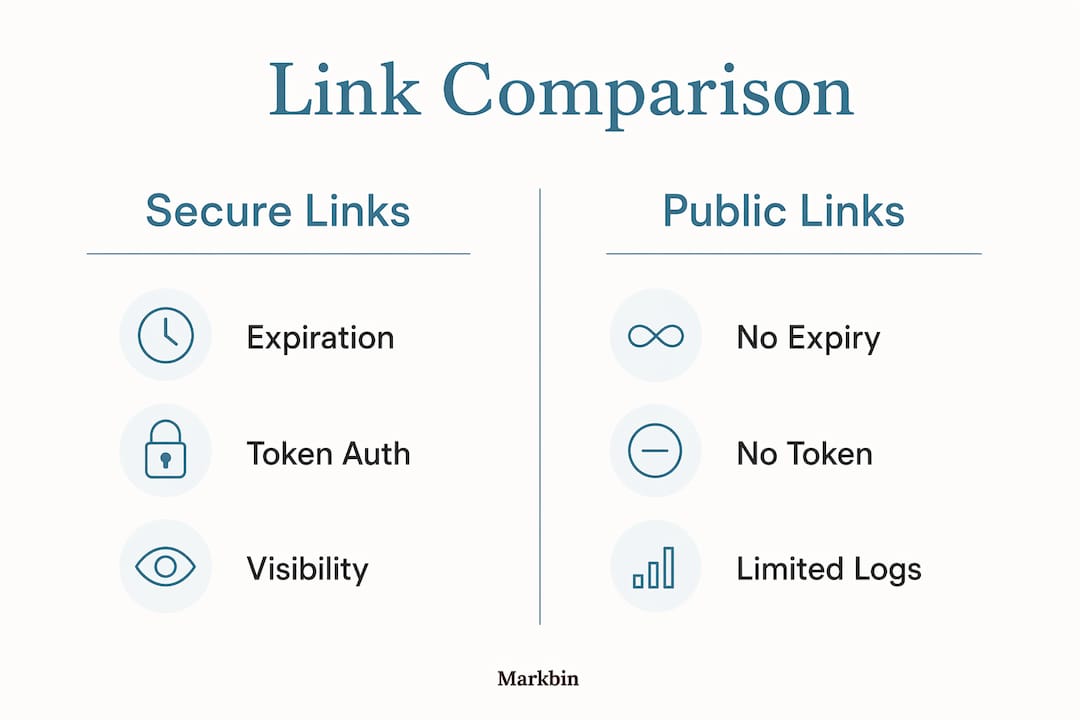
Secure delivery links differ by enforcing a time window and requiring a valid token signature on every request. Salesforce Content Deliveries demonstrates this in practice: the feature generates a link with configurable expiration and access controls, as opposed to a public link that stays live indefinitely.
| Feature | Secure delivery link | Public sharing link |
|---|---|---|
| Expiration | Yes, time-bound | No |
| Token authentication | Required | None |
| IP restriction | Optional | Not available |
| Access logging | Supported | Rarely available |
| Unauthorized reuse risk | Low (token expires) | High |
| Suitable for sensitive content | Yes | No |
The logging gap is often underestimated. A public link gives you no visibility into who accessed the file, when, or from where. A secure delivery link, properly configured, produces an audit trail that lets you detect forwarding or unexpected access patterns before damage is done.
Where are secure content delivery links actually used?
The use cases cluster around situations where you need to hand off access to someone outside your identity perimeter, temporarily, without giving them a standing account.
- API-generated reports and model outputs: Automated pipelines that produce sensitive documents can attach a signed link to a notification, giving the recipient a short window to download without any manual credential provisioning.
- Temporary external access: Sharing a confidential contract, audit bundle, or technical spec with a vendor or auditor for a defined review period. The link expires when the review window closes.
- Secure dashboard embedding: Embedding a live analytics view in an email or portal where the recipient should not have persistent access to the underlying data source.
- Time-limited or paid content distribution: Granting access to a purchased asset or licensed file for a defined period, after which the link stops working automatically.
- Automation workflows: Service accounts and bots that need to retrieve assets without going through interactive login flows. Signed links fit naturally here, though the bearer token risk requires careful logging.
The common thread is that traditional session-based identity controls are either unavailable or impractical in these scenarios. Signed links fill that gap, provided you treat them with the same seriousness as a password.
How to configure secure content delivery links
Setting up signed URL delivery involves a few concrete steps, regardless of whether you are working with Amazon CloudFront, a CDN provider, or a self-hosted nginx setup.
- Generate a secret key. Choose a strong, randomly generated string (typically 16–32 characters) and store it securely, outside your application code.
- Build the token string. Concatenate the secret key, the expiration timestamp in Unix format, the file path, and optionally the client IP address.
- Hash the token string. Compute an MD5 hash of the concatenated string and encode it in Base64url format.
- Append parameters to the URL. Add the hash and expiration as query parameters (e.g.,
?md5=<hash>&expires=<timestamp>). - Configure CDN token validation. Set your CDN or server to reject requests where the hash does not match or the expiration has passed. In nginx, this is the
secure_linkandsecure_link_md5directives. - Restrict origin access. Block direct requests to your origin server from outside your CDN's IP ranges so the token enforcement cannot be bypassed.
- Set expiration windows deliberately. Short-lived delivery links commonly have brief expiration windows; gateway links requiring OAuth sessions offer finer control for longer-lived access.
Pro Tip: Downloads can start before a link expires and complete after it, so expiration only controls when a transfer can begin. Set your window long enough for the file to start downloading on a slow connection, but short enough to limit the exposure window if the link leaks.
Best practices for securely sharing content online
Expiration alone is not enough. Relying solely on link expiration leaves you exposed if the link is forwarded, cached by a proxy, or indexed by a search engine before it expires. Layered security closes those gaps.
- Log every redemption. Signed links are bearer tokens, so an audit trail is your only way to detect abuse after the fact. Log the IP, timestamp, and user agent for every successful and failed request.
- Protect the origin server. Restrict direct origin access to authenticated CDN IP ranges. If your origin accepts requests from anywhere, an attacker who discovers the origin hostname bypasses every CDN-level control entirely.
- Push security controls to the edge. WAF, bot management, and TLS termination at the CDN edge minimize what reaches your origin and absorb DDoS traffic before it becomes your problem.
- Enforce TLS 1.2 or 1.3. Older protocol versions have known weaknesses. Modern TLS with forward secrecy means a captured session key cannot decrypt past traffic even if it is later compromised.
- Review distribution policies regularly. Access patterns change. A link generated for a quarterly report should not still be valid six months later because someone forgot to set an expiration.
- Never embed secret keys in client-side code. Generate signed links server-side only. A key exposed in JavaScript or a mobile app binary invalidates every link you have ever generated with it.
Pro Tip: Treat your signing key like a database password. Rotate it on a schedule, store it in a secrets manager like AWS Secrets Manager or HashiCorp Vault, and audit who has access to it. A leaked key lets anyone generate valid signed links indefinitely.
For developers building content protection into their delivery pipelines, the combination of signed URLs, origin lockdown, and edge-level WAF covers the majority of real-world attack vectors. Markbin applies this same philosophy to markdown document sharing, offering password protection and self-destructing links so sensitive content stays controlled from creation through delivery. You can explore those features at Markbin.
Key Takeaways
Secure content delivery links combine cryptographic token validation, time-bound expiration, and CDN edge enforcement to control access to sensitive digital assets far more effectively than public sharing links.
| Point | Details |
|---|---|
| Bearer token risk | Possession grants access, so treat signed links as sensitive credentials requiring audit logs. |
| Expiration scope | Expiration controls when a download starts, not when it finishes; set windows accordingly. |
| Origin protection | Block direct origin access to CDN IP ranges or edge-level token enforcement can be bypassed. |
| Layered security | Combine link expiration with WAF, TLS 1.2/1.3, logging, and policy review for real protection. |
| Public link contrast | Public links carry no expiration, no token check, and no audit trail, making them unsuitable for sensitive content. |