
Sending a document as an email attachment used to feel like the obvious move. Then you hit the size limit, waited for the recipient to download the file, realized they were working from an outdated version, and started the whole cycle again. What is instant document link sharing? It's the answer to all of that. Instead of transferring a physical file, you generate a unique URL that points directly to your document, giving recipients immediate access without the friction of downloads, inboxes, or version confusion. This guide breaks down how it works, why it matters, and how to do it well.
Table of Contents
- Key takeaways
- What is instant document link sharing?
- The real benefits of link sharing for teams
- Document sharing methods: cloud vs. P2P
- Security practices most teams skip
- My honest take on why this matters more than people realize
- How Markbin makes instant sharing effortless
- FAQ
Key takeaways
| Point | Details |
|---|---|
| Link sharing vs. file transfer | You share access to a document, not a copy, so recipients always see the current version. |
| Security is built in | Modern platforms offer expiration dates, password protection, and permission controls by default. |
| P2P vs. cloud hosting | Choose P2P for one-off sensitive transfers and cloud-hosted links for ongoing collaboration. |
| Metadata is a hidden risk | Documents carry embedded information that can leak sensitive details if not stripped before sharing. |
| Unified platforms save time | Integrated document tools cut retrieval time by up to 40% compared to scattered file systems. |
What is instant document link sharing?
At its core, instant document link sharing means generating a unique URL that grants controlled access to a digital file. You're not sending the file itself. You're sending a pointer to it. The recipient clicks the link, the platform authenticates their access level, and the document loads. No download required unless they specifically want one.

This distinction matters more than it sounds. With a traditional email attachment, you're creating a copy that lives in the recipient's inbox forever, separate from your original. With a link, there's only one source of truth. Update the document and the link still works, reflecting your latest changes automatically.
Modern platforms that power this process handle much more than just URL generation. They manage:
- Access control: Who can view, comment, or edit the document
- Expiration settings: Links that automatically deactivate after a set period
- Encryption: Data protected in transit and at rest
- Version history: The ability to roll back to previous document states
Traditional email attachments are limited to 10MB to 25MB, depending on the provider. Link-based sharing sidesteps that ceiling entirely. Enterprise platforms now support encrypted transfers up to 10GB, with links that expire in as little as 48 hours for added security.
The platforms driving this include cloud storage services like Google Drive and Dropbox, document collaboration tools, and more specialized options built specifically around controlled link management. There's also a fundamentally different approach worth knowing: peer-to-peer sharing, which we'll cover in detail later.
Pro Tip: Before generating a link, check whether the platform defaults to "anyone with the link" access. That setting is convenient but it means literally anyone who receives or forwards that URL can open your document.
The real benefits of link sharing for teams
The first benefit most people cite is file size. That's real, but it's not the most interesting part of the story.
Think about what actually slows teams down. Someone sends a PDF. Three people reply with questions about whether it's the latest version. Two more ask for the file again because they can't find the original email. Someone edits a downloaded copy and sends it back as "FinalFinal_v3." That's not a file size problem. That's a collaboration infrastructure problem, and link sharing solves it at the root.
Here are the four benefits that have the most measurable impact on day-to-day work:
- No more version chaos. One link points to one document. When you update the source file, every person with that link sees the current version. The "which version is this?" conversation disappears.
- Faster access, less overhead. Unified document management cuts retrieval time by up to 40% and administrative overhead by 30%. That's not a minor convenience. Across a team of ten, that compounds into hours recovered every week.
- Lower cognitive load. The real productivity tax isn't file size. It's the mental overhead of switching between working and explaining where a document lives, who has the right version, and who needs access. Structured link sharing automates that entire layer.
- Security you can actually control. You can revoke a link. You can set it to expire. You can restrict it to specific email addresses. Try doing any of that with an attachment that's already landed in six inboxes.
Centralized cloud-based sharing with live syncing also prevents the chaos that comes from team members chasing outdated copies. The document exists in one governed location. The link is just the door.
Document sharing methods: cloud vs. P2P
Not all instant file sharing tools work the same way. The two main document sharing methods each come with real tradeoffs, and picking the wrong one for your situation causes problems.
Cloud-hosted link sharing
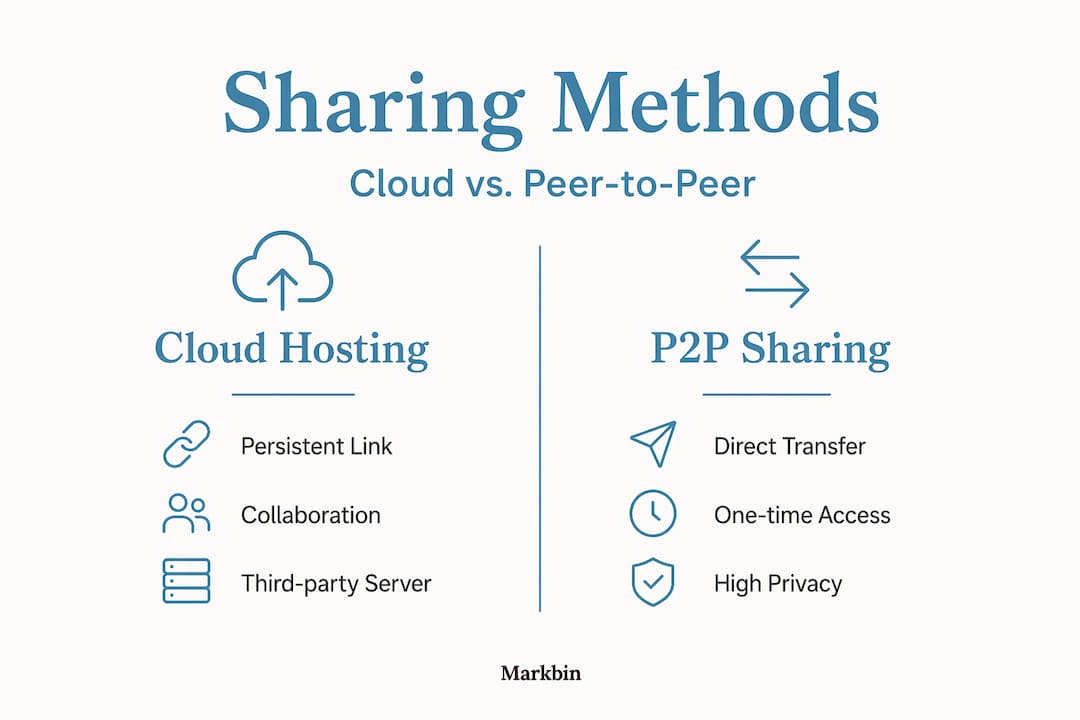
This is the model most teams already use, often without thinking much about it. You upload a file to a server (Google Drive, Dropbox, SharePoint, or a platform like Markbin), and the service generates a persistent URL. That link stays active as long as you want it to, the file lives on the platform's servers, and access is governed by your permission settings.
The advantages are persistence and collaboration depth. You can version control documents, track who opened the link, and revoke access at any time. For ongoing team projects, this is almost always the right choice.
The tradeoff is that your file does touch a third-party server. For most documents, that's fine. For highly sensitive files, it's worth considering your platform's encryption standards and compliance certifications before uploading.
Peer-to-peer (P2P) link sharing
P2P browser-to-browser sharing works differently. Using WebRTC technology, the file transfers directly between two devices without ever being stored on a server. The link is generated for that single transfer session and disappears the moment the transfer completes.
This approach offers the highest level of privacy for the actual file content. Nothing persists on a third-party server because nothing is ever uploaded to one. P2P is ideal for one-off sensitive transfers rather than ongoing collaboration.
| Feature | Cloud-hosted sharing | P2P sharing |
|---|---|---|
| File stored on server | Yes | No |
| Link persistence | Persistent (until revoked) | Expires after transfer |
| Version control | Supported | Not applicable |
| Best for | Ongoing team collaboration | One-time sensitive transfers |
| Access management | Full control | Transfer-session only |
| File size handling | Up to 10GB+ with encryption | Limited by real-time bandwidth |
Pro Tip: For enterprise-grade security needs, evaluate whether your cloud sharing platform is SOC 2 or ISO 27001 certified. Those certifications tell you far more about real data protection than marketing language does.
Security practices most teams skip
Knowing how to share documents instantly is one thing. Doing it without accidentally leaking information is another. Most teams focus on permissions and miss two other significant risk areas.
The first is metadata. Every document you create carries hidden information embedded in the file itself, including creation date, modification history, the software used, and sometimes the author's full name or organization. This document metadata travels with the file when you share a link. Before sharing externally, use your document software's built-in metadata scrubbing tools or export to a clean format.
The second is permissions misconfiguration. Granting edit access instead of view access is one of the most common causes of accidental data loss in shared documents. Someone deletes a section without realizing it. A collaborator overwrites your formatting. The fix is simple: default to view-only access and deliberately upgrade permissions only when editing is genuinely needed.
Beyond those two, here are the practices that keep your link sharing secure over time:
- Set expiration dates on any link shared outside your organization. Even if the recipient is trustworthy, you don't control who they forward it to.
- Use password protection for documents containing sensitive data, financial figures, or personal information.
- Audit your active links periodically. Most platforms let you see every open link and when it was last accessed. Revoke anything that's no longer in use.
- Avoid posting document links in public channels like open Slack workspaces, public forums, or social media, even temporarily.
The benefits of link sharing only hold up if you treat the link as a controlled access point, not a casual shortcut.
My honest take on why this matters more than people realize
I've watched teams cut their email volume by more than half simply by moving to link-based document sharing. That alone sounds like a win. But the deeper change is harder to articulate and more important.
What I've seen consistently is that the friction around document sharing doesn't just slow people down. It teaches them to work around systems instead of through them. When sending a file is annoying, people start storing things locally. They make decisions based on documents they know they have rather than documents they should have. The whole team slowly drifts into operating on incomplete information.
In my experience, the teams that benefit most from link sharing aren't the ones with the largest files or the most complex permissions. They're the ones who commit to treating link sharing as collaboration infrastructure, not just a convenience feature. That means setting up governed access from the start, picking a platform that fits the team's actual workflow, and auditing links regularly rather than letting them pile up.
The one mistake I see most often is treating link sharing as a drop-in replacement for email attachments without rethinking the broader system. You end up with the same chaos, just hosted in the cloud instead of in inboxes. The shift has to be intentional. When it is, the productivity gains are real, measurable, and surprisingly fast to materialize.
— Zack
How Markbin makes instant sharing effortless
If your team works with technical documentation, tutorials, research notes, or collaborative writing, Markbin is built specifically for that workflow. You write in markdown, Markbin renders it beautifully, and you get a shareable link instantly. No account required to start. No upload delays. No formatting battles.
The platform supports full GitHub Flavored Markdown, including syntax highlighting, tables, and task lists, which means your documents look professional the moment someone opens the link. Markbin also includes security-first sharing controls like password protection and self-destructing documents, so you can share with confidence whether you're sending internal documentation or a client-facing proposal. For teams ready to move past the attachment habit for good, Markbin is worth a look.
FAQ
What is document link sharing in simple terms?
Document link sharing means creating a URL that points to a file stored online, so recipients can access it directly without needing the file sent to them. The document stays in one place, and the link controls who can see or edit it.
How is link sharing different from sending an email attachment?
An email attachment creates a separate copy in the recipient's inbox, while a shared link points to the original file. Updates you make after sharing are reflected immediately, and you can revoke access at any time.
What are the main security risks with instant file sharing tools?
The two most overlooked risks are metadata embedded in the document (which can reveal author, creation date, and edit history) and permission misconfiguration, where edit access is granted accidentally instead of view-only.
When should I use P2P sharing instead of cloud-hosted sharing?
Use P2P sharing for one-time transfers of sensitive files where you don't want the document stored on any server. For ongoing collaboration where version history and persistent access matter, cloud-hosted link sharing is the better fit.
Do shared document links expire automatically?
It depends on the platform. Many modern sharing tools support automatic link expiration within 48 hours or a custom timeframe you set. Always check the default settings, since some platforms keep links active indefinitely unless you change them.