
Embedding rendered markdown in web apps means converting raw Markdown source into sanitized HTML or React elements and injecting that output safely into your application's DOM. The core tools for this workflow are memos-embed, DOMPurify, markdown-streaming, llmrender, and markdown-wc, each solving a distinct part of the rendering pipeline. Get this right and you unlock dynamic, styled content that works across SSR pipelines, React SPAs, chat interfaces, and static CMS sites. Get it wrong and you open your app to XSS vulnerabilities or broken UI from malformed HTML.
What tools and prerequisites you need to embed rendered Markdown
Before writing a single line of integration code, you need to understand what each library in the Markdown rendering stack actually does. These tools are not interchangeable. They solve different problems at different layers of the pipeline.
Here is a breakdown of the five primary libraries:
- memos-embed converts Markdown to HTML for SSR and static sites, with React and Web Component wrappers available for flexible integration.
- DOMPurify sanitizes the HTML output from any Markdown renderer before it touches the DOM, blocking XSS payloads by cleaning unsafe tags and attributes.
- markdown-streaming renders Markdown incrementally, producing valid HTML at every chunk boundary for real-time streaming UIs.
- llmrender converts Markdown directly to React elements, avoiding raw HTML strings entirely for safer JSX-based rendering.
- markdown-wc is a Web Component renderer that works in any JavaScript environment without requiring a React runtime.
| Tool | Primary purpose | Best use case |
|---|---|---|
| memos-embed | SSR HTML generation + wrappers | Next.js, Astro, static site generators |
| DOMPurify | HTML sanitization | Any workflow injecting HTML via innerHTML |
| markdown-streaming | Incremental streaming render | Chat UIs, LLM response streams |
| llmrender | React element rendering | React SPAs, React Server Components |
| markdown-wc | Web Component rendering | Vanilla JS sites, CMS, no-framework apps |
Your environment determines which tools you need. A Next.js app with SSR will lean on memos-embed and DOMPurify. A React SPA streaming LLM output needs markdown-streaming or llmrender. A Jekyll or Hugo site with no JavaScript framework is exactly where markdown-wc earns its place.
Pro Tip: Install DOMPurify regardless of which renderer you choose. Even if your renderer claims to produce safe HTML, sanitizing the output as a second pass costs almost nothing and eliminates an entire class of vulnerabilities.
How to embed rendered Markdown using server-side rendering and React
Server-side rendering is the most predictable way to integrate markdown rendering in web apps. The Markdown converts to HTML at build time or request time, before it ever reaches the browser. This means faster first paint and no client-side rendering flash.
Here is the standard SSR workflow using memos-embed:
- Install the core package. Add "memos-embed` to your project. The core package exposes an HTML renderer that takes a Markdown string and returns an HTML string.
- Render at build or request time. Call the HTML API with your Markdown source. The output is a raw HTML string ready for injection.
- Sanitize the output. Pass the HTML string through
DOMPurify.sanitize()before writing it anywhere. Sanitization must happen after HTML generation, not on the raw Markdown input, because unsafe content only becomes dangerous once it is parsed into HTML. - Inject into the DOM. Set
innerHTMLon your container element with the sanitized string, or pass it as a prop in your framework. - Use the React wrapper for component-based apps. The
@memos-embed/reactpackage wraps the HTML renderer in a React component, accepting pre-fetched memo data and rendering it inside your JSX tree without manual DOM manipulation.
For React apps that want to avoid dangerouslySetInnerHTML entirely, llmrender takes a different approach. It converts Markdown to React elements directly, bypassing raw HTML strings. This matters because React's reconciler can diff and update individual elements rather than re-rendering an entire HTML blob. The library also disables raw HTML by default, requiring an explicit rawHtml option for trusted content. That default is the right call. Opt-in security boundaries are far more maintainable than opt-out ones.
You can learn more about how these rendering pipelines work under the hood in this developer's deep dive on Markdown rendering.

Pro Tip: In React apps that embed multiple Markdown documents on a single page, cache the rendered HTML output by document ID. Re-rendering identical Markdown on every component mount wastes CPU cycles and slows time-to-interactive on content-heavy pages.
How to embed Markdown dynamically in streaming scenarios
Streaming Markdown rendering is a fundamentally different problem from rendering a complete document. When you feed partial Markdown to a standard renderer, you get broken HTML. An unclosed bold tag, an incomplete code fence, or a half-written table will produce malformed output that corrupts your UI.
markdown-streaming solves this by auto-closing partial Markdown pairs at every chunk boundary. Every call to its feed method produces structurally valid HTML, even if the Markdown input is mid-sentence. This is what makes it suitable for chat UIs and LLM response streams where you receive tokens one at a time.
Here is how to wire up a streaming render:
- Initialize the renderer with a target container element.
- Feed chunks as they arrive. Each chunk from your stream passes to the renderer's feed method. The library updates the container's innerHTML with valid HTML after every call.
- Handle the final flush. When the stream ends, call the renderer's close or flush method to finalize any open constructs.
- Apply sanitization at the stream boundary. Sanitize the final HTML output with DOMPurify once the stream completes, or sanitize each chunk if your content source is untrusted.
Streaming Markdown rendering scenarios differ fundamentally from full document rendering, requiring specialized tools to ensure valid intermediate HTML at every step of the stream.
The performance consideration most developers miss is DOM write frequency. Updating innerHTML on every token arrival in a high-frequency stream can trigger excessive layout recalculations. Batching updates every 50 to 100 milliseconds with a debounce or requestAnimationFrame loop gives you smooth rendering without hammering the browser's layout engine.
Pro Tip: For LLM streaming interfaces, render the stream into a hidden container first, then swap it into the visible DOM at a throttled interval. Users perceive smoother output and your browser avoids layout thrashing from hundreds of rapid innerHTML writes.
Embedding Markdown using Web Components for any runtime
Web Components are the right choice when you need to display rendered Markdown in an environment without React or any other JavaScript framework. They work in vanilla JS, static HTML, and CMS platforms like WordPress or Contentful without any build step.
markdown-wc and the memos-embed-wc wrapper both follow the same core principle: register a custom element, drop it into your HTML, and the component handles rendering. The <markdown-wc-embed> tag accepts a src attribute pointing to a Markdown file URL, fetches it, renders it, and injects the output directly into the page.
The key architectural decision in markdown-wc is light DOM rendering. Most Web Components use shadow DOM, which isolates styles inside the component. markdown-wc deliberately avoids this. By rendering in light DOM, your host page's CSS applies to the Markdown output automatically. Your h2 styles, your code block colors, your table borders all carry through without any extra configuration. This is the correct default for documentation sites and CMS integrations where visual consistency with the surrounding page is non-negotiable.
Key advantages of the Web Component approach:
- Zero framework dependency. Works anywhere HTML runs.
- CSS inheritance. Light DOM means your design system styles the Markdown output without duplication.
- Declarative embedding. Drop a tag into your template and the component does the rest.
- Interoperability. Combine with existing Markdown parsers or content APIs without rewriting your stack.
For a deeper look at how Markdown and rich text compare in CMS contexts, the Markdown vs rich text breakdown covers the tradeoffs developers face when choosing an authoring format.
Pro Tip: Use shadow DOM only if you need strict style isolation, such as embedding third-party Markdown content that must not inherit your host page styles. For internal documentation or owned content, light DOM gives you far better theming control with less effort.
Comparing methods to embed rendered Markdown: security, performance, and use cases
Choosing the right embedding method comes down to three factors: your security requirements, your performance constraints, and your runtime environment. No single approach wins on all three.
| Approach | XSS risk | Performance | Complexity | Best for |
|---|---|---|---|---|
| SSR with memos-embed | Low (sanitize post-render) | Fastest first paint | Medium | Next.js, Astro, static sites |
| React components (llmrender) | Very low (no raw HTML) | Good, React diffing | Low to medium | React SPAs, Server Components |
| Streaming (markdown-streaming) | Medium (sanitize at end) | High throughput | High | Chat UIs, LLM streams |
| Web Components (markdown-wc) | Low (sanitize output) | Good, lazy load | Low | Vanilla JS, CMS, static HTML |
| iframe embed | Very low (isolated) | Moderate | Very low | Isolated third-party content |
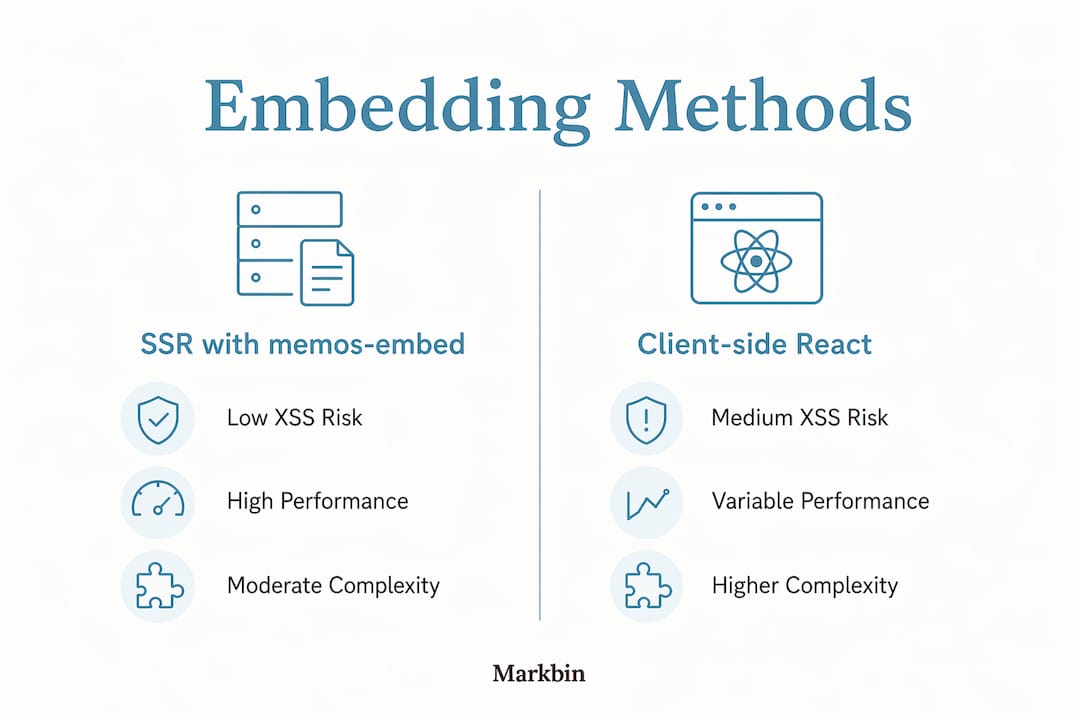
The security column deserves more attention than most developers give it. Sanitizing rendered HTML is not optional in any of these workflows. The common mistake is sanitizing the raw Markdown input instead of the HTML output. Markdown itself is not the attack surface. The HTML it generates is. A renderer that converts <script>alert(1)</script> embedded in Markdown into a live script tag is the actual vulnerability. DOMPurify's sanitize method operates on that HTML output and strips the dangerous content before it reaches the DOM.
For apps that combine multiple approaches, the pattern that works best is a single sanitization utility function that wraps DOMPurify with your project's configuration. Every rendering path calls that function before writing to the DOM. This prevents the situation where one developer sanitizes carefully and another skips it because they assumed the renderer handled it.
The memos-embed platform supports all of these integration modes from a single package ecosystem, which reduces the number of dependencies you need to manage when your app uses more than one embedding approach.
Key takeaways
Secure, maintainable Markdown embedding requires sanitizing HTML output with DOMPurify after rendering, choosing the right tool for your runtime, and treating raw HTML passthrough as an explicit opt-in security boundary.
| Point | Details |
|---|---|
| Sanitize after rendering | Run DOMPurify on the HTML output, not the raw Markdown input, to block XSS. |
| Match tool to runtime | Use llmrender for React, markdown-wc for vanilla JS, markdown-streaming for live streams. |
| SSR gives fastest first paint | Render Markdown to HTML at build or request time for best perceived performance. |
| Light DOM enables CSS inheritance | markdown-wc's light DOM rendering lets your host page styles apply to embedded content. |
| Raw HTML is opt-in only | Disable raw HTML passthrough by default in any renderer; enable it only for trusted sources. |
Why I think most developers get Markdown embedding backwards
I have reviewed a lot of Markdown integration code, and the pattern I see most often is developers treating sanitization as a cleanup step they add after something breaks. That is the wrong mental model. Sanitization is part of the rendering pipeline. It belongs between the renderer and the DOM write, every single time, with no exceptions for "trusted" content that you wrote yourself.
The second mistake I see is over-engineering the React layer. Developers reach for dangerouslySetInnerHTML with a custom sanitizer when llmrender already solves this problem cleanly by never producing raw HTML strings at all. Avoiding the problem is better than solving it after the fact. The styled text without HTML approach that llmrender enables is genuinely the right default for React apps.
My honest recommendation for new projects is to start with Web Components if you are not already committed to a framework. markdown-wc's light DOM approach gives you CSS inheritance, zero framework lock-in, and a declarative API that any developer on your team can understand in five minutes. You can always add a React wrapper later. Removing a framework dependency is much harder.
The streaming case is where I see the most production bugs. Developers test with fast network connections and miss the broken HTML that appears on slow connections where chunks arrive mid-construct. Test your streaming renderer with artificially throttled streams before you ship. The bugs are real and they are ugly.
— Zack
Start embedding Markdown today with Markbin
If you want to skip the library configuration and get a working Markdown embed in minutes, Markbin gives you exactly that. Markbin converts any Markdown document into a shareable, embeddable link that supports GitHub Flavored Markdown including syntax highlighting, tables, task lists, and math formulas. You can embed Markbin documents via iframe for full style isolation, or use the React and Web Component integrations for tighter app integration. There is no sign-up required to start, and every document supports password protection and self-destruct options for secure sharing. For developers who need professional document authoring without building a rendering pipeline from scratch, Markbin is the fastest path from Markdown to a polished, embeddable result.
FAQ
What is the safest way to embed rendered Markdown in a web app?
The safest method is to render Markdown to HTML and then sanitize that output with DOMPurify before writing it to the DOM. For React apps, llmrender avoids raw HTML entirely by converting Markdown to React elements, which eliminates the injection risk at the source.
Can I embed Markdown without a JavaScript framework?
Yes. markdown-wc provides a Web Component that works in any HTML environment without React or any other framework. Drop the <markdown-wc-embed> tag into your page with a src attribute pointing to a Markdown file and the component handles the rest.
How do I render Markdown dynamically in a chat or streaming UI?
Use markdown-streaming, which produces structurally valid HTML at every chunk boundary by auto-closing partial Markdown constructs. Standard renderers designed for complete documents will produce broken HTML when fed partial input from a live stream.
Does sanitizing raw Markdown input protect against XSS?
No. Sanitizing raw Markdown does not protect against XSS because the attack surface is the HTML output, not the Markdown source. You must sanitize the HTML string produced by the renderer before it is written to the DOM.
When should I use an iframe to embed Markdown content?
Use an iframe when you need complete style isolation between the embedded Markdown and your host page, or when embedding third-party Markdown content you do not fully control. The memos-embed package supports iframe-based embedding as one of its integration modes for exactly this scenario.