

If you think how markdown rendering works is just a series of regex replacements swapping asterisks for "<em>` tags, you're in good company. Most developers hold that assumption until the first time a parser silently mangles a nested emphasis block or misreads a delimiter. Markdown rendering, formally called markdown processing, is a multi-stage pipeline that involves lexing, block parsing, inline parsing, and HTML generation. Each stage has its own rules, and each one can surprise you. This article breaks down every layer of that pipeline so you can write markdown that renders exactly as intended, on any platform.
Table of Contents
- Key takeaways
- How markdown rendering works: from text to HTML
- Delimiter processing: how emphasis and links get resolved
- Markdown flavors and platform extensions
- Modern parsing techniques and architecture
- Practical tips for consistent rendering
- My honest take on markdown rendering complexity
- Render your markdown with Markbin
- FAQ
Key takeaways
| Point | Details |
|---|---|
| Rendering is a multi-stage pipeline | Markdown processing involves lexing, block parsing, inline parsing, and rendering as separate phases, not a single pass. |
| Delimiter stacks handle ambiguity | A stack-based algorithm matches emphasis and link openers to closers, which regex alone cannot reliably do. |
| Flavor differences break portability | CommonMark, GFM, and platform extensions like MDN's definition lists produce different output from identical source text. |
| ASTs enable extensibility | Parsers that emit an intermediate AST support plugins, multiple output formats, and source mapping far better than direct HTML renderers. |
| Test in your target environment | Markdown that renders perfectly in one tool can silently break in another due to flavor mismatches and sanitization rules. |
How markdown rendering works: from text to HTML
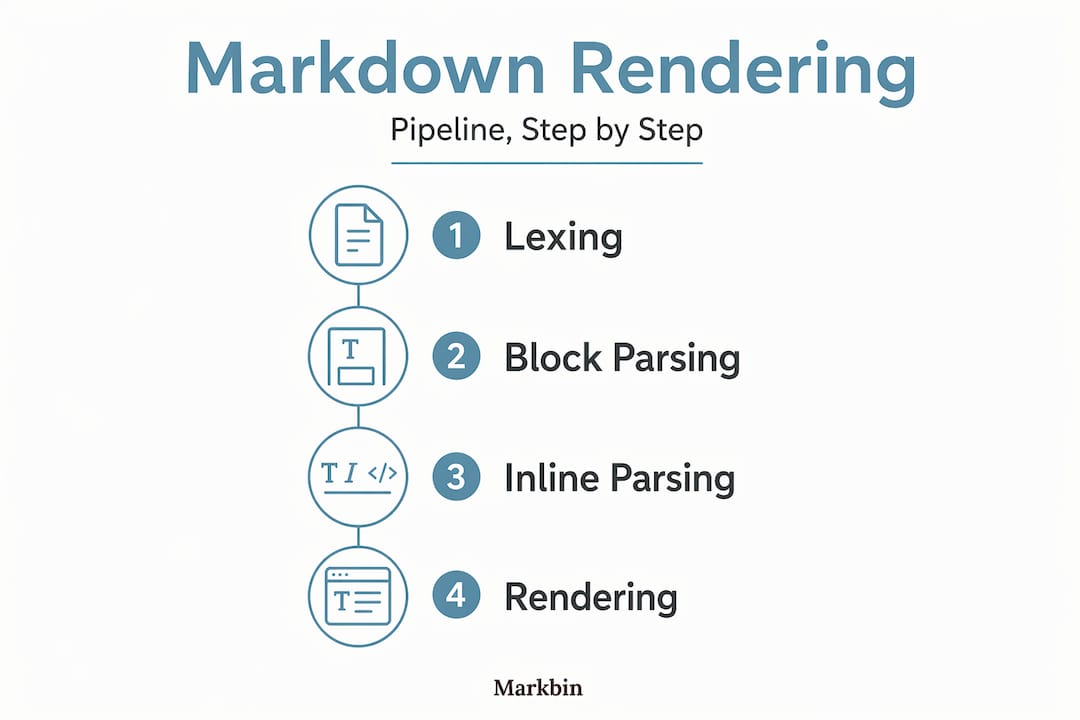
Most people picture markdown rendering as a simple find-and-replace operation. The reality is a structured, multi-pass compiler in miniature. There are four distinct phases, and each one has a well-defined responsibility.
Lexing (tokenizing) is the first pass. The lexer reads raw text character by character and groups characters into tokens: heading markers, fence delimiters, list indicators, blank lines, and raw text spans. No meaning is assigned yet. The lexer just classifies.

Block parsing comes next. The parser consumes those tokens and builds a tree of block-level containers: paragraphs, blockquotes, fenced code blocks, list items, and headings. Block parsing follows a strict precedence order. A setext heading, for example, can only be recognized after an entire paragraph has been read. CommonMark parsers collect link reference definitions during this block phase and store them separately so the inline phase can resolve them later. This two-phase link resolution is a detail that catches many developers off-guard the first time they try to build a custom parser.
Inline parsing runs after the block structure is complete. It processes the text content inside each block, identifying emphasis, code spans, links, images, and hard line breaks. This phase is where most of the interesting complexity lives, and we cover it in full in the next section.
Rendering is the final step. The parser hands off its internal representation, usually an Abstract Syntax Tree (AST), to a renderer that walks the tree and emits HTML (or any other output format). The separation between parsing and rendering is not cosmetic. It is what enables plugins, alternate output formats like PDF or EPUB, and source mapping for live preview editors.
Why an AST matters more than you think
A renderer that skips the AST and writes HTML directly during parsing is fast but inflexible. Once you need to add a plugin, transform nodes, or serialize to a different format, you have to rewrite significant portions of the engine. Parsers that produce an AST first give you a clean target for transformation. You can traverse the tree, modify nodes, inject custom ones, and then hand the modified tree to any renderer. That architecture is why tools built on AST-first designs handle markdown syntax highlighted code blocks and complex nested structures far more reliably than regex pipelines.
Pro Tip: When debugging a rendering issue, print the AST instead of staring at the HTML output. The problem is almost always visible at the tree level, and fixing it there is far cleaner than patching the HTML string downstream.
Delimiter processing: how emphasis and links get resolved
This is the section most markdown explainers skip. Delimiter processing is where simple assumptions about parsing completely fall apart.
Consider ***bold and italic***. Is the first * the opener for emphasis or strong? What about *foo _bar_ baz*? The parser cannot make that decision the moment it encounters the first character, because the right interpretation depends on what comes later. Simple regex approaches to markdown parsing fail on these nested or ambiguous delimiter cases, which is exactly why production parsers use a delimiter stack algorithm.
Here is how the algorithm works at a conceptual level:
- The inline parser scans the text left to right, collecting potential openers (like opening
*or[) and closers (like closing*or]) onto a delimiter stack without committing to any match yet. - When a potential closer is found, the algorithm walks back through the stack looking for the most recent compatible opener.
- If a match is found, both the opener and closer are removed from the stack and replaced with the appropriate inline node (emphasis, strong, etc.) in the AST.
- If no opener matches the closer, the closer is treated as literal text.
- After the full text is scanned, any unmatched openers on the stack are also converted to literal text.
A separate bracket stack coordinates link resolution. When the parser encounters ``, it pushes a bracket opener onto the stack. When it later finds ](url), it looks back, finds the matching bracket, and wraps the intervening content in a link node. [Cacheable processors can record unsuccessful match attempts so the algorithm does not re-evaluate the same delimiter pair repeatedly, which matters in documents with many unmatched asterisks.
The delimiter stack algorithm is not an optimization. It is the only correct way to parse inline markdown. Any implementation that tries to resolve emphasis in a single forward pass will produce wrong output for a meaningful percentage of real-world documents.
Pro Tip: If you are writing a markdown parser extension, implement the DelimiterProcessorInterface (or your framework's equivalent) rather than hooking into the raw text scanning step. Working at the delimiter level keeps your extension compatible with the core algorithm and avoids subtle ordering bugs.
Markdown flavors and platform extensions
Understanding that there is no single "markdown standard" is the most practically useful thing a developer can learn about rendering markdown in web environments. There are several competing specifications, and they diverge in meaningful ways.
Comparing major markdown flavors
| Feature | CommonMark | GitHub Flavored Markdown | MDN Markdown |
|---|---|---|---|
| Tables | No | Yes | Yes |
| Task lists | No | Yes | No |
| Strikethrough | No | Yes | No |
| Definition lists | No | No | Yes (custom syntax) |
| Autolinks | Limited | Extended | Limited |
| Raw HTML sanitization | Permissive | Strict filtering | Strict filtering |
GitHub Flavored Markdown is a strict superset of CommonMark, adding tables, task lists, strikethrough, extended autolinks, and security-focused raw HTML sanitization. The sanitization piece is frequently overlooked. GFM disallows certain raw HTML tags to protect against XSS, which means content that renders fine in a local CommonMark environment can be silently stripped on GitHub.
MDN's approach illustrates how platform extensions can get even more specific. MDN extends GFM with a custom definition list syntax that transforms specially formatted unordered lists into semantic <dl>/<dt>/<dd> HTML pairs. Understanding how markdown definition lists work in that context requires knowing that MDN's parser detects a nested list item prefixed with : and reclassifies the whole structure. This is purely a platform extension. Paste that same source into a standard CommonMark parser and you get a nested unordered list, not a definition list.
For developers targeting multiple environments, the practical consequence is straightforward: never assume that a feature available in one markdown tool is available in another. The formatting differences are not bugs. They are features of each platform's specification.
- Use only CommonMark-compliant syntax when writing documentation that will be consumed by multiple tools.
- Treat GFM features like tables and task lists as GitHub-specific unless you have confirmed they are supported in your target renderer.
- When markdown syntax explained in one platform's docs uses extension syntax, check whether an HTML fallback exists for other renderers.
Modern parsing techniques and architecture
Parsing design choices made early in a tool's development determine how extensible and performant it will be later. This is where the gap between academic markdown parsers and production-grade ones becomes visible.
Micromark parses markdown into tokens and events using a state machine approach, then compiles them into HTML or other formats in a separate step. The key architectural insight is that parsing and compiling are fully decoupled. The tokenizer emits a stream of events with positional data attached. A downstream consumer can intercept that stream, inject new token types for extensions, and direct the stream to any output format without touching the core parser. This is the benefits of markdown rendering architecture done right: you get extensibility without sacrificing correctness.
Source mapping is another capability that separates serious rendering tools from basic ones. Source line data embedded as HTML data-line attributes during rendering allow editors to implement click-to-jump and synchronized scrolling between source and preview. Without that metadata, a live preview editor has to use fragile heuristics to approximate the source position. With it, the mapping is exact.
Performance matters too, especially in streaming contexts like AI-generated content or large live-preview editors. Memoizing parsed blocks so that incremental updates only re-render changed portions eliminates the biggest source of jank in live-editing tools. Caching already-processed blocks is not a premature optimization. In documents beyond a few hundred lines, it is the difference between an editor that feels instant and one that stutters on every keystroke.
Pro Tip: When building a plugin for an AST-based markdown processor, prefer transforming tree nodes over manipulating raw token streams. Node transforms are easier to reason about, more testable, and survive parser version bumps far better than low-level token hooks.
Practical tips for consistent rendering
Knowing how the pipeline works is only useful if it changes how you write and ship markdown. Here are concrete practices that prevent the most common rendering surprises:
- Validate in your target environment. A markdown document that looks perfect in VS Code's preview may break in a GitHub README or a documentation site. Test the actual output where users will see it, not where you write it.
- Prefer inline links over reference links for clarity. Reference links reduce clutter in source, but inline links are easier to trace when debugging rendering issues. Use reference links only when the same URL appears many times.
- Fall back to raw HTML for unsupported constructs. If you need a definition list or a complex table and your target parser does not support them natively, write the HTML directly. Most CommonMark parsers pass raw HTML blocks through unchanged.
- Know your GFM context. If your documentation lives on GitHub or uses a GFM-compliant renderer, take full advantage of tables, task lists, and strikethrough. Just do not rely on them elsewhere without checking.
- Use a linter or CommonMark validator. Tools that check your markdown against the CommonMark spec catch ambiguous constructs before they become rendering surprises in production.
Pro Tip: When your markdown includes code blocks, make sure you're specifying the language identifier on every fenced block. Renderers use that identifier for syntax highlighting, and leaving it blank forces the renderer to either skip highlighting or guess, which produces inconsistent output across platforms.
My honest take on markdown rendering complexity
I've spent enough time inside markdown rendering engines to have a clear opinion on this: the complexity is real, and pretending otherwise causes real problems.
The most common mistake I've seen developers make is treating the first rendering pass that "looks right" as proof that their implementation is correct. Markdown parsing is full of edge cases that only appear in realistic content. A nested emphasis block containing a link inside a blockquote inside a list item will break a surprising number of parsers. The delimiter stack algorithm exists precisely because the alternative, making greedy left-to-right decisions, produces incorrect output in a non-trivial percentage of real documents.
What I've learned from working with these systems is that the trade-off between strict specification adherence and platform-specific extensions is not as painful as it sounds. Follow CommonMark as your baseline, add extensions deliberately, and document which flavor your renderer implements. That discipline pays off immediately when someone tries to consume your output from a different tool.
The developers who build the best markdown tools are the ones who embrace the specification rather than fight it. Reading the CommonMark spec is genuinely worthwhile. It reads more like a rigorous engineering document than a language reference, and the sections on delimiter processing alone are worth an afternoon of study. Complexity respected is complexity managed. Complexity ignored becomes a production bug.
— Zack
Render your markdown with Markbin
Now that you understand what actually happens between plain text and rendered HTML, you can make smarter choices about where you publish markdown. Markbin is built on full CommonMark and GFM compliance, so the rendering pipeline you just read about is the one powering every document you create there. It supports syntax highlighting, tables, task lists, math formulas, and the kind of source-faithful rendering that comes from an architecture built on proper AST generation.
You do not need an account to get started. Paste your markdown, share the link, and the output is exactly what the spec says it should be. For technical documentation, tutorials, or any content where rendering fidelity matters, Markbin handles the hard parts so you focus on the content itself.
FAQ
What are the main stages of markdown rendering?
Markdown rendering involves four stages: lexing (tokenizing raw text), block parsing (building structural containers like paragraphs and lists), inline parsing (processing emphasis, links, and code spans within blocks), and rendering (converting the AST into HTML or another output format).
Why does the same markdown render differently on different platforms?
Different platforms implement different markdown flavors. CommonMark, GitHub Flavored Markdown, and platform-specific extensions like MDN's definition lists each add or restrict syntax, so identical source text can produce different HTML depending on which parser processes it.
How do markdown definition lists work?
Standard CommonMark does not include definition lists. MDN's custom markdown flavor implements them by detecting unordered list items with a : prefix and converting the structure to semantic <dl>/<dt>/<dd> HTML. Other parsers treat the same source as a plain nested list.
What is a delimiter stack in markdown parsing?
A delimiter stack is the data structure markdown parsers use to resolve ambiguous inline elements like *emphasis* and **strong**. The parser collects potential openers and closers onto the stack during a text scan, then matches them in a second pass to produce the correct AST nodes.
How can I make my markdown render consistently across tools?
Stick to CommonMark-compliant syntax as a baseline, avoid platform-specific extensions unless you have confirmed support in every target renderer, and test your documents in the actual environments where users will read them rather than only in your authoring tool.