
Anonymous document sharing means publishing rendered GitHub-Flavored Markdown as a link, without an account, and letting the reader see clean formatting instead of raw text. The fastest path is an instant GFM publisher: paste your markdown, set a password or expiry if the content is sensitive, and get a shareable link plus a secret-edit key. Tools built for this, like Markbin, handle the rendering and privacy controls so you don't have to.
TL;DR:
- Password protection prevents casual access but relies on secure sharing of the password, which can be compromised if sent together with the link.
- Expiry and self-destruct features limit document availability based on time, not view count, which may be insufficient for long-term or recurring sharing needs.
- Git-backed or self-hosted solutions offer better control over retention and versioning but involve setup complexity and ongoing maintenance.
- An unguessable link only obscures discovery; losing the secret-edit key or expiry settings can permanently restrict access or delete the document.
- Fully supporting GitHub Flavored Markdown, including syntax highlighting, tables, math, and diagrams, is essential for technical sharing beyond quick notes.
Table of Contents
- How Do You Publish Rendered Markdown Anonymously?
- What Do Password Protection and Self-Destruct Actually Prevent?
- Which Formatting Features Should a Markdown Publisher Support?
- Should Developers Self-Host Anonymous Markdown Sharing?
- What Are the Legal Boundaries of Anonymous Document Sharing?
- What Happens When Anonymous Sharing Gets Abused?
- How Do Anonymous Markdown Tools Compare to Each Other?
- What Limits Should You Expect From Anonymous Sharing?
- What Actually Works in Practice
- Get Started With Markbin
- Sources
How Do You Publish Rendered Markdown Anonymously?
The workflow is short enough to finish before your coffee gets cold. Most GFM publishers follow the same four moves, though the details vary by tool.
- Author your content. Paste markdown directly into an online editor, import from a Git repo or Gist, or upload a raw
.mdfile. Each path lands you in the same rendered preview. - Tweak formatting. Check the live preview for broken tables or misplaced code fences, pick a syntax highlighting theme, and confirm headings nest correctly.
- Publish. Choose between an auto-generated key (fast, unguessable) or a custom slug (memorable, but easier for someone to stumble onto by trying variations).
- Share. Grab either the rendered short link or the raw markdown link, depending on whether your recipient wants to read it or reuse the source.
Where publishers differ is in what happens between steps 3 and 4. A serious tool gives you a password field and an expiry timer right there in the publish flow, not buried in account settings you don't have because you never signed up.
Before you send anything out, run through this quick check:
- Strip names, emails, or internal URLs from the document if it's meant to stay anonymous.
- Set an expiry date if the content has a shelf life, like a homework answer key or a draft under review.
- Add a password if the link might get forwarded past its intended audience.
- Copy the secret-edit key somewhere safe. Losing it means losing the ability to update the document later.
Pro Tip: Publish a throwaway test document first if you're new to a tool. It takes fifteen seconds and shows you exactly what your reader will see, including whether your code blocks kept their language tags for syntax highlighting.
This lightweight approach, editor plus export, skips the overhead of a full docs-as-code pipeline when you just need something shared in the next five minutes.
What Do Password Protection and Self-Destruct Actually Prevent?
Each privacy control on a markdown publisher solves a narrow problem, and understanding the narrowness matters more than the feature list itself.
Password protection gates the read view. The document body stays hidden until the correct password is entered, which stops casual link-guessing or accidental discovery through a shared browser history. It does nothing, though, once the password itself gets forwarded alongside the link. If you text both together, you've effectively removed the gate.
Expiry and self-destruct work on a timer, not on access count. A document set to expire in 24 hours disappears from the server at that mark, regardless of how many people viewed it. For teaching, short expiries in the 7 to 30 day range paired with a password cut down on a handout getting indexed or rediscovered months later, while still giving students a reasonable window to access it.
Secret-edit keys let you revise a published document anonymously, without an account tying you to it. The tradeoff: anyone who gets that key can edit or delete the document too. Treat it like a spare house key, not a bookmark.
- Rotate or regenerate the key if you suspect it leaked.
- Never embed the edit key in the same message as the read link.
- Assume a leaked key means the document is no longer fully yours to control.
Client-side encryption with a key stored in the URL fragment keeps the decryption key out of server logs entirely, since fragments (the part after #) never get sent in an HTTP request. The catch: titles and descriptions often stay in plaintext for social preview cards, so a leaked title can expose more than you intended even when the body is locked.
One in-page statistic worth remembering: a document protected only by an unguessable slug, with no password, is one accidental forward away from being public. Treat obscurity as a delay tactic, not a lock.
Pro Tip: If you're sharing attachments over WebRTC's DataChannel for a peer-to-peer transfer, test from a network you don't control first. Without a TURN server, transfers fail silently for anyone behind a symmetric NAT, which in practice means a chunk of mobile and corporate networks.
Which Formatting Features Should a Markdown Publisher Support?
Markdown is the working language of technical documentation for a reason: files are portable, diffable, and render cleanly across static site generators, CI pipelines, and editors. A publisher that only handles bold and italics isn't built for developers, educators, or researchers who need real technical formatting. Check for full GitHub Flavored Markdown support before committing to a tool.
Look for:
- Fenced code blocks with syntax highlighting across common languages, not just a generic monospace box.
- Tables and task lists that render properly instead of collapsing into plain text.
- Math formula rendering, essential if you're sharing problem sets, proofs, or data analysis notes.
- Diagram support, like Mermaid or Markmap, for anyone documenting architecture or mind maps inline.
- Multiple visual themes and reasonable accessibility defaults, like readable contrast and scalable text.
- Export options: a print-optimized PDF, a raw
.mddownload, and a one-click copy-all button. - Mobile-responsive rendering and predictable embed behavior if the document gets dropped into an iframe elsewhere.
Skipping any of these isn't fatal for a quick note, but it becomes a real limitation the moment you're sharing a tutorial with code samples or a research summary with citations. Markdown's platform independence is the whole point. A publisher that renders inconsistently defeats that advantage before you've even shared the link.
Should Developers Self-Host Anonymous Markdown Sharing?
Self-hosting makes sense once you need control over retention, storage, or audit trails that a hosted tool doesn't expose. A few architectures show up repeatedly in open-source projects:
- Fragment-key encryption, where ciphertext lives server-side and the decryption key rides in the URL fragment. Implementation is straightforward, but remember the UX tradeoff: plaintext titles for social previews mean PII-free naming conventions matter.
- Git-backed storage with an SPA or Worker renderer. A repo becomes your document store, updates are just commits, and rendering happens client-side or at the edge. This lines up with the broader docs-as-code approach that already versions and reviews changes through pull requests.
- Zero-storage peer-to-peer streaming for attachments, useful when you genuinely don't want a copy sitting on any server. It fits small, direct transfers between two parties who are online at the same time; it fits poorly for anything meant to be discoverable later, and it needs a TURN fallback for NAT traversal.
Whichever pattern you pick, decide your abuse-prevention and retention policy before launch, not after your first incident. Document your key rotation process too. A self-hosted tool with no written recovery plan for a leaked key is a liability wearing a privacy label.
What Are the Legal Boundaries of Anonymous Document Sharing?
Anonymous publishing itself isn't illegal in the United States. It's a long-standing tool for whistleblowing, peer review, and sharing drafts without attaching your name prematurely. The legal exposure comes from what gets shared, not the act of sharing it without a login.
Copyright is the most common trip-up. Publishing someone else's proprietary documentation, licensed course material, or a paywalled paper without permission carries the same liability whether you signed up for an account or not. Anonymity doesn't shield the content from a takedown request; it just means the platform, not you personally, ends up handling that request first.
Defamatory content, harassment material, and anything crossing into criminal territory (threats, doxxing, distribution of illegal material) carries legal risk for the publisher regardless of intent to stay anonymous. Most reputable markdown publishers reserve the right to remove content that violates their terms and will cooperate with valid legal process, even without knowing who uploaded it.
There's also an ethical layer separate from the legal one. Sharing a colleague's unpublished research notes anonymously, even if not strictly illegal, raises consent questions the law doesn't fully address. If you wouldn't put your name on it, ask why before you hit publish rather than after someone asks who did.
The practical takeaway: treat anonymity as a privacy feature for legitimate use, not a shield against consequences for the content itself.
What Happens When Anonymous Sharing Gets Abused?
Every tool that removes signup friction also removes a layer of accountability, and that tradeoff attracts misuse alongside legitimate use. The common failure modes are predictable: spam links, phishing pages dressed up as legitimate documents, and occasionally distribution of content that violates platform terms or the law outright.
Mitigation generally works in layers rather than one silver bullet:
- Automated content scanning at publish time catches known abuse patterns before a link ever goes live.
- Rate limiting on document creation slows down bulk spam campaigns that rely on volume.
- Expiry defaults limit the lifespan of abusive content even if it slips past initial checks, capping the damage window.
- Reporting mechanisms give recipients a way to flag a link, which matters more than it sounds since anonymous publishers can't rely on user reports tied to accounts.
- IP and pattern logging on the backend, even without exposing identity to the public, gives platforms a way to respond to legal requests without undermining reader-facing anonymity.
None of this eliminates misuse entirely. What it does is shift the cost-benefit calculation for bad actors, who generally prefer tools with the least friction and the least oversight. A publisher that takes ten seconds longer to flag suspicious content, or that caps document lifespan by default, filters out a meaningful share of low-effort abuse without punishing the researcher sharing a legitimate draft.
If you're evaluating a publisher, ask what happens after you hit report on a link. A tool with no visible answer to that question is one where you're trusting a lot on faith.
How Do Anonymous Markdown Tools Compare to Each Other?
The category splits into a few recognizable approaches, each with a different center of gravity.
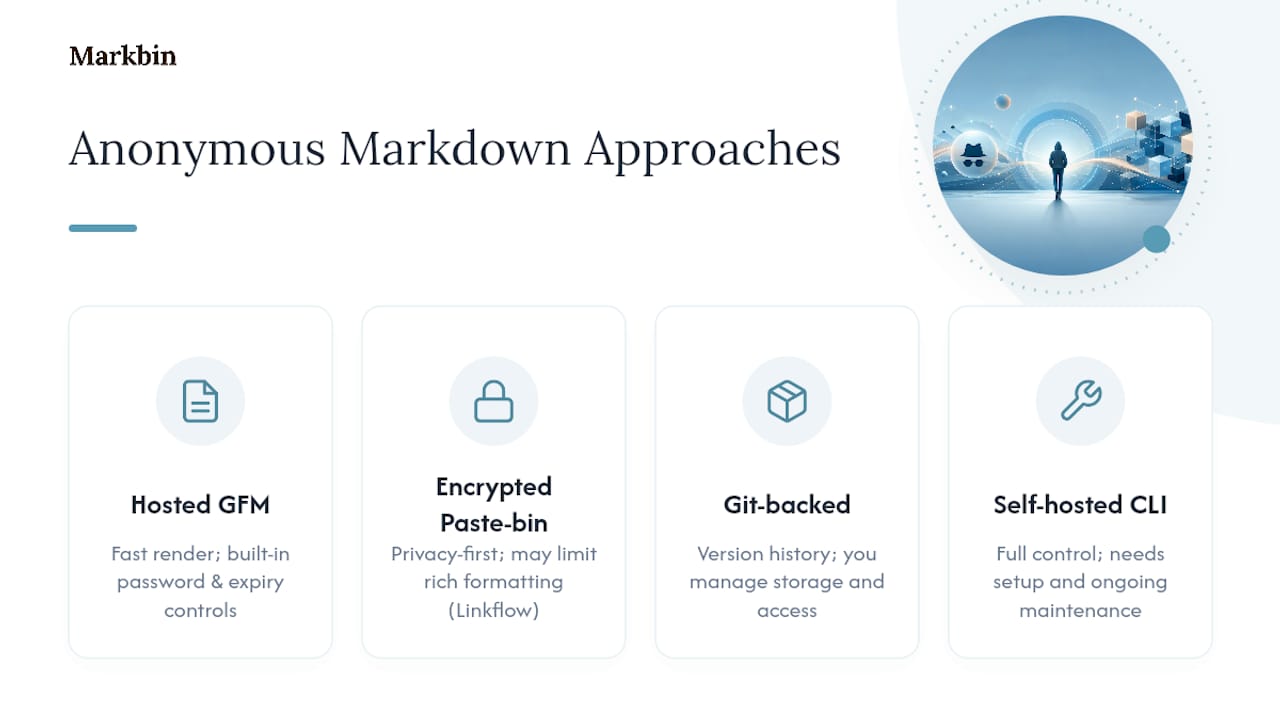
Hosted GFM publishers prioritize speed and formatting fidelity. You paste markdown, get a rendered link, and lean on built-in password and expiry controls. This is the category Markbin sits in, and it's the right fit when your priority is a clean-looking document shared in under a minute.
Encrypted paste-bin style tools put privacy first, sometimes at the cost of rich formatting. Linkflow's deniable encrypted link tool is a good example of this pattern applied broadly to private link creation, not specifically markdown rendering, but it illustrates the privacy-first end of the spectrum well.
Git-backed renderers appeal to developers already living in a repo. You get version history for free, but you're managing your own storage and access model instead of letting a hosted tool handle it.
Self-hosted CLIs and open-source scripts, like the fragment-key encryption pattern documented in projects such as md-share, give you full control at the cost of setup time and ongoing maintenance. Fine for a developer who wants zero third-party trust; overkill for an educator who needs a handout shared by lunchtime.
None of these approaches is universally correct. The right pick depends on how much setup time you're willing to trade for control, and whether formatting fidelity or maximum privacy is your bigger constraint that day.
What Limits Should You Expect From Anonymous Sharing?
Anonymous document sharing solves the signup-friction problem, but it doesn't solve every problem, and pretending otherwise sets you up for a bad surprise.
Discoverability cuts both ways. An unguessable link is hard for a stranger to stumble onto, but it's just as hard for you to recover if you lose it and didn't save the secret-edit key. There's no password-reset flow when there's no account to reset it on.
Permanence is a design choice, not a given. Free tiers on most publishers cap retention, meaning a document you meant to reference in six months might already be gone. If long-term access matters, check the retention window before you publish, not after the link goes dead.
Search engine indexing is a real risk if a document isn't password-protected. A public rendered link with no gate can get crawled and cached, which defeats the point of publishing anonymously in the first place if the content was ever meant to stay semi-private.
Version control is limited or absent on hosted tools, unlike the Git-backed alternative. If you need a full edit history, a hosted anonymous publisher generally isn't the right tool, and a docs-as-code setup will serve you better.
Attribution disputes can get messy. If a document goes viral or gets misquoted, there's no account trail to prove authorship after the fact, which is the same anonymity that made publishing appealing in the first place cutting the other way.
What Actually Works in Practice
Most guidance on this topic treats every use case the same way, and that's where it falls short. A developer publishing API documentation has different needs than an educator sharing a quiz answer key, and pretending otherwise leads to bad defaults.
For developers, published reference docs generally don't need an expiry at all. Drafts and internal notes do, so set a short TTL on those instead of leaving everything permanent by default. For educators, a 7 to 30 day expiry on handouts strikes the right balance between giving students enough time and not leaving material floating around after the unit ends. For researchers sharing sensitive data summaries, pair a password with an actual retention policy you've written down, not just a mental note.
The most common mistake I see is treating the secret-edit key as disposable. It's not. Lose it, and you've lost the ability to fix a typo without republishing under a new link entirely.
If you remember one thing: match your expiry setting to how long the document should realistically matter, and never send the password over the same channel as the link.
— Zack
Get Started With Markbin
Markbin is built for exactly the workflow this article walks through: paste your markdown, get a rendered link, no signup required. It supports full GitHub Flavored Markdown, including syntax highlighting, tables, task lists, and math formulas, plus the password protection and self-destructing documents that make sharing sensitive drafts or handouts safe by default. When you need a document ready to hand off, the built-in PDF export saves you a conversion step.
The free plan covers transient sharing well: pick a theme, set a basic expiry, and publish. If you need longer retention, more themes, or access to the source code, the paid plans unlock that without changing how the tool works day to day. Head to Markbin and publish your first document. It takes less time than reading this sentence twice.
Sources
- Markdown in Technical Writing Workflows | OpenMark
- Markdown for Technical Writers: The Docs-as-Code Workflow Guide | MarkdownTools Blog
- Markdown for Technical Writers: Best Practices (2026 Guide) – Markdown Tools Online
- Using Markdown for Technical Writing | mdkit