
Markdown bold and italic syntax uses asterisks ("*) and underscores (_`) as delimiters around text to signal emphasis, with single delimiters producing italic, double producing bold, and triple producing both at once. This system works across platforms like GitHub, Discord, VS Code, and Obsidian, making it one of the most portable text formatting conventions in modern writing. Whether you are writing technical documentation, a README file, or a shared note, understanding how these delimiters behave is the foundation of every markdown syntax guide you will encounter. The rules are simple once you see the pattern clearly.
How markdown bold italic syntax works: the basic rules
Markdown emphasis syntax follows a straightforward count system. Single delimiters produce italic, double delimiters produce bold, and triple delimiters produce combined bold and italic text. This applies whether you use asterisks or underscores. GitHub's Markdown guide confirms this three-tier structure, and it holds across most major platforms.
Here is what each level looks like in practice:
*italic*or_italic_renders as italic**bold**or__bold__renders as bold***bold and italic***or___bold and italic___renders as bold and italic
The CommonMark standard formalizes these rules so that parsers behave predictably. CommonMark is the specification most modern Markdown editors follow, including GitHub Flavored Markdown (GFM). Knowing that your syntax follows CommonMark means you can trust it will render correctly on any compliant platform.
One thing beginners often miss: the delimiters must be placed directly adjacent to the text, with no space between the delimiter and the first or last character of the word or phrase. Writing * italic * with spaces will not produce italic text on most parsers. It will render as a literal asterisk followed by the word.

Pro Tip: Always preview your Markdown in the actual editor or platform you are targeting. A syntax that renders perfectly in one tool may behave differently in another due to parser variations.
The delimiter count rule is the single most useful mental model for Markdown text styles. Once you internalize it, you can predict the output of any emphasis combination without memorizing separate rules for each case.
How do asterisks and underscores differ in Markdown emphasis?
Both asterisks and underscores produce the same visual output when used correctly, but they do not behave identically in every situation. Asterisks work reliably for emphasis inside words, while underscores have restrictions near alphanumeric characters that can cause mid-word emphasis to fail silently.
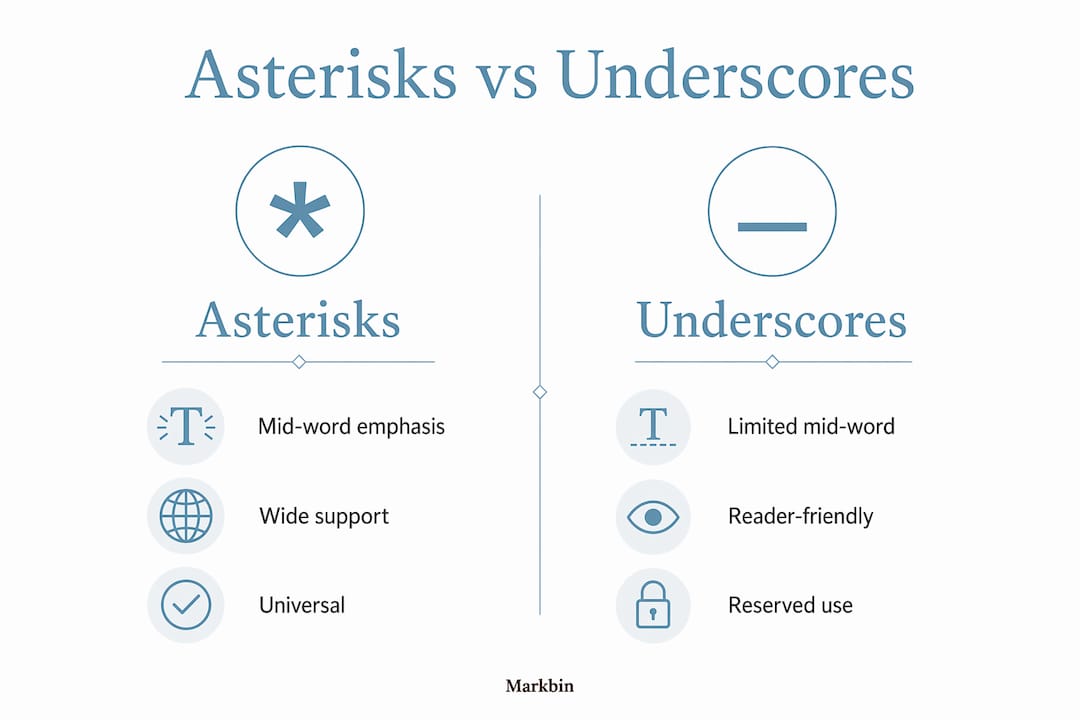
| Feature | Asterisks (*) | Underscores (_) |
|---|---|---|
| Mid-word emphasis | Works reliably | Fails in most parsers |
| Platform support | Universal | Inconsistent |
| CommonMark compliance | Full support | Restricted near alphanumerics |
| Recommended for beginners | Yes | Use with caution |
The CommonMark specification defines this behavior precisely. Underscores cannot open or close emphasis when they are adjacent to an alphanumeric character. This means un_der_score will not italicize "der" on a CommonMark-compliant parser. The same text with asterisks, un*der*score, will render "der" in italics. This distinction matters most when you are formatting technical terms, variable names, or compound words.
In practice, asterisks work universally across editors like GitHub, VS Code, Obsidian, and MacMD Viewer, while underscores fail in some mid-word contexts. This is not a bug in any specific tool. It is the intended behavior defined by the specification.
Underscores still have a place. Many writers prefer them for readability in raw text, particularly for bold formatting where __bold__ can feel visually distinct from surrounding prose. The key is knowing when each delimiter is safe to use.
Pro Tip: Default to asterisks for all emphasis in Markdown. Reserve underscores for situations where you find the raw text easier to read and you are confident the parser supports them in that context.
What are common pitfalls with bold and italic Markdown syntax?
Markdown emphasis syntax has several edge cases that trip up even experienced writers. Understanding them saves you from formatting that looks correct in raw text but breaks on render.
The most common problem is interleaved delimiters. Sequences like *foo **bar* baz** produce undefined behavior because the opening and closing delimiters do not match in a clean, nested structure. The result varies by parser, which means your document may look fine in one editor and broken in another. The fix is always to close the innermost delimiter before the outermost one.
A second pitfall involves parser implementation differences. Not every editor implements the full CommonMark emphasis stack. Some lightweight parsers skip edge-case handling entirely, which means overlapping or ambiguous delimiter sequences render inconsistently. This is especially common in custom-built content management systems and older blogging platforms.
Here are the most frequent mistakes to avoid:
- Interleaved delimiters: Never open bold inside italic and close bold before italic. Always close the inner emphasis first.
- Spaces next to delimiters:
* text *does not produce italic. The delimiter must touch the text directly. - Mixing delimiter types carelessly: Writing
*bold and italic__mixes asterisks and underscores in a way that most parsers will not resolve correctly. - Assuming all parsers are equal: Reddit, Discord, Notion, and GitHub each use slightly different Markdown flavors. Test your formatting in the actual platform before publishing.
Testing Markdown syntax in your target editor is the most reliable way to avoid surprises. No amount of theoretical knowledge replaces a quick render check. Markbin, for example, renders full CommonMark syntax live, so you can see exactly how your emphasis will look before sharing.
The deeper issue is that Markdown was designed for human readability in raw form. John Gruber introduced this principle in 2004, and it means the syntax intentionally stays close to how people already write for emphasis in plain text. That simplicity is a strength, but it also means the spec leaves some edge cases to parser discretion.
How to effectively combine bold and italic text in Markdown
Combining bold and italic in Markdown gives you a third level of visual emphasis, useful for warnings, key terms, or critical instructions. There are several ways to achieve this, and they are not all equally portable.
The most reliable method is triple asterisks. Triple asterisks produce bold-italic text that renders correctly on virtually every CommonMark-compliant platform. Here are the main approaches, ranked from most to least portable:
***bold and italic***renders as bold and italic and works on GitHub, VS Code, Obsidian, and most other editors.___bold and italic___uses triple underscores and works on many platforms, but carries the same underscore restrictions described above.**_bold and italic_**nests single underscores inside double asterisks and works correctly on CommonMark parsers.*__bold and italic__*nests double underscores inside single asterisks and is slightly less reliable across all parsers.**bold with *italic* inside**applies bold to a phrase and italic to a word within it, which is useful for mixed emphasis in a single sentence.
The fifth option is particularly practical for technical writing. You might write **Run the **git commit** command with *-m* for a message** to bold the command name while italicizing the flag. This kind of mixed emphasis makes documentation easier to scan.
Cross-platform compatibility is the deciding factor when choosing a method. If your Markdown will be read on GitHub, Discord, and a personal blog simultaneously, triple asterisks are the safest choice. Markdown allows multiple syntaxes for bold-italic, but triple asterisks are the clearest and most portable option across all major platforms.
For learners building a markdown formatting examples library, the best practice is to pick one method and use it consistently throughout a document. Consistency prevents parser confusion and makes your raw Markdown easier to read and maintain.
Key takeaways
Markdown bold and italic syntax requires matching delimiters placed directly adjacent to text, with asterisks being the most reliable choice across all major platforms and parsers.
| Point | Details |
|---|---|
| Delimiter count controls output | Single for italic, double for bold, triple for bold-italic. |
| Asterisks beat underscores | Asterisks work mid-word and universally; underscores fail near alphanumeric characters. |
| Interleaving breaks formatting | Always close the innermost delimiter before the outermost to avoid undefined rendering. |
| Triple asterisks are most portable | ***text*** is the safest syntax for combined bold-italic across platforms. |
| Test in your target platform | Parser behavior varies; always preview before publishing to catch rendering surprises. |
Why I think most people learn Markdown emphasis backwards
Most tutorials teach bold and italic as two separate features, then mention the combination as a bonus. That framing creates confusion because learners memorize syntax patterns instead of understanding the underlying logic. The delimiter count model is the real insight, and it should come first.
After years of writing Markdown across GitHub, Notion, Obsidian, and custom documentation systems, the single lesson I keep returning to is this: the raw text should tell you what the rendered text will look like. That was Gruber's original intent, and it still holds. If your raw Markdown looks cluttered or ambiguous, the rendered output will probably surprise you.
The underscore versus asterisk debate is where I see the most unnecessary frustration. Writers who learned Markdown through a specific tool often assume underscores work everywhere because they worked in that one context. They do not. Asterisks are the safer default, and there is no meaningful readability tradeoff that justifies using underscores for mid-word emphasis.
My practical advice for anyone building a Markdown habit: write a small reference document for yourself with every emphasis combination you use regularly. Render it in every platform you write for. You will find the gaps immediately, and you will never be surprised by a broken heading or a missing italic again. Markbin is a good place to build that reference document because it renders full CommonMark syntax live and lets you share the result instantly.
— Zack
Write and share formatted Markdown instantly with Markbin
If you are practicing bold, italic, and combined emphasis, you need a live preview environment that renders CommonMark accurately. Markbin supports full GitHub Flavored Markdown, including all emphasis syntax covered in this article, with a live preview that shows your formatting as you type. There is no sign-up required to start writing. You can create a document, preview your bold and italic formatting, and share it via a secure link in under a minute. Markbin also supports password protection and self-destructing documents, making it useful for sharing formatted notes in professional or educational settings. For anyone learning how to use Markdown, having a reliable render environment removes the guesswork entirely.
FAQ
What is the difference between bold and italic in Markdown?
Italic text uses a single asterisk or underscore on each side of the text, while bold uses two. Triple delimiters produce text that is both bold and italic simultaneously.
Why does my underscore emphasis not render correctly?
Underscores cannot open or close emphasis when adjacent to alphanumeric characters under the CommonMark specification. Use asterisks instead for reliable results, especially inside words.
Can I mix asterisks and underscores for bold-italic?
Yes, syntaxes like **_text_** and *__text__* work on CommonMark-compliant parsers. Triple asterisks (***text***) are the most portable option and the safest choice for cross-platform documents.
Does Markdown bold and italic syntax work on GitHub and Discord?
Both platforms support asterisk-based bold and italic formatting. GitHub follows GitHub Flavored Markdown (GFM), which is built on CommonMark. Discord uses its own Markdown flavor that supports the core emphasis syntax but may differ on edge cases.
How do I avoid broken formatting when nesting bold and italic?
Always close the innermost delimiter before the outermost. Nested emphasis works correctly with patterns like **bold with *italic* inside**, but interleaved delimiters like *foo **bar* baz** produce undefined behavior across parsers.