

Sharing content briefs with collaborators is the structured practice of distributing a single source of truth about a content project to every team member who needs it, before a single word of the draft is written. When done right, it eliminates contradictory feedback, reduces revision cycles, and keeps developers, educators, and content creators aligned from kickoff to publish. Platforms like StoryChief, Grow2.ai, and Markbin have built entire workflows around this idea. The core principle is simple: a brief that lives separately from the draft is a brief that will eventually be ignored.
What tools and features actually support sharing content briefs with collaborators?
The right platform does more than store a document. It controls who can edit, tracks every change, and keeps the brief visible alongside the draft at every stage of the workflow.
Role-based access control
Role-based access is the single most important feature to look for. Collaborative platforms implement editor and viewer roles to limit active editors to five per session, which protects workflow integrity when multiple contributors are working simultaneously. That limit exists for a reason: too many concurrent editors produce conflicting edits that are expensive to untangle.

Real-time syncing and version control
Real-time syncing means every collaborator sees the current version of the brief without manually refreshing or downloading a new file. Tools like the Obsidian Collaborative Folders plugin take this further by using end-to-end encryption to sync notes locally, so your brief never sits as plaintext on a third-party server. For teams handling sensitive editorial strategies or unreleased product details, that distinction matters.
Comparing the leading options
| Tool | Key Sharing Feature | Permission Levels | Encryption |
|---|---|---|---|
| StoryChief AI Canvas | Brief attached to campaign workflow | Editor, Viewer, Approver | Standard TLS |
| Obsidian Collaborative Folders | Encrypted local sync | Editor, Viewer | End-to-end |
| Markbin | Shareable markdown links, password protection | Link-based access | Password-gated |
| Grow2.ai | AI draft generation from brief | Editor, Reviewer | Standard TLS |
The table above shows that no single tool wins on every dimension. StoryChief excels at keeping briefs inside a full campaign workflow. Obsidian suits teams with strict security requirements. Markbin is the fastest option when you need to send a formatted brief to an external collaborator without requiring them to create an account.
Pro Tip: Always assign a single "brief owner" with editor rights. Everyone else gets viewer access until the brief is approved. This prevents premature edits that contradict the original strategy.
How do you create and share collaborative content brief templates?
A content brief template is a reusable document structure that captures every decision a writer or developer needs before starting work. The goal is to make the template specific enough to be useful and short enough to actually be filled out.
What every brief template needs
Strong templates include these components:
- Content objective: What specific outcome does this piece drive? (signups, page views, course enrollments)
- Target audience: Who is reading this, and what do they already know?
- Primary keyword and related terms: Required for SEO-driven content
- Tone and voice guidelines: Link to a brand voice document if one exists
- Deliverables and word count: Exact specifications, not ranges
- Deadline and review stages: Who approves, and by when?
- Reference materials: Links to competitor examples, internal data, or source interviews
How to share the template
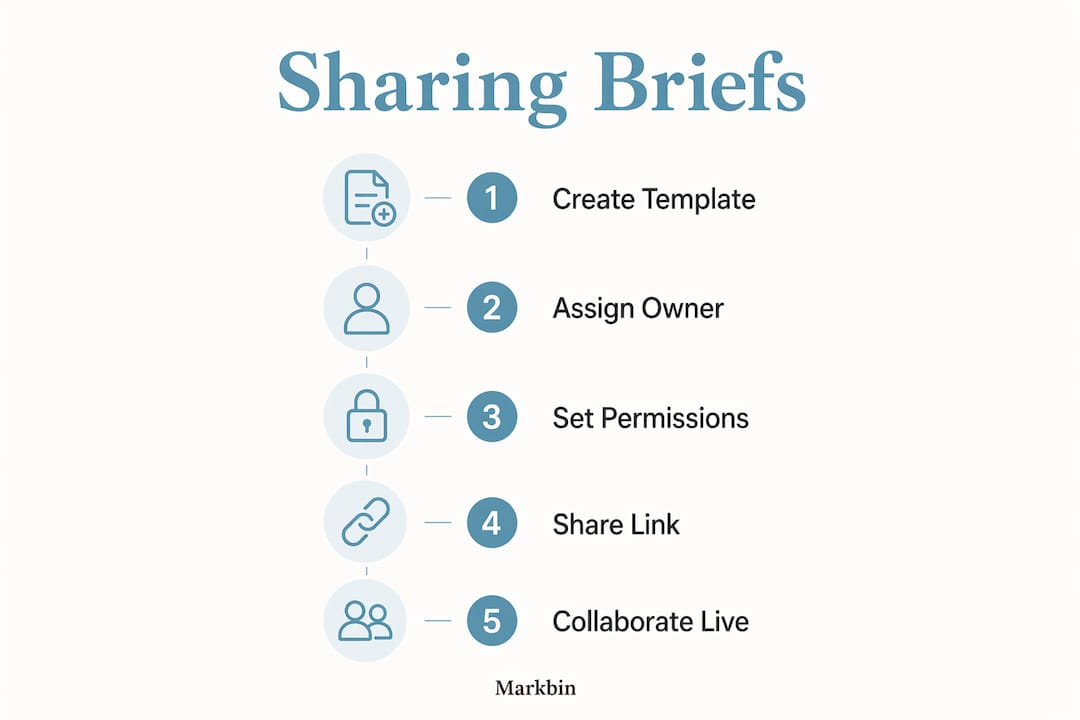
Three methods work reliably for distributing project briefs to collaborators. First, shareable links are the fastest option. Platforms like Markbin convert a markdown brief into a formatted, password-protected link you can send via Slack or email in under a minute. Second, platform invites work well when the collaborator is already inside your content management system. Third, email with an attached template file is the lowest-tech option and still works for external freelancers who do not use your internal tools.
The critical rule from StoryChief's workflow research is that briefs must stay attached to the draft and campaign throughout the content lifecycle. A brief that lives in a separate folder from the draft creates fragmentation. Writers stop consulting it. Requirements get missed. Keeping the brief and the draft in the same workspace, whether that is a shared folder or a linked document, is what prevents this.
Pro Tip: Create one master brief template in Markbin or your preferred markdown editor, then duplicate it for each new project. Version the template quarterly so it reflects your current content strategy without requiring a full rebuild each time.
Step-by-step: how to share and co-manage briefs with your team
This process works for content teams of two or twenty. Adjust the tool names to match your stack, but keep the sequence intact.
-
Draft the brief in a shared environment. Open your collaboration platform and create the brief using your standard template. Fill in every field before inviting anyone. An incomplete brief invites premature questions that slow the process down.
-
Assign roles before sending the invite. Decide who is an editor and who is a viewer. Editors should be limited to the brief owner and the lead writer. Everyone else, including stakeholders and subject matter experts, gets viewer access.
-
Send the invite with context. Do not just drop a link in Slack. Write two sentences explaining what the brief covers, what feedback you need, and the deadline for comments. Context reduces back-and-forth by 40–60% in most team environments.
-
Centralize all feedback in one place. Version control fragmentation happens when feedback is spread across email, chat, and documents. Use inline comments inside the brief document itself. If your platform supports it, disable email replies to feedback notifications so all responses stay inside the tool.
-
Lock the brief before the draft begins. Once feedback is incorporated, change all editor permissions to viewer. This signals that the brief is final and prevents last-minute changes that derail the writer.
-
Keep the brief linked to the draft. Paste the brief link at the top of the draft document. When reviewers leave feedback on the draft, they can reference the brief without hunting for it.
"Integrated briefs with attached research and comments reduce 'missed key detail' revisions more than any other single workflow change." — StoryChief on marketing workflow automation
Pro Tip: Use a naming convention like [Project Name] + [Brief v1] for every brief file. When the brief changes after feedback, save it as v2 rather than overwriting v1. You will need the original version more often than you expect.
How does automation improve content brief sharing and collaboration?
Automation removes the manual handoffs that slow down collaborative content sharing. The biggest gains come from three specific integrations.
Automated draft generation
Grow2.ai reports that automating first draft generation cuts author time on initial drafts by up to 60%. That time saving is real, but it comes with a condition. AI drafts content from the brief, but humans must finalize tone, facts, and brand voice before anything goes to review. Automation handles the blank page. Humans handle the judgment calls.
Notification triggers
When a draft is ready for review, Slack and email alerts sent automatically through Grow2.ai notify the right team members without requiring anyone to manually check a dashboard. Zapier and Make extend this further by connecting your brief workflow to Google Docs, Notion, or any CMS your team uses. Zapier and Make can trigger newsletter drafts in Google Docs and push Slack notifications automatically when a new brief is published.
CMS integration with restricted permissions
Efficient teams automate the handoff of AI-generated drafts into their CMS with draft-only permissions. This means the content appears in the CMS for human review but cannot be published without a manual approval step. The workflow looks like this:
| Automation Step | Tool | Output |
|---|---|---|
| Brief published | Markbin or StoryChief | Notification sent to writer |
| AI draft generated | Grow2.ai | Draft pushed to CMS as restricted draft |
| Draft ready alert | Zapier or Make | Slack message to editor |
| Human review complete | CMS approval workflow | Content published |
This four-step automation covers the entire handoff from brief to published content without a single manual file transfer.
Key takeaways
Keeping content briefs attached to drafts inside a single shared workspace is the most effective way to prevent fragmented feedback and missed requirements across collaborative teams.
| Point | Details |
|---|---|
| Attach briefs to drafts | Store the brief and draft in the same workspace to prevent fragmentation and missed requirements. |
| Use role-based access | Limit active editors to five or fewer per session to protect workflow integrity and reduce conflicting edits. |
| Centralize all feedback | Keep comments inside the brief document itself to avoid version control fragmentation across email and chat. |
| Automate handoffs | Use Zapier, Make, or Grow2.ai to trigger notifications and push drafts to CMS with restricted permissions. |
| Template and version briefs | Maintain a master brief template and save each revision as a new version rather than overwriting the original. |
Why most teams get brief sharing wrong
I have reviewed content workflows for teams ranging from two-person newsletters to 30-person editorial departments. The most common failure is not a tool problem. It is a discipline problem. Teams invest in platforms like StoryChief or Notion, set up beautiful brief templates, and then abandon the brief the moment the draft starts. The writer opens a blank doc, the brief sits in a separate tab, and by paragraph three, the brief is forgotten entirely.
The fix is structural, not motivational. Paste the brief link at the top of every draft. Lock editing permissions once the brief is approved. Make it physically harder to ignore the brief than to consult it. Role-based access is not just a security feature. It is a workflow integrity tool that forces the team to treat the brief as a living document with a defined lifecycle, not a checklist to complete and discard.
I am also skeptical of teams that fully automate brief distribution without a human checkpoint. AI-powered drafting accelerates editorial timelines, but automation cannot catch a brief that was written with the wrong audience assumption or a keyword that no longer fits the campaign. A 10-minute human review of every brief before it goes to collaborators catches more errors than any automated validation system. Speed is valuable. Accuracy is not optional.
The teams I have seen do this best treat the brief as the contract between strategy and execution. Every collaborator signs off on it, literally or figuratively, before the draft begins. That single habit eliminates more revision cycles than any tool upgrade ever will.
— Zack
Share formatted briefs instantly with Markbin
Markbin converts plain markdown into a beautifully rendered brief you can share via a single link, no account required for recipients. Password protection and self-destructing documents mean you control who sees the brief and for how long. For developers, educators, and content creators who need to send content drafts to external collaborators quickly, Markbin removes the friction of platform onboarding entirely. You write the brief in markdown, Markbin renders it with full GitHub Flavored Markdown support including tables, task lists, and syntax highlighting, and your collaborator gets a clean, readable document in seconds. Learn more about document sharing for teams and how Markbin fits into your existing workflow.
FAQ
What should a content brief template include?
A content brief template should include the content objective, target audience, primary keyword, tone guidelines, word count, deadline, and links to reference materials. These components give every collaborator the context needed to produce aligned content without follow-up questions.
How do you prevent version control problems when sharing briefs?
Centralize all feedback inside the brief document itself and lock editing permissions once the brief is approved. Scattered feedback across email and chat is the leading cause of contradictory edits and missed requirements.
How many editors should have access to a shared content brief?
Limit active editors to five per session. Collaborative platforms commonly enforce this limit to maintain workflow integrity and prevent conflicting simultaneous edits.
Can automation tools replace manual brief distribution?
Automation tools like Zapier, Make, and Grow2.ai handle notifications and draft handoffs, but a human checkpoint before distribution catches strategic errors that automation cannot identify. Use automation for speed, not as a substitute for editorial judgment.
What is the fastest way to share a brief with an external collaborator?
A shareable link from a platform like Markbin is the fastest method. It requires no account creation from the recipient and can include password protection for sensitive briefs.