
Markdown tables syntax is defined as a plain-text method for creating structured tables using pipe characters ("|), dashes (-), and colons (:`) to separate columns, define headers, and control alignment. This syntax is not part of the original Markdown specification. It belongs to GitHub Flavored Markdown (GFM), a widely adopted extension that platforms like GitHub, GitLab, Reddit, and Discord all support. If you write documentation, build tutorials, or format data for any of these platforms, understanding markdown table formatting is non-negotiable.
What is markdown tables syntax and how does it work?
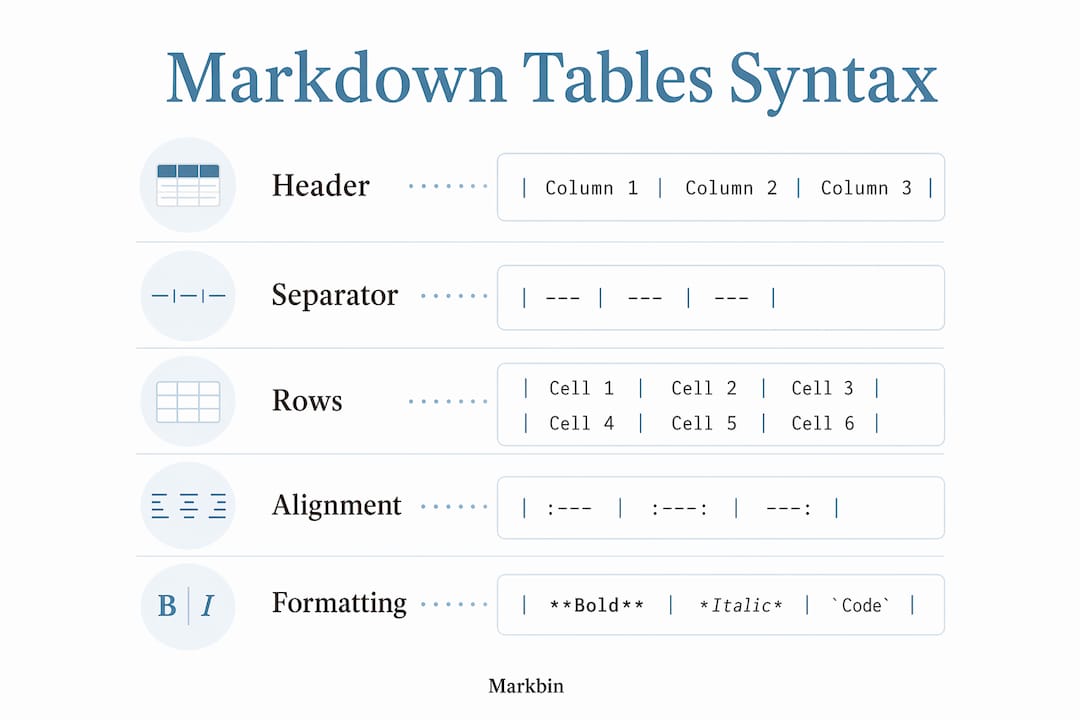
Markdown table syntax structures data into rows and columns using three types of characters. Pipes (|) divide cells horizontally. Dashes (-) fill the separator row that sits between the header and the data rows. Colons (:) inside that separator row tell the renderer how to align text within each column.
Here is the simplest possible markdown table:
| Name       | Role       | Level  |
| ---------- | ---------- | ------ |
| Alice       | Developer  | Senior |
| Bob         | Designer   | Mid    |
That renders as a clean, three-column table with a header row. Every markdown table requires exactly two things to function: a header row and a separator row. Remove either one and the table breaks entirely.
GFM extends basic markdown to support tables, which the original CommonMark specification does not include. This distinction matters because not every markdown parser supports tables by default. Tools like Pandoc, Jekyll, and Hugo all handle GFM tables, but a plain CommonMark parser will render your table as raw text. Knowing which parser your platform uses saves a lot of debugging time.
How to create the basic components of a markdown table
Every markdown table is built from three layers. Understanding each layer prevents the most common formatting errors.
The three required layers are:
- Header row: Contains your column names, each separated by a pipe character. Example:
| Column A | Column B | Column C | - Separator row: Contains at least three dashes per column, also separated by pipes. Example:
| --- | --- | --- | - Data rows: One row per record, following the same pipe-separated format as the header.
The separator row does more than visually divide the header from the data. It signals to the markdown renderer that the block above it is a table header, not a regular paragraph. Without it, the entire structure collapses.
Leading and trailing pipes in every row are recommended for 100% compatibility across platforms including Discord, Reddit, and GitHub. Technically, some parsers accept tables without them, but omitting pipes is a reliable way to produce broken output on at least one platform you care about.

Pro Tip: Always write your separator row with at least three dashes per cell (---). Single-dash separators (-) are technically valid in some parsers but fail silently in others.
Here is a concrete markdown table example showing a course catalog:
| Course         | Duration | Format  |
| -------------- | -------- | ------- |
| Python Basics  | 6 weeks  | Online  |
| Data Analysis  | 8 weeks  | Hybrid  |
| Web Dev Intro  | 10 weeks | In-person |
Manual alignment of pipes in the source code, as shown above, improves human readability. Renderers ignore pipe spacing entirely and only care about consistent pipe count and row structure. You can write ragged, unaligned pipes and the output will look identical.
How to control alignment and format content inside cells
Column alignment in markdown is controlled by placing colons in the separator row. The position of the colon relative to the dashes determines the alignment direction.
| Syntax | Alignment |
|---|---|
:--- | Left (default) |
---: | Right |
:---: | Center |
Right-aligning numeric data is standard practice for readability. A column of prices or scores reads far more cleanly when the digits line up on the right edge. Left alignment works best for names, labels, and prose. Center alignment suits short categorical values like status flags or ratings.
Inline formatting is fully supported inside markdown table cells. You can use bold, italics, inline code, hyperlinks, and even images. This makes markdown table formatting genuinely useful for documentation where you need to highlight specific values or link to related resources.
What you cannot do is use block-level elements inside a cell. A bullet list, a code block, or a second paragraph inside a single cell will not render as intended. The cell content is treated as a single inline string.
Pro Tip: To add a line break inside a cell, use the raw HTML <br> tag. Native line breaks inside cells are not supported, but GitHub, GitLab, and most major editors handle <br> correctly.
The other formatting challenge is the pipe character itself. If your cell content contains a literal |, the renderer will interpret it as a column separator and break your table. You have two options: escape it with a backslash (\|) or use the HTML entity |. Both methods work across major markdown renderers, though the HTML entity offers slightly better cross-platform reliability.
What are the common pitfalls and limitations of markdown tables?
Markdown tables have hard limits that trip up even experienced writers. Knowing them upfront saves hours of troubleshooting.
The most frequent error is a missing separator row. If you write a header row and jump straight to data rows, the renderer produces plain text, not a table. The separator row is not optional. A close second is a column count mismatch. If your header has three columns but a data row has four, behavior varies by parser. Some renderers add an empty cell; others break the entire row. Consistent column counts across every row are the only safe approach.
Markdown tables do not support block elements such as headings, lists, images used as block content, or blockquotes inside cells. This is the single biggest misconception among developers and educators who expect markdown tables to behave like HTML tables. When your layout requires nested lists, multiple paragraphs, or merged cells using rowspan or colspan, raw HTML is the correct tool. Trying to force block content into markdown table cells produces broken output every time.
Wide tables exceeding six columns cause usability problems on mobile devices. The table overflows its container and forces horizontal scrolling, which most readers abandon immediately. The fix is to restructure the data: split one wide table into two narrower ones, or transpose rows and columns so the table reads vertically instead of horizontally.
Pro Tip: Before publishing any markdown document with tables, preview it in the target platform, not just your local editor. Rendering differences between VS Code, GitHub, and Notion are significant enough to break your layout silently.
Platform compatibility is a real concern. Discord supports GFM tables. Reddit supports them in most contexts. Notion has its own markdown import behavior that does not always respect pipe tables. Confluence uses a different table syntax entirely. Understanding how markdown rendering works across these environments is the difference between a polished document and a wall of pipe characters.
Best practices and tools for efficient markdown table creation
Creating markdown tables manually for large datasets is slow and error-prone. These practices and tools cut that time significantly.
- Always add a blank line before the table. Most parsers require this blank line to recognize the table block correctly. Omitting it is one of the most common causes of tables rendering as plain text.
- Use a markdown table generator. Most users copy tab-separated values from Excel or Google Sheets and convert them via table generators to avoid manual pipe placement errors. Tools that accept clipboard TSV data and output valid markdown save significant time on large tables.
- Keep tables narrow. Six columns is a practical maximum for most screen sizes. If your data requires more, consider whether a table is the right format at all.
- Use HTML tables for complex layouts. When you need merged cells, nested content, or precise styling, styled text without HTML has real limits. Raw HTML tables give you full control and render correctly in every GFM environment.
- Validate column counts before publishing. A quick visual scan of your source catches mismatched column counts before they become rendering bugs.
Pro Tip: Manually aligning your pipes in the source file, so every column lines up vertically, costs a few extra seconds but makes the raw markdown readable to any collaborator who opens the file directly.
A cross-platform compatibility checklist worth keeping:
- Include leading and trailing pipes on every row
- Use at least three dashes in every separator cell
- Add a blank line immediately before the table
- Escape any literal pipe characters in cell content
- Preview in the target platform before publishing
- Limit tables to six columns for mobile readability
For anyone building a content publishing workflow that involves markdown tables, these six checks eliminate the majority of rendering failures before they reach readers.
Key takeaways
Markdown table syntax requires a header row, a separator row with alignment colons, and consistent pipe counts across every row to render correctly on platforms like GitHub, Discord, and Reddit.
| Point | Details |
|---|---|
| Syntax foundation | Pipes, dashes, and colons are the only characters needed to build a functional markdown table. |
| Alignment control | Place colons in the separator row to set left, right, or center alignment per column. |
| Inline formatting only | Bold, italics, inline code, and links work inside cells; block elements like lists do not. |
| Blank line requirement | Add a blank line before every table to prevent rendering failures in most parsers. |
| Know the limits | Tables exceeding six columns break on mobile; use raw HTML for merged cells or nested content. |
Why markdown tables are simpler than most people expect
I have worked with markdown tables across documentation platforms, course materials, and developer wikis for years. The pattern I see most often is not confusion about syntax. It is overconfidence. Someone learns the three-character system, pipes and dashes and colons, and immediately tries to build a complex comparison matrix with nested bullet points and multi-paragraph cells. It fails. They blame markdown.
The honest truth is that markdown tables were designed to be simple on purpose. They sacrificed complex layout features for portability and readability in plain text. That trade-off is a feature, not a bug. A table you can read in raw source code is a table any collaborator can edit without a special tool.
Where I see markdown tables genuinely shine is in API documentation, course syllabi, feature comparison pages, and quick reference sheets. These are all cases where the data is compact, the columns are few, and the reader needs to scan quickly. For anything more complex, I reach for HTML without hesitation. The visual markdown approach to document authoring reinforces this: choose the simplest format that does the job correctly.
The biggest misconception I encounter in developer and educator communities is expecting markdown tables to behave like spreadsheet software. They do not. They never will. Once you accept that constraint, you stop fighting the syntax and start using it for what it actually does well.
— Zack
Create and share markdown tables instantly with Markbin
Markbin is built for exactly this workflow. Paste your markdown table syntax into Markbin and it renders immediately using full GitHub Flavored Markdown support, including alignment, inline formatting, and proper separator row handling. No sign-up required. You get a shareable link in seconds, with optional password protection and self-destructing documents for sensitive content.
For teams and educators who create markdown tables regularly, Markbin's plans include document management features that keep your formatted tables organized and accessible across projects. If you write technical documentation, course materials, or collaborative notes, Markbin removes the gap between writing markdown and sharing polished output.
FAQ
What is the minimum syntax for a markdown table?
A markdown table requires at least a header row and a separator row with three or more dashes per column, both using pipe characters to separate cells. Without the separator row, the renderer outputs plain text instead of a table.
Does markdown table syntax work everywhere?
Markdown table syntax is part of GitHub Flavored Markdown, not the original CommonMark specification, so support varies by platform. GitHub, GitLab, Reddit, and Discord all support GFM tables, but plain CommonMark parsers and some CMS platforms do not.
How do I align columns in a markdown table?
Place a colon in the separator row to control alignment: :--- aligns left, ---: aligns right, and :---: centers the column. Right-aligning numeric columns is standard practice for readability.
Can I put a list inside a markdown table cell?
Markdown tables do not support block-level elements like lists, headings, or multiple paragraphs inside cells. For layouts that require nested content, use a raw HTML table instead.
Why is my markdown table rendering as plain text?
The two most common causes are a missing separator row and a missing blank line before the table. Add a blank line directly above the table and confirm that every column in the separator row contains at least three dashes.