
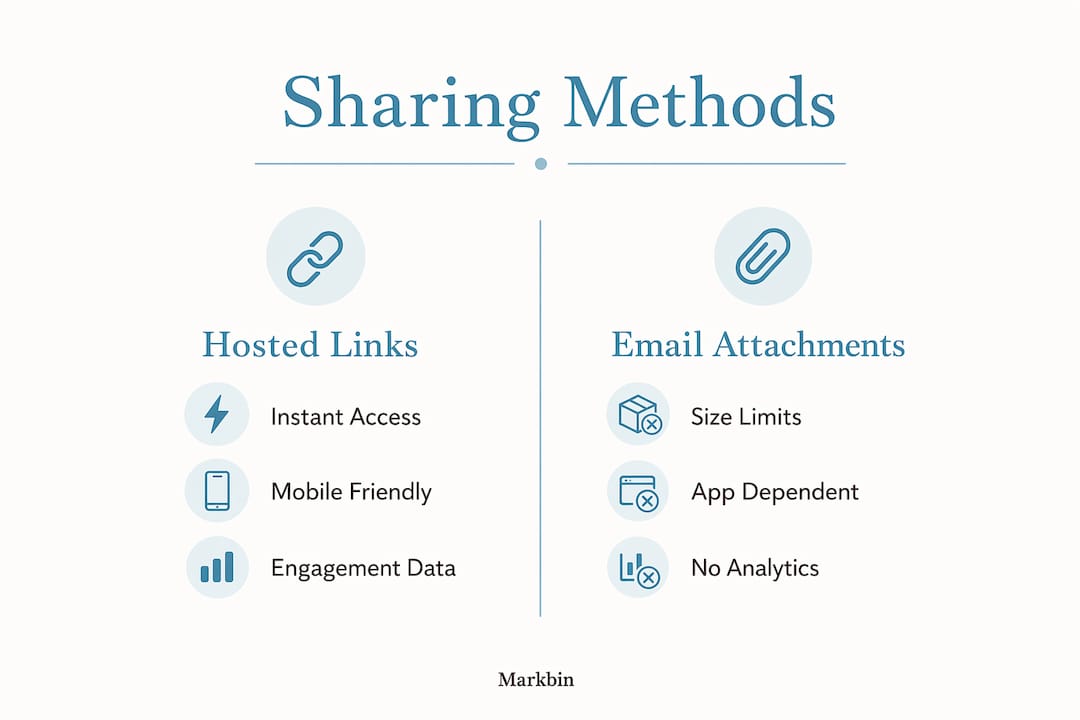
The fastest way to share reading guides with students instantly is through hosted links, not email attachments. Paste a URL into a class chat, display a QR code on the projector, and every student has the guide open in their browser within seconds, no account required, no file size headaches, no waiting on a slow LMS.
Here is what makes hosted link sharing work so well:
- Instant access: Students click once and the guide loads in their browser, formatted and ready.
- No accounts needed: Zero-account access removes the single biggest barrier to participation in digital distribution.
- Mobile and cross-browser compatible: Works on phones, tablets, and laptops without installs.
- Format preserved: Tables, syntax highlighting, and math formulas render exactly as written.
- Engagement tracking: Hosted links can log opens and access patterns, giving educators visibility that an email attachment never provides.
Table of Contents
- Why hosted links beat email attachments for reading guides
- What features should you look for in a sharing tool?
- How to maintain formatting and keep shared guides secure
- How Markbin makes instant markdown sharing easy for educators
- Markbin gives educators a better way to share reading guides
- Key Takeaways
Why hosted links beat email attachments for reading guides
Email attachments face size limits and platform access hurdles that make link-based sharing faster and more reliable for distributing course packs. A PDF that bounces back because a school mail server caps attachments at 10 MB is a problem a hosted link never creates.
Mobile-friendliness is the other gap. An attachment forces a download to a device that may not have the right app to open it. A hosted link opens in the browser, formatted and readable, whether the student is on a Chromebook in the library or a phone on the bus.
Hosted links also give educators analytics: opens, access times, and engagement data that attachments cannot provide. That visibility matters when you need to confirm that materials actually reached students before a class discussion.
Pro Tip: When you post a reading guide link on your LMS or class page, also display the QR code on your projector at the start of class. Students who missed the post can scan and open the guide quickly, bypassing any IT network restrictions.
What features should you look for in a sharing tool?
Not every link-sharing tool handles markdown well. The features below separate tools that genuinely serve educators from those that just move files around.
- Zero-account access: Direct link access without student sign-ups maximizes participation.
- Browser-based preview: Students can confirm the correct file before downloading, saving device storage.
- Full markdown rendering: Tables, syntax highlighting, task lists, and math formulas must display correctly, not as raw text.
- Password protection and link expiration: Critical for sensitive teaching materials and school data privacy compliance.
- Preserved folder structure: Original organization arrives intact, so students do not have to sort through a jumbled download.
- Multi-device compatibility: Desktop, tablet, and phone support is non-negotiable for a diverse classroom.
- Simple interface: Educators should be able to generate and share a link in under a minute.
| Feature | Why it matters |
|---|---|
| Zero-account access | Students open guides immediately, no sign-up friction |
| Browser preview | Confirms correct file before download |
| Markdown rendering | Tables, code blocks, and formulas display as intended |
| Password protection | Restricts access to intended recipients only |
| Link expiration | Limits exposure of time-sensitive materials |
| Folder structure preservation | Keeps multi-file guides organized on arrival |
| Mobile-first design | Works on any device students actually carry |
How to maintain formatting and keep shared guides secure
GitHub Flavored Markdown (GFM) is the standard that covers the full range of educational document needs: tables for comparison charts, fenced code blocks for technical courses, task lists for reading checklists, and LaTeX-style math for STEM guides. A sharing tool that renders GFM correctly means students see the guide exactly as the educator built it.
Always preview a shared document before sending the link. One misplaced fence character can collapse a table into raw text, and catching that before 30 students open the guide saves a lot of confusion.
Security deserves equal attention. Password protection and access restrictions keep exam prep materials and sensitive reading guides away from unintended recipients. For maximum privacy, tools that store document data client-side in the URL fragment avoid transmitting content to external servers entirely, which aligns with school data compliance standards.
Pro Tip: Set a link expiration date on any guide tied to a specific assignment deadline. Students who access it on time get the full experience; the link goes dark automatically afterward, reducing the risk of materials circulating beyond the intended audience.
Accessibility across devices comes down to responsive design. A guide that renders cleanly on a 27-inch monitor but wraps awkwardly on a phone screen will frustrate students who rely on mobile access. Test the shared link on at least one mobile device before distributing it to a class.
How Markbin makes instant markdown sharing easy for educators
Markbin is built specifically for the workflow educators need: write or paste markdown, generate a shareable link, and send it. No recipient account required, no configuration, no waiting.

The platform supports full GitHub Flavored Markdown, including syntax highlighting, tables, task lists, and math formulas. A chemistry study guide with LaTeX equations, a literature reading guide with formatted blockquotes, a coding tutorial with fenced code blocks: all render correctly and immediately.
Here is the practical sharing flow with Markbin:
- Write or paste your markdown reading guide into the editor.
- Click to generate a shareable link.
- Optionally add a password or set a document expiration date.
- Share the URL via email, LMS, class chat, or display the QR code on your projector.
- Students open the guide in any browser, on any device, with no sign-up.
Markbin offers password protection, self-destructing documents, and instant sharing with no sign-up requirement for recipients, making it a practical fit for educators who need professional, secure distribution without IT overhead.
The QR code option is particularly useful for in-class distribution. QR codes let students access guides instantly without logging into restricted school networks or waiting on LMS load times. Display it on the projector and the whole class has the guide open before you finish giving instructions.
Markbin's mobile-first responsive design means the rendered guide looks right on a phone screen, not just a laptop. For educators sharing reading materials to a mixed-device classroom, that consistency matters.
Markbin gives educators a better way to share reading guides
Markbin is the direct answer for educators who want to share formatted reading guides without the friction of email attachments, LMS upload limits, or student account requirements. Write your guide in markdown, generate a link in seconds, and your students have a professionally rendered document open in their browser before the class period starts.
Password protection and self-destructing links mean you control who sees the material and for how long. No IT ticket, no platform permissions, no chasing down students who never got the attachment. Visit Markbin and share your first reading guide today.
Key Takeaways
Hosted links with full markdown rendering are the most reliable way to distribute reading guides to students instantly, with Markbin offering the security and formatting features educators need most.
| Point | Details |
|---|---|
| Hosted links outperform attachments | They bypass size limits, load in any browser, and provide access analytics attachments cannot. |
| Zero-account access boosts participation | Students open guides immediately without sign-up friction slowing them down. |
| GFM rendering preserves guide quality | Tables, code blocks, task lists, and math formulas display exactly as written. |
| Password protection and expiration | These features keep sensitive materials school-compliant and time-limited. |
| Markbin for educators | Markbin generates shareable, password-protected markdown links instantly, with no recipient sign-up required. |