
Markdown wins for developers and solo content creators because it keeps content in plain text files, integrates directly with Git, and costs nothing beyond a text editor. No database, no admin panel, no monthly subscription. If your team writes code and content in the same repository, Markdown isn't just convenient — it's the obvious choice. That said, it's not a universal answer. The right call depends almost entirely on who edits the content and how often non-technical contributors need access.
Here's the short version of why Markdown pulls ahead for the right use cases:
- Plain
.mdfiles live in Git, giving you full history, branching, and rollback out of the box - No vendor lock-in: your content stays portable and readable in any text editor, forever
- Zero recurring platform costs compared to hosted CMS subscriptions
- Direct integration with CI/CD pipelines and static site generators
- Typed frontmatter catches structural errors before deployment, unlike loosely typed CMS fields
- Works best for developer-led projects, technical documentation, and solo creators
What does "Markdown as a CMS" actually mean?
A traditional CMS stores content in a database and serves it through an admin dashboard. Writers log in, click around a rich text editor, hit publish, and the CMS handles the rest. Markdown flips that model entirely. Content lives as .md or .mdx files in a Git repository, authored in a text editor like VS Code, and published through a build pipeline.
The CommonMark specification standardized Markdown syntax to reduce parser inconsistencies across tools, which was a real problem in the early days. Today, most static site generators and documentation platforms follow it closely.
A typical Markdown blog workflow looks like this:
- Write a post in VS Code using Markdown syntax
- Add structured metadata (title, date, tags) in YAML frontmatter
- Commit the file to Git and open a pull request
- A CI/CD pipeline builds the static site and deploys it automatically
The key difference from a CMS isn't just technical. It's philosophical. Content is treated like code: versioned, reviewed, and deployed through the same processes engineers already use. Tools like Tina CMS and Decap CMS sit in the middle, offering visual editing interfaces that write back to Markdown files in Git, so you get some CMS convenience without abandoning the file-based model.
Pro Tip: If you're evaluating Markdown workflows, start by asking who will edit content six months from now. If the answer includes anyone who doesn't use Git daily, plan for a visual layer from the beginning.
Advantages of using Markdown for blog content management
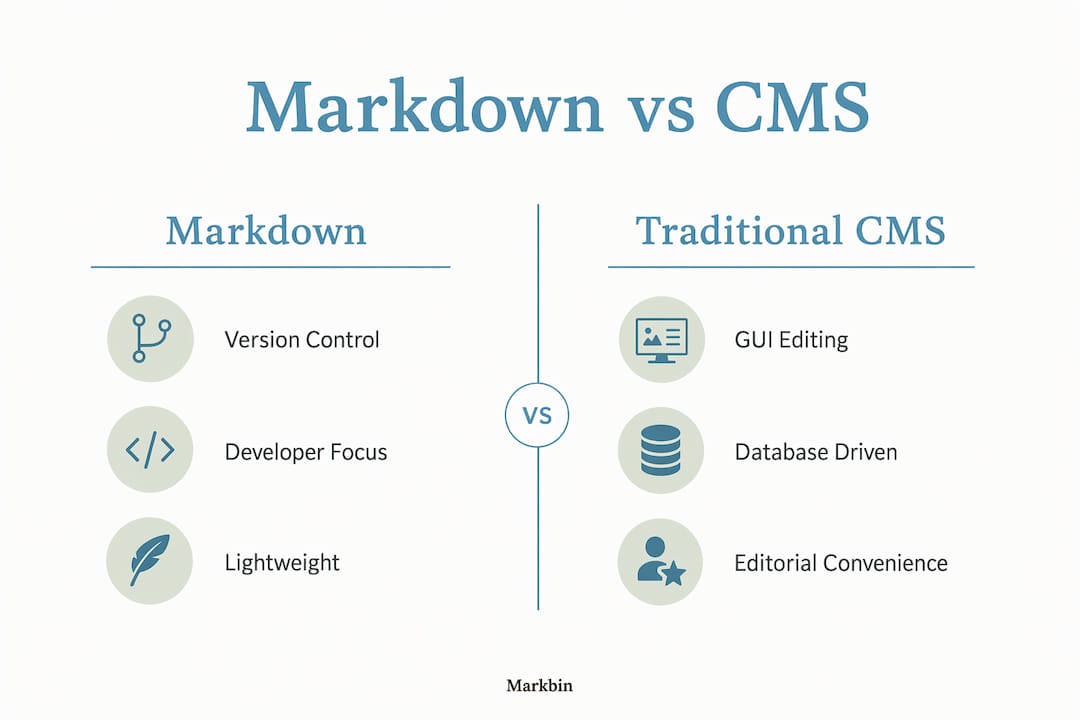
Markdown's biggest practical advantage is that it removes the infrastructure layer entirely. No database to maintain, no CMS version to upgrade, no plugin conflicts to debug. A folder of .md files and a static site generator is a complete publishing system.
The benefits stack up quickly for developer-led teams:
- Version control by default. Every content change is a Git commit. You can audit who changed what, revert a bad edit in seconds, and branch content for A/B testing or staged releases.
- Content portability. Plain text files aren't tied to any platform. Move from Gatsby to Next.js to Astro without migrating a database or exporting proprietary formats.
- No subscription costs. Hosted CMS platforms charge monthly fees that compound as your team grows. Markdown files cost nothing to store in a Git repository.
- CI/CD integration. Content changes trigger the same automated build and deploy pipelines as code changes, giving you consistent, testable publishing workflows.
- Performance gains. Static sites generated from Markdown files load faster than database-driven CMS pages because there's no server-side rendering at request time.
- Typed frontmatter reliability. Using Markdown with typed frontmatter, similar to TypeScript's approach to catching errors, prevents runtime surprises common in CMS platforms with loosely typed fields.
- Long-term readability. Markdown syntax is human-readable without any rendering. A
.mdfile opened in Notepad in 2035 will still make sense.
For technical writing workflows, Markdown also pairs naturally with documentation-as-code practices, where docs live in the same repository as the software they describe.
The core advantage: team composition drives the choice between Markdown and CMS. Developer-only teams gain the most from Markdown's Git-native model; mixed teams usually need something more.
Limitations and challenges of using Markdown over traditional CMS tools
Markdown's simplicity is also its ceiling. Once a site grows past a certain point, you end up rebuilding CMS features from scratch, and that overhead adds up fast.
The friction points are real and worth naming directly:
- No native editorial workflows. Markdown has no built-in content approval, scheduling, or role-based permissions. You build those on top, usually with Git branch conventions and CI rules.
- Non-technical editors struggle. Git pull requests are cumbersome for marketing or content teams who didn't grow up in a terminal. The learning curve isn't steep for developers, but it's a wall for everyone else.
- No media management. Uploading, resizing, and organizing images requires separate tooling. There's no built-in asset library or automatic image optimization.
- Localization is painful. Managing translated content across multiple
.mdfiles with no relational structure gets messy quickly. CMS platforms handle locale routing and translation workflows far more gracefully. - No structured content querying. You can't easily query "all posts tagged X published after date Y" without building a custom data layer or relying on a static site generator's data pipeline.
- Manual deploys for every change. Unlike a dynamic CMS where a published change goes live instantly, scaling Markdown sites require CI/CD pipelines, bots, and branching strategies that add maintenance overhead.
- Parser inconsistencies. Despite CommonMark, different tools still interpret edge cases differently, which can cause unexpected rendering bugs across environments.
The honest summary: Markdown asks you to trade editorial convenience for developer control. That trade is worth it for the right team. For a marketing-heavy org with five non-technical writers, it usually isn't.

The practical middle ground: combining Markdown and CMS tools
Most mature teams don't choose one or the other. They split the work. Developer-owned content like technical docs, changelogs, and API references stays in Markdown. Marketing pages, landing pages, and structured product content live in a CMS with a proper editorial interface.
Hybrid setups worth knowing:
- Git-backed CMS tools. Tina CMS and Decap CMS both provide visual editing interfaces that read and write Markdown files stored in Git. Non-technical editors get a dashboard; developers keep file-based control. Neither side has to compromise their workflow.
- Database-backed Markdown. Storing Markdown content in a database like Postgres lets teams publish changes without triggering a full site rebuild, which solves one of the biggest pain points of static site generators at scale.
- Headless CMS with Markdown export. Some headless CMS platforms let you author in a rich editor and export content as Markdown, giving you portability without forcing editors to write raw syntax.
A practical example: a developer blog might use Next.js with .mdx files for technical posts, while the company's main marketing site runs on a headless CMS. The two systems share a design system but handle content independently, each optimized for the team that owns it.
Pro Tip: When onboarding non-technical contributors to a Markdown workflow, set up Tina CMS or Decap CMS before their first day. Asking a content writer to learn Git cold is a fast way to lose them to a Google Doc.
The Jamstack architecture community has documented dozens of these hybrid patterns, and the consensus is consistent: the best setup matches the tool to the team, not the other way around.
Why Markdown aligns with modern developer and AI-ready workflows
Markdown's plain text format turns out to be exactly what AI tools need. Large language models parse structured Markdown reliably, which makes it a natural fit for AI-assisted content generation, editing, and validation pipelines. A CMS with proprietary rich text storage adds a translation layer that AI tools have to work around.
A few reasons Markdown is pulling ahead in 2026 publishing workflows:
- Content-as-code. Developers update docs in the same pull request as the code they describe, keeping content synchronized and preventing the "content rot" that plagues wikis and CMS-hosted docs.
- AI compatibility. Markdown's structured syntax makes content AI-readable and positions teams to work with next-generation LLM-assisted workflows without reformatting their entire content library.
- No vendor lock-in for the long term. Plain text files outlast any platform. When the next generation of publishing tools arrives, Markdown content migrates cleanly.
- Automation-friendly. Custom validation scripts, linters, and content pipelines run directly against
.mdfiles. There's no API rate limit or proprietary SDK standing between your content and your tooling. - Full developer ownership. Teams control the entire stack, from authoring to deployment, without depending on a third-party platform's uptime or pricing decisions.
For teams exploring AI-readable content formats, Markdown's structure gives AI tools a reliable, consistent input that proprietary CMS formats rarely match.
Pro Tip: As your team scales and non-technical contributors join, revisit the hybrid model. Markdown for developer content, a Git-backed visual editor for everything else, is the configuration most teams land on after their first year.
Platforms like Markbin make this practical for teams that want to share and publish Markdown content without setting up a full static site pipeline. You get rendered, shareable Markdown documents with password protection and instant links, no infrastructure required.
Key Takeaways
Markdown outperforms traditional blog CMS tools for developer-led teams because it keeps content in version-controlled plain text files, eliminates platform costs, and integrates directly with code workflows and AI tooling.
| Point | Details |
|---|---|
| Team composition decides the winner | Developer-only teams gain the most from Markdown; mixed teams with non-technical editors usually need a CMS layer. |
| Git gives you version control for free | Every content change is a commit, with full history, branching, and rollback built in from day one. |
| Hybrid setups solve the hard tradeoffs | Tools like Tina CMS and Decap CMS provide visual editing while keeping Markdown files in Git. |
| AI tools prefer plain text Markdown | Structured Markdown is AI-readable and positions your content for LLM-assisted workflows without reformatting. |
| Database-backed Markdown avoids rebuild delays | Storing Markdown in a database lets teams publish without triggering a full static site rebuild each time. |