
Markdown is a lightweight markup language that has become the standard format for technical coursework because it combines plain text simplicity with powerful compatibility across every major platform and tool. Students writing lab reports, coding assignments, or research notes in Markdown never worry about file corruption, version conflicts, or software licensing. Educators building course materials in Markdown can publish PDFs, HTML slides, and handouts from a single source file. Tools like Git, Obsidian, and Claude AI all read and write Markdown natively, making it the shared language of modern technical education.
Why markdown for technical coursework is the right choice
Markdown's core advantage is its plain text format, which works across every operating system without proprietary lock-in. A .md file written on a Mac opens perfectly on Windows, Linux, or any web-based editor. That portability matters enormously in academic settings where students use different machines and institutions run mixed software environments.
The syntax itself is minimal by design. A # creates a heading. A - starts a list. A - [ ] creates a task checkbox. Students learn the full core syntax in under an hour, then spend the rest of their time writing content rather than clicking through menus. That shift in focus is the real productivity gain.

Markdown also integrates directly with Git for version control, which is the standard tool for collaborative coding assignments. Because Markdown is plain text, Git can track line-by-line changes, show diffs clearly, and merge edits from multiple contributors without conflicts. A Word document cannot do any of that cleanly.
The format has proven durable. Markdown files written a decade ago still render correctly today. That longevity makes it a future-proof choice for course materials that educators want to reuse and update across semesters.
Pro Tip: Store all your course notes in a single Git repository organized by week. You get automatic version history, easy search, and a portfolio of your work at the end of the semester.
How does Markdown improve workflow and productivity for students?
Markdown removes the formatting decisions that slow writers down. There are no font menus, no style panels, no ribbon toolbars. Students type, and the structure emerges from the syntax. That keyboard-driven workflow keeps attention on the argument or the code, not the appearance of the document.
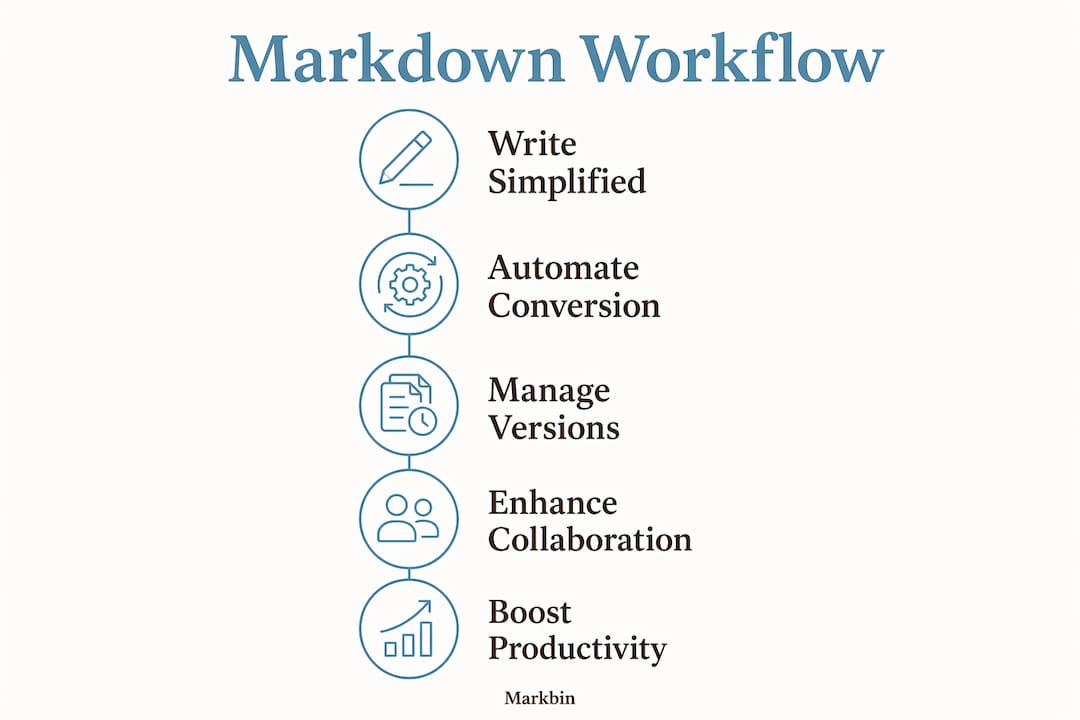
The productivity benefits extend into automation. Educators use tools like Pandoc and Makefiles to convert a single Markdown source file into PDFs, HTML pages, and presentation slides automatically. A change to one file propagates across every output format at once. That is the docs-as-code approach, and it eliminates the manual reformatting that wastes hours every semester.
Markdown also fits naturally into AI-native workflows. AI tools like Claude read and write Markdown directly without any conversion step. A student can paste a Markdown draft into Claude and ask for feedback, then paste the revised text back into their editor without losing any formatting. That tight loop between writing and AI review is only possible because both sides speak the same format.
The steps below show how a typical student workflow runs in Markdown:
- Write notes in a
.mdfile during lecture using headings and bullet points. - Add code blocks with syntax highlighting for any programming examples.
- Commit the file to a Git repository after each session to track changes.
- Use Pandoc to export a polished PDF before submission.
- Share a rendered link via Markbin for peer review without any file attachments.
Pro Tip: Use the - [ ] checkbox syntax to turn your notes into a study checklist. Check off concepts as you master them, and you have a built-in progress tracker for exam prep.
Compared to rich-text editors like Microsoft Word or Google Docs, Markdown's simplicity is a feature, not a limitation. Minimal syntax reduces cognitive load and keeps students focused on content structure rather than visual formatting. The mental overhead of deciding between heading styles or adjusting margins disappears entirely.
What are the practical applications of Markdown in technical coursework?
The single-source-of-truth approach is Markdown's most powerful practical feature for educators. One master Markdown file can generate a course syllabus, weekly handouts, a quiz, and a slide deck through automated scripts. When the syllabus changes, every derived document updates automatically. That eliminates the version drift that plagues courses managed through separate Word files and PowerPoint decks.
Markdown supports callout blocks and semantic tags that add pedagogical structure to course materials. Fenced divs can mark sections as exercises, warnings, or fill-in-the-blank activities. Those tags let scripts extract specific content types automatically, so an educator can generate a student exercise sheet from the same file that produces the instructor notes.
For coding assignments specifically, Markdown's code block support is a direct advantage. Fenced code blocks with language identifiers render with full syntax highlighting in GitHub, VS Code, and any Markdown renderer. Students submitting coding assignments in Markdown present their code and their explanation in one readable document.
The table below shows common technical coursework types and how Markdown handles each one:
| Coursework type | Markdown feature used | Output |
|---|---|---|
| Lab report | Headings, tables, code blocks | PDF via Pandoc |
| Coding assignment | Fenced code blocks with syntax highlighting | GitHub-rendered README |
| Research notes | Linked notes with Obsidian | Interlinked knowledge base |
| Course handout | Callout blocks, semantic tags | Auto-generated PDF or HTML |
| Collaborative project | Git integration, plain text diffs | Tracked revision history |
Tools like Obsidian take Markdown's value further by letting students link notes together into a knowledge graph. That structure pushes students beyond passive note-taking into active synthesis of ideas across topics. A student studying algorithms can link a note on sorting to a note on time complexity, then to a lab report where both concepts appear. That kind of interlinked thinking is how mastery develops.
What are Markdown's limitations and how do you work around them?
Markdown covers roughly 80% of educational documentation needs without any extensions. That remaining 20% is where students and educators hit friction. Complex mathematical notation, multi-column layouts, and precise print formatting require either extensions or a different tool entirely.
For heavy math, LaTeX remains the stronger choice. Many Markdown renderers support LaTeX math syntax inline using $ delimiters, which handles most coursework equations. When a document is primarily mathematical proofs, a full LaTeX workflow makes more sense than Markdown with math extensions bolted on.
For documents requiring precise visual layout, like formatted academic papers with strict journal styles, AsciiDoc or LaTeX give more control. Markdown was never designed for that use case. Recognizing the boundary between what Markdown handles well and what it does not is a practical skill for any technical student.
The comparison below shows where each format fits best in educational contexts:
| Format | Best use case | Key limitation |
|---|---|---|
| Markdown | Notes, READMEs, course materials, coding docs | Limited layout control |
| LaTeX | Math-heavy papers, formal academic submissions | Steep learning curve |
| AsciiDoc | Long-form technical books and manuals | Less tool support |
| HTML/CSS | Web-based course content | Verbose for simple notes |
Common pitfalls in Markdown use include inconsistent heading levels, missing blank lines between elements, and mixing flavors (GitHub Flavored Markdown vs. standard CommonMark). These issues cause rendering errors that confuse students new to the format.
Pro Tip: Always specify your Markdown flavor at the start of a project. GitHub Flavored Markdown (GFM) is the safest default for technical coursework because GitHub, VS Code, and most modern renderers support it natively.
Key Takeaways
Markdown is the most practical format for technical coursework because its plain text foundation supports version control, AI-native workflows, and multi-format publishing from a single source file.
| Point | Details |
|---|---|
| Plain text portability | Markdown files open on any OS and integrate with Git without compatibility issues. |
| Productivity through simplicity | Minimal syntax keeps focus on content, not formatting, reducing cognitive load. |
| Single-source publishing | One Markdown file generates PDFs, slides, and handouts via Pandoc and scripts. |
| AI-native compatibility | Tools like Claude read and write Markdown directly, speeding up review and revision cycles. |
| Know the limits | Use LaTeX or AsciiDoc for math-heavy or layout-critical documents where Markdown falls short. |
Markdown changed how I think about teaching and writing
I have watched students spend 20 minutes adjusting margins in Word before writing a single sentence. Markdown makes that impossible in the best way. There is nothing to adjust. You open a file and write. That forced simplicity is not a constraint. It is a cognitive gift.
The shift I find most underappreciated is what happens when students start linking their notes in Obsidian. They stop treating each assignment as a standalone task and start seeing their coursework as a connected body of knowledge. A note on recursion links to a lab on binary trees, which links to a final project on graph traversal. That network of ideas is what learning actually looks like, and Markdown makes it visible.
Educators who resist Markdown often cite the learning curve. In practice, the curve is about 45 minutes. After that, students write faster, collaborate more cleanly, and produce documents that work everywhere. The real barrier is habit, not difficulty.
My honest recommendation: teach Markdown in the first week of any technical course. Treat it as a foundational skill alongside Git and the command line. Students who graduate knowing Markdown, Git, and Pandoc are ready for professional documentation workflows on day one. That is a concrete career advantage, not a theoretical one.
The integration with AI tools is the argument that should convince any skeptic in 2026. When a student's notes, assignments, and project documentation are all in Markdown, every AI tool in their workflow can read, edit, and generate content without any conversion friction. That is a structural advantage that Word and Google Docs simply cannot match.
— Zack
Markbin makes Markdown coursework shareable and secure
Markbin is built for exactly the workflow this article describes. Students and educators can write Markdown documents and publish them as shareable, rendered links in seconds, with no sign-up required. The platform supports full GitHub Flavored Markdown, including syntax highlighting, tables, task lists, and math formulas, covering every technical coursework format discussed here. Password protection and self-destructing documents make it practical for sharing draft assignments or sensitive course materials. For educators who want to distribute handouts without managing file attachments, and for students who need a clean way to share project documentation, Markbin removes every unnecessary step between writing and sharing.
FAQ
What is Markdown and why do students use it?
Markdown is a lightweight markup language that formats plain text using simple symbols like # for headings and - for lists. Students use it because it works across all platforms, integrates with Git, and removes formatting distractions from the writing process.
Is Markdown good for coding assignments?
Markdown is the standard format for coding assignments because fenced code blocks render with full syntax highlighting on GitHub and in VS Code. Students can combine code, explanations, and results in one readable document without any special software.
How does Markdown work with version control?
Markdown files are plain text, so Git tracks every change line by line and merges edits from multiple contributors without conflicts. That makes Markdown the natural choice for collaborative technical projects and group coursework.
When should students use LaTeX instead of Markdown?
Students should use LaTeX when a document is primarily mathematical proofs or requires strict academic journal formatting. Markdown handles most coursework well, but LaTeX gives more control over complex equations and precise print layouts.
Can educators automate course materials with Markdown?
Educators use tools like Pandoc and custom scripts to generate PDFs, slides, and handouts from a single Markdown source file automatically. Semantic tags and callout blocks in Markdown let scripts extract exercises and instructor notes from the same document.