
The fastest way to lock down an unpublished research draft is to create it in a markdown platform, enable a per-link password with an expiration, and send the URL and password through two separate channels. Markbin supports all three steps natively. Industry guidance from Microsoft Research and workflow patterns documented by Papermark both confirm that password protection works well as a gating control for short-term, low-to-moderate sensitivity sharing — but it is not a substitute for encryption.
Here is the core workflow in under a minute:
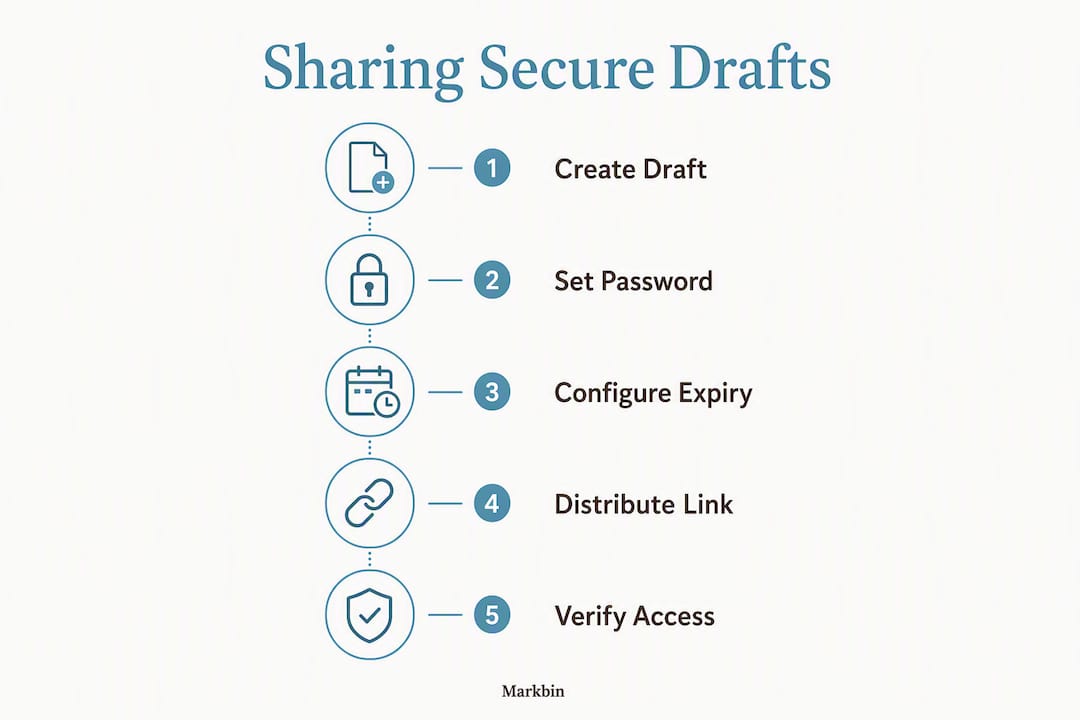
- Create your markdown draft (paste or import GitHub Flavored Markdown, add assets or math blocks as needed).
- Protect the draft by enabling a per-link password and setting an expiration or self-destruct timer.
- Share the link in one message and the password in a separate channel (SMS, encrypted chat, or voice).
- Revoke access instantly by invalidating the link the moment sharing is no longer needed.
Pro Tip: Never put the password and the link in the same email or Slack message. If that message is forwarded, your protection disappears.
Table of Contents
- How do you create and share a password-protected markdown draft?
- What does password protection actually protect — and what doesn't it cover?
- What are the best practices for sharing secure research drafts?
- When should you use password protection vs. account access or end-to-end encryption?
- What platform features do you actually need for protected drafts?
- Before you share: a 9-point security checklist
- Key Takeaways
- The part most researchers skip
- Markbin makes password-protected research sharing straightforward
- Further reading and primary sources
How do you create and share a password-protected markdown draft?
Follow these steps to go from a blank file to a securely shared link:
- Create or import your draft. Paste your markdown directly into Markbin or import a GitHub Gist. Full GitHub Flavored Markdown is supported: syntax highlighting, tables, task lists, and math formulas all render correctly.
- Enable per-link password protection. In the link settings panel, set a strong, unique password. Markbin's paid plan unlocks this feature.
- Set an expiration or self-destruct. Choose a specific date/time for the link to expire, or enable self-destruct so the document deletes itself after the first view or after a set period.
- Decide on download and email gating. Disable downloads if you want view-only access. Enable email gating to require viewers to enter their email before reading — this creates an auditable viewer list.
- Generate the link. Copy the shareable URL from the platform.
- Send link and password separately. Email the link; send the password via SMS or Signal. This two-channel approach is a best-practice sharing flow that prevents a single intercepted message from granting full access.
- Revoke when done. Invalidate the link immediately from your dashboard. Link expiry and document deletion are two different actions: expiry blocks new viewers; deletion removes the content entirely.
Pro Tip: Test the link in an incognito browser window before sending it. You will catch misconfigured passwords or broken rendering before your reviewer does.
The UCSF Secure Research Guide recommends treating every shared draft as a potential data exposure event and applying controls before sharing, not after.
What does password protection actually protect — and what doesn't it cover?
Password protection is a gating control. It stops casual or accidental access to a URL. It does not make your document cryptographically unreadable to a determined adversary or to the platform itself.
What it protects against:
- Random internet users who stumble on the link
- Accidental sharing of a public URL
- Short-term embargoes before publication or peer review
- Opportunistic viewers who lack the password
What it does not protect against:
- Platform administrators with server-side access to stored content
- Metadata leakage: file existence, size, and update timestamps can still signal sensitive project activity even when content is locked
- Weak or reused passwords that are guessable or already compromised
- A subpoena or legal hold directed at the platform provider
- Server-side compromise if the platform stores passwords or content in plaintext
Password protection prevents casual unauthorized access but does not replace stronger controls such as client-side encryption or strict access revocation. Treat it as the first layer of a defense-in-depth approach, not the only layer.
Microsoft Research's Encrypted Spaces project makes the architectural point explicit: servers should store ciphertext and only see data users choose to expose. A password-gated link does not meet that bar. The server still holds the plaintext unless the platform implements client-side encryption separately.
What are the best practices for sharing secure research drafts?
Operational security for shared drafts relies on layered controls. No single setting covers every risk.
Password handling:
- Generate a unique password for every draft link. Never reuse a password across multiple documents or recipients.
- Communicate passwords through a channel that is separate from the link: SMS, Signal, WhatsApp, or a phone call.
- Rotate passwords for long-lived drafts that stay active for more than a few days.
Least-privilege sharing:
- Use email gating so only named recipients can view the document. This limits exposure and creates an audit trail.
- Set the shortest expiration that still gives your reviewer enough time. A short window is usually sufficient for peer feedback.
- Disable downloads by default. If a reviewer needs a copy, they can request one explicitly.
Auditing and revocation:
- Choose platforms that log viewer access with timestamps. Without logs, you cannot confirm who actually opened the document.
- Revoke links the moment you suspect unauthorized access. The most significant vulnerability in shared-document workflows is the absence of instant revocation.
| Do | Don't |
|---|---|
| Set a unique password per link | Reuse passwords across drafts or recipients |
| Send password in a separate channel | Include the password in the same message as the link |
| Enable email gating for auditable access | Share with anonymous, open links for sensitive work |
| Set short expirations appropriate for your review window | Leave links active indefinitely after review is complete |
| Revoke links immediately after use | Wait until the next scheduled cleanup to invalidate old links |
| Enable audit logs | Assume no one accessed the document because you did not hear otherwise |
Pro Tip: For self-destructing link workflows, set the TTL to match your review window exactly. A link that expires the moment the reviewer finishes reading cannot be forwarded.

When should you use password protection vs. account access or end-to-end encryption?
The right control depends on sensitivity, who your collaborators are, and how quickly you need to revoke access.
| Control | Best for | Revocation | Encryption level |
|---|---|---|---|
| Per-link password | Quick peer review, classroom sharing, embargoed preprints | Instant (invalidate link) | Server-side only |
| Account-based access (RBAC) | Ongoing team collaboration with named users | Remove user or role | Server-side only |
| Client-side E2EE | High-sensitivity drafts, human-subject data, PI-level work | Cryptographic key revocation | Client-side, server blind |
- Quick peer review: A per-link password with a 48-hour expiry is the right tool. Fast to set up, easy to revoke, no account required from the reviewer.
- Classroom assignment sharing: Password links or email-gated links work well. The secure link sharing model lets instructors distribute drafts without requiring students to create accounts.
- Embargoed preprints: Password protection plus email gating gives you a named viewer list and instant revocation if the embargo is broken.
- High-sensitivity drafts (human-subject data, IRB-regulated research): Use client-side end-to-end encryption where private keys never leave the user's device. Platforms like tiCrypt implement per-user RSA key pairs and AES-256 file encryption so even a server breach leaves data unreadable.
For the highest-sensitivity work, you can combine controls: password plus email gating plus a short expiry gives you a pragmatic hybrid that covers most peer-review scenarios without requiring a full E2EE infrastructure.
Pro Tip: If your research involves regulated data (HIPAA, FERPA, IRB protocols), password links alone will not satisfy your compliance obligations. Confirm your data classification with your institution's research security office before sharing.
What platform features do you actually need for protected drafts?
Not every platform that claims "password protection" delivers the same level of control. These are the features that materially affect security:
- Per-link password with hashed storage. The platform must never store your password in plaintext. Confirm this in the documentation or security policy.
- Per-link expiry and self-destruct. Expiry blocks new viewers after a set time; self-destruct deletes the document entirely. Both are distinct controls and both matter.
- Instant link revocation. You need to be able to invalidate a link from the UI or API immediately, without waiting for a scheduled job. Least-privilege architectures require this.
- Email gating and viewer verification. Requiring viewers to enter their email before access creates an auditable record of who viewed the document and when.
- Audit logs. Timestamped access records are the only way to confirm your sharing controls worked.
- Download controls. The ability to disable downloads prevents recipients from creating uncontrolled copies.
- GitHub Flavored Markdown rendering. For research drafts with code blocks, math formulas, and tables, full GFM support is non-negotiable.
- Asset uploads and theme support. Figures, diagrams, and formatted output matter for research communication.
Pro Tip: Ask the platform vendor directly whether passwords are stored hashed or in plaintext. Any vendor that cannot answer this question clearly is not ready for research use.
Before you share: a 9-point security checklist
Run through this before every draft goes out. Copy it into your team's SOP or a shared note.
Pro Tip: Save this checklist as a pinned note in your team's communication tool. Running it takes 90 seconds and catches the mistakes that matter.
Key Takeaways
Password-protected markdown drafts are fast and effective for short-term sharing, but they require pairing with expirations, email gating, and audit logs to hold up under real-world conditions.
| Point | Details |
|---|---|
| Passwords gate, not encrypt | Per-link passwords block casual access but do not make content unreadable to the platform server. |
| Layer your controls | Combine password, email gating, and short expiry for most peer-review and classroom scenarios. |
| Revocation is the critical control | Instant link invalidation is the most important feature; missing it is the largest single vulnerability. |
| E2EE for high-sensitivity work | Human-subject data and IRB-regulated drafts require client-side encryption, not just password gating. |
| Markbin covers the core workflow | Markbin's paid plan provides per-link passwords, expirations, self-destruct, and GFM rendering in one platform. |
The part most researchers skip
Most researchers spend time choosing the right password and almost no time thinking about revocation. That is the wrong priority. A strong password on a link that stays active for six months after the review is finished is weaker than a mediocre password on a link that expires in 48 hours. The threat is not usually a brute-force attack on your password. The threat is a forwarded email, a screenshot, or a link that outlives its purpose.
The secure document sharing guidance that holds up in practice treats expiration and revocation as the primary controls and the password as the secondary one. Set the expiry first. Then set the password. Then send them separately. That order of operations reflects the actual risk model, not the one that feels intuitive.
Password protection is genuinely useful. It is not theater. But it works best when you treat it as one layer in a short stack of controls, not as the whole answer.
Markbin makes password-protected research sharing straightforward
Researchers who need to share drafts securely without setting up a full document management system will find Markbin covers the practical workflow directly. The free plan supports instant markdown sharing with GFM rendering, syntax highlighting, math formulas, and asset uploads. Upgrading to a paid plan unlocks per-link password protection, document expiration, self-destructing links, and extended retention — the exact feature set this guide recommends for peer review and pre-publication sharing.
The workflow is: create your draft in markdown, enable password and expiry in the link settings, send the URL and password through separate channels, and revoke the link when the review is complete. No account required from your reviewer. No complex setup on your end. Visit Markbin to create your first protected draft.
Further reading and primary sources
- Microsoft Research: Encrypted Spaces — architectural guidance on least-privilege and server-blind collaborative systems; start here for policy-level discussion.
- UCSF Secure Research Guide — institutional step-by-step guidance for research security across the data lifecycle.
- tiCrypt: Secure Research Enclave — developer-level documentation on per-user RSA key pairs and AES-256 client-side encryption for regulated research data.
- Molecule Docs: Data Privacy and Access — protocol-gated decryption and on-chain access conditions for high-sensitivity research workflows.
- JIL Sovereign: Secure Document Vault — immutable provenance, on-chain revocation, and client-side encryption for institutional document storage.
- Password-protected file sharing tools — third-party overview of sharing tools and trade-offs; useful for evaluating options beyond a single platform.
- Markbin blog: secure document sharing — platform-specific rationale and risk framing for protecting unpublished work.
| Source | Best for |
|---|---|
| Microsoft Research: Encrypted Spaces | Policy and architecture decisions on least-privilege and E2EE |
| UCSF Secure Research Guide | Institutional compliance and research lifecycle security |
| tiCrypt documentation | Developer integration of client-side encryption |
| Markbin blog | Platform-specific workflows and markdown sharing patterns |