
Secure sharing of sponsored content drafts means controlling who can view, download, and approve your drafts through encryption, access restrictions, and audit trails. Without these controls, a single misrouted email attachment can expose pre-release campaign content to competitors, violate NDA terms, or trigger a client trust crisis before a campaign launches. The industry standard for secure draft sharing in 2026 requires AES-256 encryption, identity-bound access, and full audit logging at minimum. Content creators and marketing professionals who skip these controls are not saving time. They are creating liability.
How to share sponsored content drafts securely: the essential features
The security features you choose determine whether a draft stays confidential or becomes a liability. Not all sharing platforms offer the same protections, and the gap between basic and purpose-built tools is significant.
The non-negotiable baseline for 2026 includes:
- AES-256 encryption for data at rest and in transit. This is the same standard used by financial institutions and government agencies.
- Password protection on every shared link, with passwords delivered through a separate channel from the link itself.
- Expiring links with 24 to 48-hour review windows to prevent stale drafts from circulating after a review period closes.
- Granular access revocation, so you can cut off a single viewer without affecting others.
- Download blocking to prevent recipients from saving local copies outside your control.
- Dynamic watermarking that embeds viewer identity into the document, making leaks traceable.
- Audit trails showing who opened the draft, when, and for how long.
Dynamic watermarking and download blocking deter unauthorized sharing and help trace leaks when they occur. These features change viewer behavior because they make leaks costly and identifiable, not just technically difficult.
Pro Tip: Set link expiry to 24 hours for initial client reviews. If the client needs more time, regenerate the link rather than extending the window indefinitely.

How do you set up a secure sharing workflow for sponsored drafts?
A secure workflow is not just a platform choice. It is a repeatable process that removes human error from the equation.
-
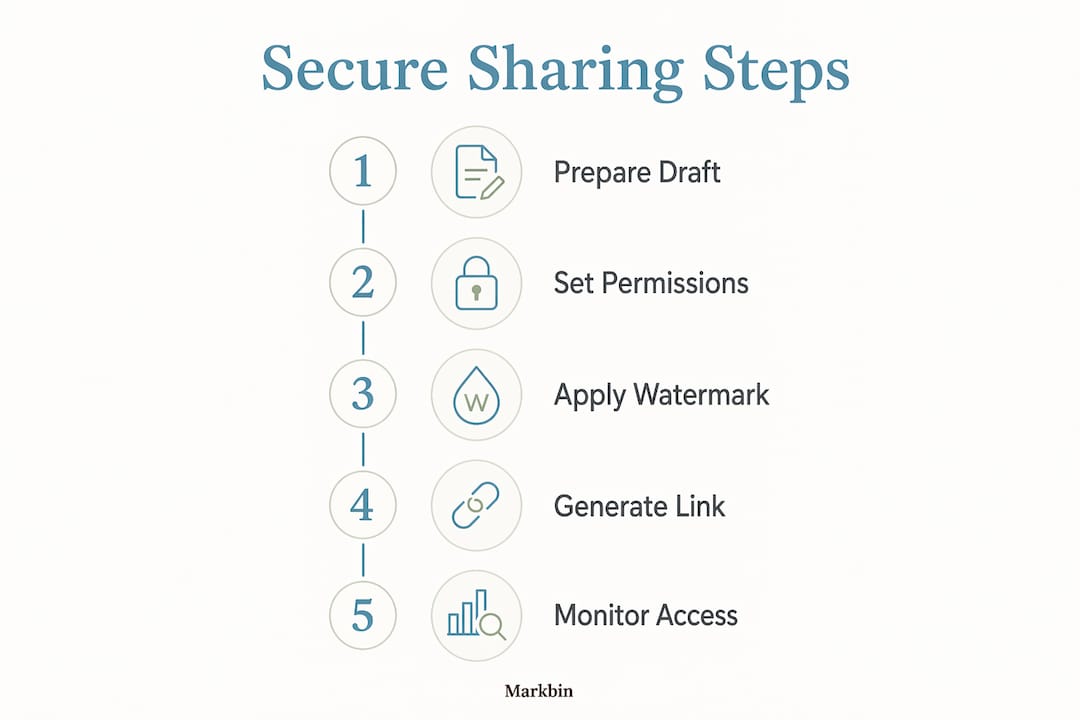
Choose a platform with identity-bound links. Generic "anyone with the link" permissions offer no accountability. Select a platform that ties access to a verified email address or requires authentication before viewing. This creates an audit trail from the first click.
-
Create a dedicated client-facing workspace. The clean-room content sharing approach copies only approved assets into a separate client workspace. Internal notes, version history, and unvetted drafts never appear in the client view. This prevents accidental disclosure of sensitive internal content.
-
Send the link and password through separate channels. Delivering both in the same email thread eliminates the security benefit of password protection. Send the link by email and the password by SMS or phone call. Sending passwords in the same email as the link is one of the most common and avoidable mistakes in content workflows.
-
Configure link expiry, viewer limits, and download restrictions before sending. Never share a link with open-ended access. Set a specific expiry date, cap the number of allowed views if the platform supports it, and disable downloads by default.
-
Use audit logs to manage approvals. When a client views the draft, the audit log timestamps the event. This creates a verifiable record for approval workflows and protects you if a dispute arises over what was reviewed and when.
Pro Tip: Treat your audit log as a legal record. Export and archive it at the close of every sponsored content project.
For teams managing multiple campaigns at once, content collaboration best practices recommend assigning one team member as the access administrator for each project to prevent link sprawl.
What are the common mistakes to avoid when sharing sponsored drafts?
Most security breaches in content workflows do not come from sophisticated attacks. They come from predictable, avoidable habits.
- Using email attachments for sensitive drafts. Email attachments lack revocation capability and create uncontrolled copies the moment they are downloaded. Once a file lands in a recipient's inbox, you have no way to update or retract it.
- Sharing the link and password in the same message. This is the digital equivalent of leaving a key under the doormat you just locked.
- Using "anyone with the link" permissions. These links can be forwarded without your knowledge, shared in Slack channels, or indexed by browser extensions. Identity-bound access is the only way to maintain accountability.
- Failing to revoke access after project completion. Old links to approved drafts remain active indefinitely unless you revoke them. A link shared in march for a campaign that launched in april is still a live security risk in june unless you close it.
- Exposing internal drafts to clients accidentally. Sharing a workspace folder instead of a specific file can reveal internal comments, rejected versions, or confidential strategy notes.
"Fastest sharing methods like email attachments lead to version control confusion and leak risk, which are costly in the long term. The convenience of a quick attachment is almost always outweighed by the exposure it creates in a professional content workflow."
For guidance on sharing earlier-stage materials safely, the process for sharing content briefs with collaborators follows the same access-control principles.
How do secure preview links work with CMS platforms for sponsored content?
CMS-based secure preview links let external reviewers see an unpublished draft without logging into your content management system. This is the right approach for sharing sponsored content with brand partners, legal teams, or clients who should never have CMS credentials.
The technical foundation matters here. Cryptographically secure preview links use 64-character random hex token URLs that are computationally impossible to guess. Short or predictable tokens are vulnerable to brute-force and timing attacks. A 64-character token eliminates that risk.
| Feature | Purpose | Security benefit |
|---|---|---|
| 64-character random token | Generates unguessable preview URL | Prevents brute-force and timing attacks |
| PIN protection | Requires code entry before viewing | Adds second layer beyond the URL |
| Time-limited expiry | Auto-expires link after set period | Stops stale drafts from remaining accessible |
| Audit logging | Records every access event | Creates accountability trail |
| No CMS login required | Client views without account creation | Reduces attack surface and credential risk |
WordPress secure preview plugins and Umbraco's uPreviewShare both implement this model. PIN codes in these systems are stored as HMAC hashes rather than plaintext, which means even a database breach does not expose the access code. That is the level of technical rigor that professional sponsored content sharing requires.
For teams working outside a CMS, platforms like Markbin generate shareable, encrypted links from markdown documents with the same expiry and access controls, without requiring any publishing infrastructure.
How do you monitor and control access after sharing a sponsored draft?
Sharing a draft is not the end of your security responsibility. Active monitoring is what separates a controlled workflow from a hope-and-pray approach.
- Review audit logs after every share event. Logs should show the viewer's identity, IP address, timestamp, and time spent on the document. Unusual access patterns, such as a link opened from three different countries in one hour, signal an unauthorized forward.
- Use real-time notifications. Real-time access notifications tell you the moment a recipient opens a draft. This is useful for time-sensitive approvals and for confirming that the right person received the link.
- Revoke access immediately when a project closes. Centralized revocable links let you cut off all recipients with a single action. This is far more effective than trying to recall distributed email attachments.
- Set hard expiration dates, not open-ended access. A link that expires automatically requires no manual follow-up. Build expiry into your standard operating procedure, not as an optional step.
- Monitor per-page or per-section engagement. AI-powered engagement scores show which sections of a draft received the most attention. This helps you identify whether a client actually reviewed the full document or only skimmed the first page.
Pro Tip: If a link is opened from an unexpected location or device, revoke it immediately and re-share with the intended recipient directly. Do not wait to investigate.
For professionals who need links that disappear entirely after a single use, self-destructing link use cases cover the scenarios where one-time access is the right call.
Key takeaways
Secure sponsored content sharing requires encryption, identity-bound access, and active audit monitoring working together. No single feature is sufficient on its own.
| Point | Details |
|---|---|
| Encryption is the baseline | AES-256 encryption for data at rest and in transit is the minimum standard for any draft sharing platform in 2026. |
| Separate link and password delivery | Always send the access link and password through different channels to prevent simultaneous exposure. |
| Use expiring links | Set 24 to 48-hour expiry windows on all shared draft links to prevent stale content from remaining accessible. |
| Revoke access proactively | Close all shared links immediately after a project ends. Centralized revocation is faster and more reliable than recalling attachments. |
| Monitor after sharing | Audit logs and real-time notifications let you detect unauthorized access and respond before a leak escalates. |
The discipline gap is the real security problem
Zack here. After working with content teams across agencies and in-house marketing departments, the pattern I keep seeing is not a technology gap. It is a discipline gap. Teams have access to good tools. They just do not use them consistently.
The most common failure I witness is the "quick share" instinct. A draft is ready, a client is waiting, and someone sends an email attachment because it is faster than setting up a secure link. That decision takes 10 seconds and can cost weeks of damage control if the content leaks before launch.
The second failure is treating security as a one-time setup rather than an ongoing practice. Sharing a password-protected link is good. Never revoking it after the project closes is not. Secure sharing is as much about workflow discipline as it is about technical controls. The technical controls only work if the process around them is consistent.
My honest recommendation: pick one purpose-built platform, document your sharing protocol, and enforce it across every project. The teams that do this stop having security incidents. The teams that treat it as optional keep having them.
— Zack
How Markbin supports secure sponsored content sharing
Markbin is built for content creators and marketing professionals who need to share formatted documents without the overhead of a full document management system. Every shared document on Markbin is protected by AES-256 encryption, with options for password protection, expiring links, and self-destructing documents that delete themselves after a set time or number of views.
Markbin supports sharing workflows that require no account creation from the recipient, which removes friction from client reviews while keeping access controlled on your end. You can revoke any link instantly, and the platform generates clean, rendered markdown previews that look professional without exposing your source files. No credit card is required to get started.
FAQ
What is the minimum security standard for sharing sponsored drafts?
AES-256 encryption, password protection, expiring links, and download blocking are the minimum baseline for securely sharing sponsored content drafts in 2026. Platforms that lack any of these features create unnecessary exposure risk.
Why are email attachments a security risk for sponsored content?
Email attachments cannot be revoked after sending and create uncontrolled copies on every recipient's device. A single forwarded attachment can distribute a confidential draft to unintended parties with no way to recover it.
How long should a shared draft link remain active?
Industry recommendations as of 2026 suggest 24 to 48-hour expiry windows for client review links. If more time is needed, regenerate the link rather than extending the original access period.
What is a clean-room content sharing approach?
A clean-room approach copies only approved, final assets into a dedicated client-facing workspace, keeping internal notes and unvetted drafts completely separate. This prevents accidental disclosure of sensitive internal content during client reviews.
Do clients need an account to view a secure draft?
No. Platforms like Markbin and CMS preview plugins such as Umbraco's uPreviewShare allow external reviewers to access drafts via a secure link and PIN without creating an account or receiving CMS credentials.