
Markdown documentation is a lightweight, plain-text markup language that lets teams write structured, portable documents without touching HTML or proprietary software. Teams can learn basic syntax in about 60 minutes and be fully productive the same day. That speed matters when your team needs to ship documentation alongside code, not weeks after it. Markdown has become the de facto standard for technical and collaborative writing because it removes formatting friction, works natively with version control, and renders cleanly across dozens of platforms. If your team is asking why use markdown documentation, the short answer is: nothing else gives you this combination of simplicity, portability, and staying power.
What are the core benefits of using Markdown for documentation?
Markdown's biggest advantage is that it separates content from presentation. You write plain text with simple symbols, and any compliant renderer turns it into clean, readable output. No toolbar clicks, no hidden formatting, no file corruption when you open a document on a different machine.
The benefits stack up quickly for teams:
- Version control compatibility. Markdown is plain text, which means clean line-by-line diffs in Git. Reviewers can see exactly what changed in a pull request, the same way they review code. Binary formats like
.docxfiles produce unreadable diffs that make collaborative review nearly impossible. - Broad syntax coverage. CommonMark and GitHub Flavored Markdown (GFM) cover roughly 95% of standard technical documentation needs, including tables, task lists, code blocks, and syntax highlighting. That coverage means most teams never hit a wall with what Markdown can express.
- Platform portability. A
.mdfile works on GitHub, GitLab, MkDocs, Docusaurus, Hugo, and Jekyll without conversion. You own the content in a format that will still open in 20 years. - Reduced context switching. Writing documentation in the same environment as your code cuts tool-switching time and keeps developers focused. Every context switch costs cognitive load.
- Automation-ready. Static site generators and CI/CD pipelines consume Markdown natively. You can publish an entire documentation site from a folder of
.mdfiles with a single build command.
Pro Tip: Add YAML frontmatter at the top of each Markdown file to store metadata like title, author, date, and tags. Most static site generators read this automatically, giving you organized, searchable docs with zero extra tooling.
The combination of these advantages explains why Markdown has replaced proprietary formats in most developer-focused documentation workflows. The format works with your tools rather than against them.
How does Markdown support technical writing and API documentation?
API documentation is a contract between a backend system and the developers who consume it. That contract needs to be consistent, versioned, and easy to read. Markdown delivers all three.
Effective API docs written in Markdown follow a repeatable structure for every endpoint:
- Method and path. State the HTTP method and the full URL path on the first line of each endpoint section.
- Authentication. Specify the auth type (Bearer token, API key, OAuth 2.0) before any parameters.
- Parameters. List query, path, and body parameters in a Markdown table with name, type, required status, and description columns.
- Request schema. Show a fenced code block with a realistic JSON or XML request body.
- Response schema. Include both success and error responses with status codes and example payloads.
- Copy-paste examples. End each endpoint with a ready-to-run curl command. Developers will use these immediately.
This structure works because Markdown tables and fenced code blocks with syntax highlighting make parameters and payloads scannable at a glance. A developer looking for the right query parameter does not want to read prose. They want a table.
The deeper advantage comes from automation. Tools built around the OpenAPI specification can generate Markdown files directly from your API schema at build time. That means your docs update automatically when the schema changes, with no manual editing required. Generating docs from OpenAPI at build time keeps documentation consistent with the actual API contract.

Pro Tip: Keep API docs focused. Good API documentation acts as a contract, not a tutorial. Avoid excessive detail that buries the key parameters. Lean docs have a higher ROI on developer time because engineers find what they need in seconds.
Versioning is the final piece. When your API docs live in the same repository as your code, they update alongside code changes in the same pull requests. Documentation drift, where docs describe an API version that no longer exists, becomes a non-issue.
How does Markdown compare with other documentation formats?
Markdown is not the right tool for every situation. Understanding where it wins and where it falls short helps teams make smarter choices.
| Factor | Markdown | HTML | Rich text editors |
|---|---|---|---|
| Learning curve | Low (1 hour to basics) | Medium to high | Very low |
| Version control | Excellent (clean diffs) | Good (verbose diffs) | Poor (binary formats) |
| Portability | High (plain text) | High (web standard) | Low (format lock-in) |
| Complex layouts | Limited | Full control | Good |
| Automation support | Excellent | Good | Poor |
| Collaboration for non-technical users | Moderate | Low | High |
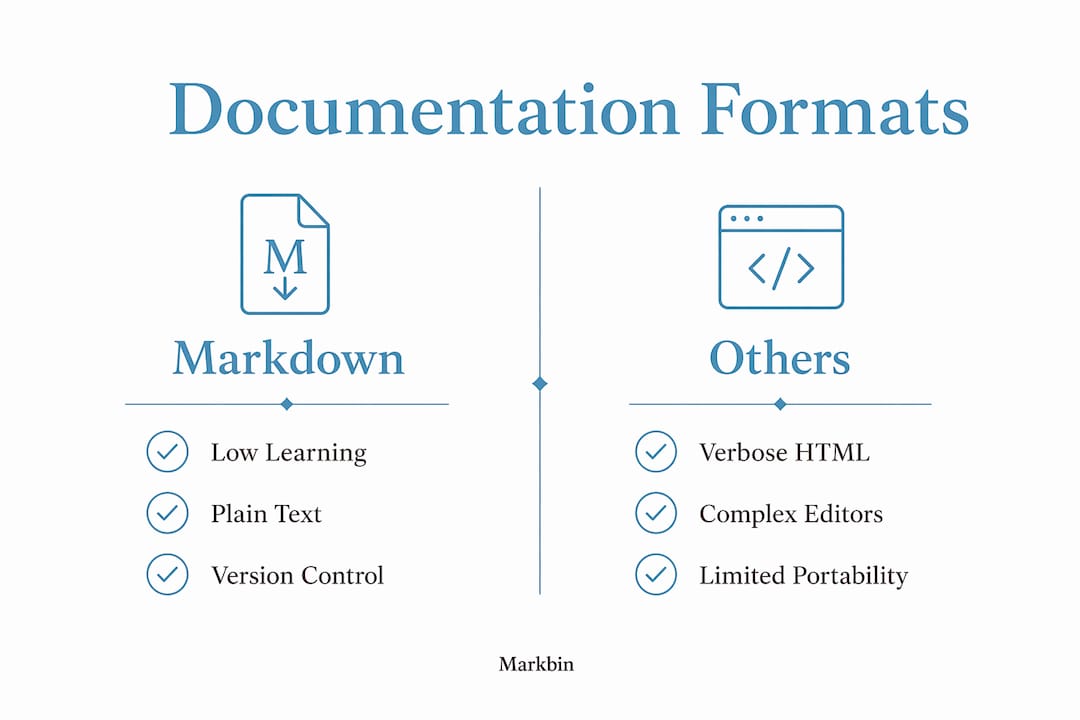
Markdown beats HTML for documentation because HTML is verbose. A simple heading in HTML requires an opening tag, content, and a closing tag. In Markdown, it is a single # character. That difference compounds across thousands of lines of documentation. Teams spend less time on markup and more time on content.
Rich text editors like those built into wiki platforms are faster for non-technical contributors. A marketing writer does not want to type **bold** when they can click a button. That is a real limitation of Markdown for cross-functional teams.
The practical answer is a hybrid documentation approach. Use Markdown for developer-focused content that lives in version control. Use WYSIWYG tools for marketing pages, HR policies, and other content where non-technical contributors need fast collaboration. The two strategies complement each other rather than compete.
Markdown also has genuine limitations worth acknowledging. Complex tables with merged cells require HTML fallback. Precise page layout for print-ready PDFs is difficult without extensions. Teams that need pixel-perfect design control will hit friction. For those cases, Markdown can still serve as the source format, with a rendering layer handling the final output. Explore how Markdown fits rich text workflows before committing to a single-tool strategy.
What are best practices for adopting Markdown documentation?
Adopting Markdown works best when teams treat it as a system, not just a file format. A few structured habits make the difference between docs that stay current and docs that rot.
- Start with a template. Create a standard Markdown template for each doc type: API reference, tutorial, runbook, and release note. Consistent structure means readers always know where to find information, and writers spend less time on formatting decisions.
- Commit docs with code. Store documentation in the same repository as the code it describes. When a developer opens a pull request, the docs update in the same commit. This practice prevents stale documentation more reliably than any review process.
- Use a static site generator. Platforms like MkDocs and Docusaurus convert your Markdown files into a searchable, navigable documentation site at build time. You write plain text; your users get a polished web experience.
- Add Mermaid diagrams for architecture. Mermaid syntax embedded in Markdown files creates version-controlled diagrams for flowcharts, state machines, and database schemas. These diagrams render natively on GitHub and update when the underlying text changes.
- Enforce a style guide. Decide on heading conventions, code block language tags, and link formats before your doc set grows. Consistency at scale is much easier to maintain when rules exist from the start.
Pro Tip: Use a dedicated Markdown editor rather than a general code IDE for writing documentation. Dedicated Markdown editors provide live rendered output and quick preview toggling, which reduces the friction of writing long-form docs in a code-focused environment.
Teams that connect their Markdown documentation to AI tools gain an additional advantage. Linking your internal docs to an AI assistant, as described in this guide to connecting Claude to internal docs, lets engineers query documentation in natural language rather than searching manually. Plain-text Markdown is the ideal input format for these integrations because it is clean, structured, and machine-readable.
Key takeaways
Markdown documentation is the most practical format for technical teams because it combines plain-text portability, version control compatibility, and broad tooling support in a single lightweight standard.
| Point | Details |
|---|---|
| Fast onboarding | Teams learn basic Markdown syntax in about 60 minutes and are productive the same day. |
| Version control fit | Plain-text diffs let teams review documentation changes with the same rigor as code reviews. |
| API doc structure | Effective API docs in Markdown include method, path, parameters, schemas, and copy-paste examples. |
| Hybrid strategy | Use Markdown for developer docs in version control and WYSIWYG tools for non-technical audiences. |
| Commit docs with code | Storing docs in the same repository as code prevents documentation drift across releases. |
Markdown's staying power: what I've actually observed
The teams I've seen struggle with documentation share one pattern. They treat docs as a separate workstream from code. They use a wiki that no one updates, a shared drive that no one searches, or a proprietary platform that locks content behind a login. Markdown breaks that pattern because it lives where developers already work.
What surprises most teams when they switch is how much time they recover. Not from writing faster, but from stopping the constant tool-switching. When your docs are .md files in the same repo as your code, the mental overhead of "where do I put this?" disappears. The answer is always the same place.
The one mistake I see teams make is over-engineering their Markdown setup before they have enough content to justify it. They spend a week configuring a static site generator before writing a single page. Start with a docs/ folder and a README. Add tooling when the content demands it, not before.
Markdown's plain-text nature also future-proofs your documentation in a way that proprietary formats cannot. A .md file written in 2015 opens perfectly today. The same cannot be said for files tied to specific software versions. That longevity is underrated. Documentation is an investment, and Markdown protects that investment better than any other format I've worked with.
Markbin makes Markdown documentation shareable
Teams that adopt Markdown still face one friction point: sharing rendered documents with people outside the repository. Markbin solves that directly. Paste your Markdown into Markbin and get a shareable link with full GitHub Flavored Markdown rendering, including syntax highlighting, tables, task lists, and math formulas. No sign-up required. You can password-protect sensitive docs or set them to self-destruct after a set time. For developers, educators, and technical writers who need to share polished documentation fast, Markbin removes the last step between writing and publishing.
FAQ
What is Markdown documentation?
Markdown documentation is content written in a lightweight plain-text markup language that uses simple symbols to define headings, lists, code blocks, and tables. It renders into formatted HTML on platforms like GitHub, GitLab, and documentation sites built with MkDocs or Docusaurus.
Why use Markdown for API documentation?
Markdown gives API docs a consistent, version-controlled structure that updates alongside code in the same pull requests. It supports tables for parameters, fenced code blocks for request and response examples, and integrates with OpenAPI-based tools that generate docs automatically from schemas.
How does Markdown handle version control better than other formats?
Markdown is plain text, which produces clean line-by-line diffs in Git. Reviewers can see exactly what changed in a documentation update, unlike binary formats such as .docx files, which produce unreadable diffs in version control systems.
What are the main limitations of Markdown?
Markdown struggles with complex table layouts that require merged cells, precise print-ready page design, and real-time collaboration for non-technical contributors who prefer WYSIWYG editing. Teams with mixed technical and non-technical contributors often use a hybrid approach to address these gaps.
Do I need special software to write Markdown documentation?
No special software is required. Any text editor can write Markdown. Dedicated Markdown editors add live preview rendering, which reduces friction for longer documents. Platforms like Markbin render Markdown instantly and generate shareable links without requiring installation or sign-up.