
A no-signup publishing tool is a web-based platform that lets you create, format, and share content instantly without creating an account or providing personal information. These tools sit in a category sometimes called "stateless publishing platforms," a more precise industry term for services that store no user identity on the server side. The core promise is speed: paste your content, configure a few optional settings, and get a shareable link in seconds. Limits vary from 3 uses per day for some free publishing tools to unlimited free access for text-sharing platforms. That range tells you something important: "no signup" describes the user experience, not a single business model.
What is a no-signup publishing tool and how does it differ from traditional platforms?
A no-signup publishing tool removes the registration wall that stands between you and a live, shareable URL. Traditional content management systems like WordPress or Drupal require account creation, server configuration, and often a paid hosting plan before a single word goes live. No-signup platforms skip all of that. You arrive, write or paste your content, and publish.
The technical foundation behind this experience is stateless architecture. Stateless design means the server does not store your identity or link your content to a persistent profile. Your document exists as data tied to a secret link or a browser session, not to a user account. That design choice is what makes instant publishing possible.

The trade-off is permanence. Stateful features like revision history, saved drafts, and content libraries require account registration by definition. A true no-signup tool cannot offer those features without contradicting its own architecture. Knowing this distinction helps you pick the right tool for the right job.
How do no-signup publishing tools work?
The typical workflow follows three steps, and the whole process takes well under 10 minutes from idea to published output.
- Input your content. Paste plain text, markdown, code snippets, or formatted copy into the editor. Most platforms support GitHub Flavored Markdown (GFM), which includes syntax highlighting, tables, task lists, and math formulas.
- Configure optional settings. Choose an expiration window, which commonly spans 1 day to 3 months. Add a password, enable burn-after-reading mode, or generate a QR code for mobile sharing. These settings are optional but powerful.
- Generate and share your link. The platform produces an HTTPS URL instantly. Copy it, embed it, or send it through any channel. No email confirmation. No dashboard to navigate.
This workflow contrasts sharply with a traditional CMS setup, which requires DNS configuration, plugin installation, and user role management before content ever reaches a reader.
Pro Tip: Set an expiration date every time you share sensitive content. A link that expires in 24 hours cannot be accessed after that window closes, which limits exposure if the URL leaks.
What features and limitations distinguish no-signup publishing tools?
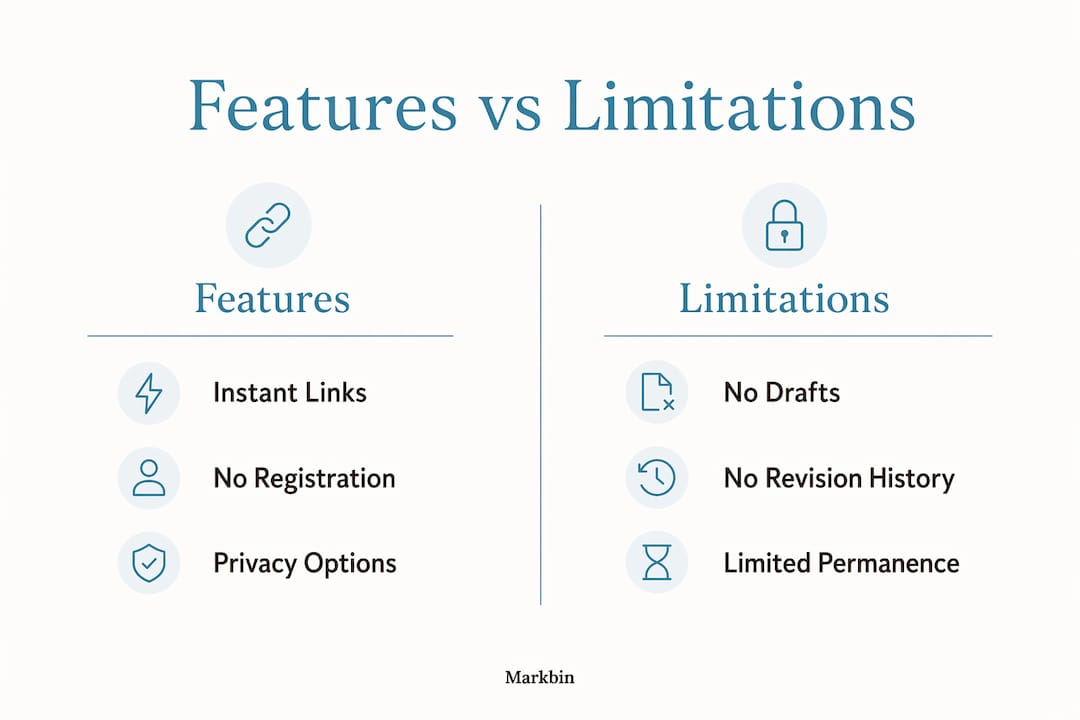
No-signup platforms pack more capability than their simplicity suggests. The best ones generate instant HTTPS links with optional password protection, burn-after-reading modes, custom slugs, and QR codes. Markbin, for example, supports full GFM rendering including syntax highlighting and math formulas, making it practical for technical documentation and tutorials, not just plain notes.
Usage models vary significantly across the category. Some platforms cap free use at 3 sessions per day. Others offer unlimited generation with no account required at any tier. That gap matters if you plan to use these tools in a high-volume workflow.
The limitations are real and worth understanding before you commit to a tool.
- No saved history. Without an account, the platform has no record of your past documents. If you lose the link, the content is gone.
- Ephemeral storage. Most tools use expiration policies ranging from 30 to 90 days. After that window, content is deleted automatically.
- No version control. You cannot roll back to a previous draft or compare edits over time.
- Usage caps. Entry-level free tiers on some platforms restrict daily publishing volume, which limits professional use at scale.
- No team management. There are no user roles, permissions, or shared workspaces in a true no-signup environment.
Pro Tip: Always copy your raw content to a local file before publishing. No-signup tools are not backup systems. Treat the shareable link as a delivery mechanism, not a storage location.
The security model deserves a separate note. Password protection and burn-after-reading add meaningful privacy controls. But anonymous sharing also means no audit trail. If you need to prove who published what and when, a no-signup tool is the wrong choice.
In what scenarios are no-signup publishing tools most useful?
No-signup platforms excel at a specific class of tasks: fast, ephemeral sharing where speed matters more than permanence. Practitioners treat these tools as ephemeral publishing conduits rather than full production systems, and that framing is exactly right.
The strongest use cases include:
- Sharing AI-generated outputs. You run a prompt, get a long markdown response, and need to send it to a colleague or client immediately. A no-signup tool converts that output to a clean, readable URL in seconds.
- Technical snippet sharing. Developers share code blocks, API responses, or configuration files without setting up a repository or a ticketing system.
- Design draft reviews. A quick HTML or markdown preview link lets a client comment on layout without accessing a staging server.
- Demo documentation. Sales engineers and product managers publish one-time walkthrough docs for prospect calls, then let the link expire after the meeting.
- Rapid prototyping. Writers and researchers test document structures or formatting before committing to a full CMS workflow.
These tools also fit naturally into instant document sharing workflows where a team needs to circulate a draft without spinning up a shared drive or a project management tool.
No-signup platforms are not suited for long-term content management, SEO-driven publishing, or any project that requires version history. If your content needs to live online for more than 90 days and be updated regularly, a traditional CMS or a document management platform is the better fit.
Are no-signup publishing tools truly free and secure?
"Free" and "secure" both require qualification in this category. Most no-signup tools offer a free tier, but usage models vary from 3 daily uses to unlimited generation. The free tier is genuine for most text and markdown tools. For AI-powered generators, free access often comes with daily caps or watermarks.
Security is more nuanced. The stateless architecture that enables no-signup publishing also means the platform holds no user credentials to protect. That removes one attack surface. But it introduces another: the link itself is the only key. Anyone with the URL can read the content unless you add a password.
The risks worth knowing before you publish:
- Link loss equals content loss. There is no account recovery. If you lose the secret link, the document is permanently inaccessible.
- No encryption at rest by default. Most platforms serve content over HTTPS, but do not encrypt stored data at the server level.
- Burn-after-reading is one-way. Once a burn-after-reading link is opened, the content is deleted. There is no undo.
- Anonymous publishing leaves no audit trail. You cannot prove authorship or access history without an account system.
The honest answer is that no-signup tools are appropriately secure for low-sensitivity, short-lived content. For anything confidential or legally significant, add password protection at minimum, and consider whether a no-signup tool is the right vehicle at all. Developers building on top of these platforms often integrate them via API or command-line workflows to automate content release while keeping sensitive data out of the tool entirely.
Key Takeaways
A no-signup publishing tool is the fastest path from content to shareable link, but its stateless architecture makes it a delivery mechanism, not a storage system.
| Point | Details |
|---|---|
| Core definition | A no-signup tool publishes content instantly via stateless architecture, with no account required. |
| Three-step workflow | Input content, configure optional settings like expiration or password, then generate a shareable HTTPS link. |
| Key limitation | Lost links mean lost content permanently, since no account exists to recover documents. |
| Security trade-off | Password protection and burn-after-reading add privacy, but anonymous sharing leaves no audit trail. |
| Best use cases | Ideal for ephemeral tasks like snippet sharing, demo docs, and AI output delivery, not long-term hosting. |
No-signup tools work best when you know what they are not
I have used no-signup publishing tools in professional workflows for years, and the single biggest mistake I see is treating them like a lightweight CMS. They are not. They are publishing primitives: fast, disposable, and purpose-built for the moment.
The framing that changed how I use them came from thinking about a fax machine. A fax sends a document instantly to one recipient. You do not store your files on the fax machine. No-signup tools work the same way. They are transmission infrastructure, not archives.
Where I find them genuinely indispensable is in unblocking situations. A client needs to see a formatted spec right now. A developer needs to share a config snippet without setting up a repository. A researcher needs to send a structured note before a meeting. In all three cases, a no-signup tool with secure markdown sharing gets the job done in under a minute.
The caution I always add: never let a no-signup tool become your only copy of anything. The link is the document. Lose the link, lose the work. I keep a local copy of everything I publish through these platforms, without exception. That one habit eliminates the only real operational risk these tools carry.
The ecosystem is maturing. Tools now offer QR codes, custom slugs, and burn-after-reading modes that would have seemed advanced two years ago. The category is moving toward professional-grade ephemeral publishing, and that is a genuinely useful direction.
— Zack
Markbin makes no-signup publishing practical for professionals
Markbin is a no-signup markdown publishing platform built for developers, writers, educators, and researchers who need clean, shareable documents without the overhead of account management. You paste your markdown, configure optional settings like password protection or a self-destruct timer, and publish instantly via a secure HTTPS link. Markbin supports full GitHub Flavored Markdown, including syntax highlighting, tables, task lists, and math formulas. That makes it practical for technical documentation, tutorials, and collaborative notes, not just plain text. If you need secure document sharing without registration friction, Markbin is built for exactly that workflow.
FAQ
What is a no-signup publishing tool?
A no-signup publishing tool is a web-based platform that lets you create and share content via a shareable link without creating an account. It uses stateless architecture, meaning no user identity is stored on the server.
How long does shared content last on no-signup platforms?
Expiration times typically range from 1 day to 3 months, depending on the platform and settings you choose. Some tools also offer burn-after-reading mode, which deletes content after the first view.
Are no-signup publishing tools free to use?
Most offer a free tier, but usage models vary. Some platforms allow unlimited publishing with no account, while others cap free use at 3 sessions per day.
What happens if I lose my shareable link?
The content becomes permanently inaccessible. No-signup tools have no account system to recover documents, so the link is the only key to your published content.
Can no-signup tools replace a content management system?
No. These tools are designed for ephemeral, task-specific sharing, not long-term content management. They lack version control, saved history, and team permissions that a CMS provides.